docs(aws): AWS EC2 provider instructions, diagram and code for manual AWS IAM set up.#1996
docs(aws): AWS EC2 provider instructions, diagram and code for manual AWS IAM set up.#1996dorbin merged 34 commits intospinnaker:masterfrom
Conversation
Something happened in [PR1964](spinnaker#1964) i am readding the changes and re-committing them.
Please help @dorbin @brian-armory
 dorbin
left a comment
dorbin
left a comment
There was a problem hiding this comment.
@aleon1220 thanks for re-doing this!
I've left some suggestions. Sorry if some of them are repetitive.
great suggestion thanks.

Co-authored-by: Dave Dorbin <ddorbin@google.com>
grammar fix

Co-authored-by: Dave Dorbin <ddorbin@google.com>
dorbin
left a comment
There was a problem hiding this comment.
@aleon1220 Oops, looks like I responded some days ago but didn't submit my review. Looks like just the one comment about linking.
the instructions allow Spinnaker operators to
deploy to AWS Accounts develop and staging.
arranged the wording of the instructions.
The diagram can be opened online with https://www.draw.io/
The example shows an architecture with 3 AWS accounts
1 Spinnaker Managing where Spinnaker Lives
2 develop
3 staging
|
Hello, @dorbin Many of the new links are not working because they are not created but in general terms i checked this page after running it locally in my docker container dev set up.
|
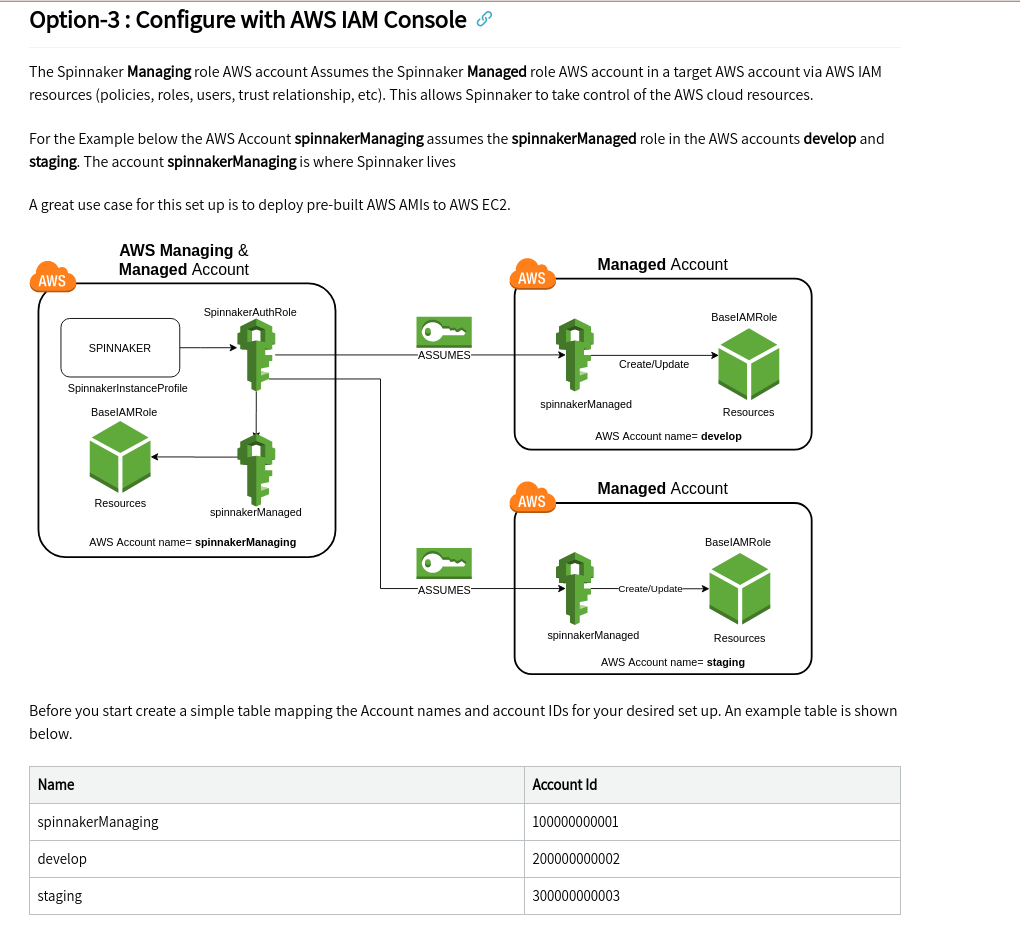
|
@dorbin Hi Dave, I have added details for the EC2 provider. By using it with these instructions one can successfully deploy Instances to EC2. It is a big change because i think his document was not updated much. In summary there are 3 options to set up AWs IAM structure for Spinnaker. |
|
@brian-armory can you take a look at this when you get a chance? I'm not on AWS, so I can't test these instrux. Thanks! |
|
Hi @aleon1220, I've scheduled time for myself to work on this during this sprint (this week and next). Sorry for the delay. |
Thanks Brian. I am still preparing my AWS personal account to test this and record a short video. Other than that. Thanks for your review. |
dorbin
left a comment
There was a problem hiding this comment.
Hi, @aleon1220 . A few more suggestions. Also, it looks like you've got a conflict in one of the files.
| {% include toc %} | ||
|
|
||
| > :warning: These instructions are out-of-date and a new version is being | ||
| > :warning: These instructions were updated to manually set up the AWS provider with [Option-3](#option-3--configure-with-aws-iam-console) on **2020-08-22**. <br> |
There was a problem hiding this comment.
| > :warning: These instructions were updated to manually set up the AWS provider with [Option-3](#option-3--configure-with-aws-iam-console) on **2020-08-22**. <br> | |
| > :warning: These instructions were updated, on **2020-08-22**, to manually set up the AWS provider with [Option-3](#option-3--configure-with-aws-iam-console). <br> |
Great suggestion

Co-authored-by: Dave Dorbin <ddorbin@google.com>
sadly yes. This PR is been here for a while. Maybe someone updated the page. I dont understand. This AWS provider really needs some attention. |
simple and concise. Thanks

Co-authored-by: Dave Dorbin <ddorbin@google.com>
grammar fix.

Co-authored-by: Dave Dorbin <ddorbin@google.com>
grammar fix

Co-authored-by: Dave Dorbin <ddorbin@google.com>
|
@brian-armory Hi Brian, Thanks for all the help. I have improved the doc based on your suggestions. I have been keeping this branch updated. Would you like to do a review? |
There was a problem hiding this comment.
LGTM. Thanks for all your hardwork on this @aleon1220. I pushed a commit to fix some indenting on lines 214-16 for the nested list.
 aleon1220
left a comment
aleon1220
left a comment
There was a problem hiding this comment.
Thank you so much!
|
Thanks for all the work, Andres! And all the re-doing of the work. 😃 |
| 2. Switch to the AWS Account you want to create the roll for. | ||
| 3. Go to **Roles > Create Role**. | ||
| 4. Select EC2. You can change this later, because we want to specify an explicit consumer of this role in a later stage. | ||
| 5. For permissions, search for "PowerUserAccess" and select this policy. This gives the role permission to access AWS services. |
There was a problem hiding this comment.
PowerUserAccess is broader access than Spinnaker really needs; there used to be a very specific policy document doc that had what Spinnaker needs; we should refer to that here. I think that Armory at least has an up-to-date, narrower policy to refer to.
There was a problem hiding this comment.
what access do you recommend?
the policy is AWS managed it should be ok...
There was a problem hiding this comment.
The PowerUserAccess policy is extremely broad. Unfortunately it looks like the Armory docs also now recommend PowerUserAccess.
This is the policy I'm using now, which at least limits access to the core services Spinnaker needs, although it would need to be broadened to account for CloudFormation and Lambda and potentially other small revisions. This or a similar policy used to be present in the Spinnaker docs (or perhaps the Armory docs).
{
    "Version": "2012-10-17",
    "Statement": [
        {
            "Sid": "Stmt1486065689000",
            "Effect": "Allow",
            "Action": [
                "autoscaling:CreateAutoScalingGroup",
                "autoscaling:CreateLaunchConfiguration",
                "autoscaling:CreateOrUpdateTags",
                "autoscaling:DeleteAutoScalingGroup",
                "autoscaling:DeleteLaunchConfiguration",
                "autoscaling:DeletePolicy",
                "autoscaling:DeleteScheduledAction",
                "autoscaling:DeleteTags",
                "autoscaling:DescribeAutoScalingGroups",
                "autoscaling:DescribeLaunchConfigurations",
                "autoscaling:DescribeLoadBalancers",
                "autoscaling:DescribePolicies",
                "autoscaling:DescribeScalingActivities",
                "autoscaling:DescribeScheduledActions",
                "autoscaling:DetachInstances",
                "autoscaling:DisableMetricsCollection",
                "autoscaling:EnableMetricsCollection",
                "autoscaling:PutLifecycleHook",
                "autoscaling:PutNotificationConfiguration",
                "autoscaling:PutScalingPolicy",
                "autoscaling:PutScheduledUpdateGroupAction",
                "autoscaling:ResumeProcesses",
                "autoscaling:SuspendProcesses",
                "autoscaling:TerminateInstanceInAutoScalingGroup",
                "autoscaling:UpdateAutoScalingGroup",
                "cloudwatch:DeleteAlarms",
                "cloudwatch:DescribeAlarms",
                "cloudwatch:GetMetricStatistics",
                "cloudwatch:ListMetrics",
                "cloudwatch:PutMetricAlarm",
                "ec2:AttachClassicLinkVpc",
                "ec2:AuthorizeSecurityGroupIngress",
                "ec2:CreateNetworkInterface",
                "ec2:CreateSecurityGroup",
                "ec2:CreateTags",
                "ec2:DeleteSecurityGroup",
                "ec2:DeleteTags",
                "ec2:DescribeAccountAttributes",
                "ec2:DescribeAddresses",
                "ec2:DescribeAvailabilityZones",
                "ec2:DescribeClassicLinkInstances",
                "ec2:DescribeImages",
                "ec2:DescribeInstances",
                "ec2:DescribeKeyPairs",
                "ec2:DescribeRegions",
                "ec2:DescribeReservedInstances",
                "ec2:DescribeReservedInstancesOfferings",
                "ec2:DescribeSecurityGroups",
                "ec2:DescribeSpotPriceHistory",
                "ec2:DescribeSubnets",
                "ec2:DescribeTags",
                "ec2:DescribeVpcClassicLink",
                "ec2:DescribeVpcs",
                "ec2:GetConsoleOutput",
                "ec2:ModifyImageAttribute",
                "ec2:ModifyInstanceAttribute",
                "ec2:RebootInstances",
                "ec2:RevokeSecurityGroupIngress",
                "ec2:TerminateInstances",
                "elasticloadbalancing:ApplySecurityGroupsToLoadBalancer",
                "elasticloadbalancing:ConfigureHealthCheck",
                "elasticloadbalancing:CreateListener",
                "elasticloadbalancing:CreateLoadBalancer",
                "elasticloadbalancing:CreateLoadBalancerListeners",
                "elasticloadbalancing:CreateLoadBalancerPolicy",
                "elasticloadbalancing:CreateRule",
                "elasticloadbalancing:CreateTargetGroup",
                "elasticloadbalancing:DeleteListener",
                "elasticloadbalancing:DeleteLoadBalancer",
                "elasticloadbalancing:DeleteLoadBalancerListeners",
                "elasticloadbalancing:DeleteRule",
                "elasticloadbalancing:DeleteTargetGroup",
                "elasticloadbalancing:DeregisterInstancesFromLoadBalancer",
                "elasticloadbalancing:DeregisterTargets",
                "elasticloadbalancing:DescribeInstanceHealth",
                "elasticloadbalancing:DescribeListeners",
                "elasticloadbalancing:DescribeLoadBalancerAttributes",
                "elasticloadbalancing:DescribeLoadBalancerPolicies",
                "elasticloadbalancing:DescribeLoadBalancers",
                "elasticloadbalancing:DescribeRules",
                "elasticloadbalancing:DescribeTargetGroupAttributes",
                "elasticloadbalancing:DescribeTargetGroups",
                "elasticloadbalancing:DescribeTargetHealth",
                "elasticloadbalancing:ModifyListener",
                "elasticloadbalancing:ModifyLoadBalancerAttributes",
                "elasticloadbalancing:ModifyTargetGroup",
                "elasticloadbalancing:ModifyTargetGroupAttributes",
                "elasticloadbalancing:RegisterInstancesWithLoadBalancer",
                "elasticloadbalancing:RegisterTargets",
                "elasticloadbalancing:SetLoadBalancerPoliciesOfListener",
                "elasticloadbalancing:SetSecurityGroups",
                "iam:ListServerCertificates",
                "iam:PassRole"
            ],
            "Resource": [
                "*"
            ]
        }
    ]
}
There was a problem hiding this comment.
A customer managed policy is cumbersome for an organization. Is an interesting concept to try to reduce risk but is just too much to handle.
There was a problem hiding this comment.
With cloudformation stacksets and AWS organizations it is quite feasible to have a customer managed policy.
The power user policy is an irresponsible one and it reflects poorly on the product to recommend it.
There was a problem hiding this comment.
@avram I understand. If that's the case I highly encourage you to improve the Cloud formation templates that use the AWS IAM policies at https://github.com/spinnaker/spinnaker.github.io/tree/master/downloads/aws
Something happened in PR1964 i am re-doing the changes and re-committing them.
Please help @dorbin @brian-armory