Skip to content

Add additional scenarios to gherkin for sync resources workflow#2983

Merged
marcellamaki merged 4 commits intolearningequality:hotfixesfrom
marcellamaki:update-gherkin-scenario-syncing
May 13, 2021
Merged

Add additional scenarios to gherkin for sync resources workflow#2983
marcellamaki merged 4 commits intolearningequality:hotfixesfrom
marcellamaki:update-gherkin-scenario-syncing

Conversation

@marcellamaki
Copy link
Copy Markdown
Member

This PR is to add more scenarios for the gherkin re: "Sync Resources"

I will explain my findings here (in non-gherkin!), and I would appreciate any comments, discussion, or suggestions for how to improve the gherkins, because I want to be sure they're quite clear and the workflow is not necessarily the most intuitive.

In Studio, if a user imports some content from a channel, there are two different ways this content might "sync":

The first option is if the user has imported some content, made no changes to it, but the original/source content/channel has been updated. If the user syncs resources, then they will be fetching any updates from that new change (as long as they check off the things they want to update - tags, titles, etc.)

The second option is if the user has imported some content, and they have made changes to it. In this case, when the user syncs the resources, their edits are overwritten by the current state of the source content. (This could be v1 of the original content, or it could be a situation like the scenario mentioned above. If there are changes in both, then like the above the "source/origin" version is prioritized, even if it's been updated).

This, as far as I can tell, is the "expected" behavior.

On a separate/parallel track and for a later date:
It might be worth thinking about

  1. if this is the desired behavior, because it is not super intuitive or particularly clear (from my perspective) and
  2. how many users are using this feature (perhaps we can tell from Google Analytics?).

There is some technical debt around this in general as @MisRob has helpfully illustrated in 2969 and I think having a better sense of if people are using it and how people are using it would be helpful before undertaking that refactoring.

@MisRob
Copy link
Copy Markdown
Member

MisRob commented Feb 23, 2021

Thank you, Marcella, for initiating the conversation and describing the feature, this has been very helpful.

@radinamatic
Copy link
Copy Markdown
Member

Thank you @marcellamaki 👍🏽

Before we continue, I suggest checking the Style guide for feature files we have used for Kolibri Gherkin scenarios 🙂

I'll have to run a few tests to remind myself what exactly is the desired behavior for the second option 🤔

@metodimilevqa
Copy link
Copy Markdown

@marcellamaki Here's what I've found so far as a current behavior of the Sync functionality (tested at the hotfixes branch):

CASE 1
I created a new channel, imported Kolibri QA channel to it and published it - this is the SOURCE channel
I created a new channel and imported the SOURCE channel and published it - this is the TARGET channel
I made some changes (uploaded a MP3 file) to the SOURCE channel and published it
I went back to the TARGET channel and clicked the Sync button
RESULT: The newly added MP3 in the SOURCE channel does not appear in the TARGET channel after syncing

CASE 2
I made a topic title change + added tags in the topic in the TARGET channel and published it
I clicked Sync in the TARGET channel
RESULT: The changes in the TARGET channel disappeared

@pcenov
Copy link
Copy Markdown
Member

pcenov commented Apr 21, 2021

Hi @marcellamaki and @radinamatic
Today I had a chance to have a look at this PR and start investigating what is the current state of this functionality.
So far I can confirm that the workflow is as explained by @marcellamaki. Here’s a simplified version of the main gherkin scenario that we can have if we just want to fully ‘sync’ all imported resources:

Background:
	Given I am signed in to Studio as a non-admin user
		And I have at least two channels #assuming this is tested with the same user account

Scenario: Sync all imported resources
	Given I’ve imported some content in my channel B from my channel A
		And I’ve modified the original content in channel A
		And I’ve not modified the imported content in any way in channel B
	When I click on the ellipsis button in the top-right corner of channel B
		And I click *Sync resources*
		And I select all the available checkboxes - *Files*, *Tags*, *Titles and descriptions*, *Assessment details*
	Then I see that the imported content in channel B is updated #files, tags, titles, descriptions, assessment details (questions, answers and hints)

Issues observed so far:

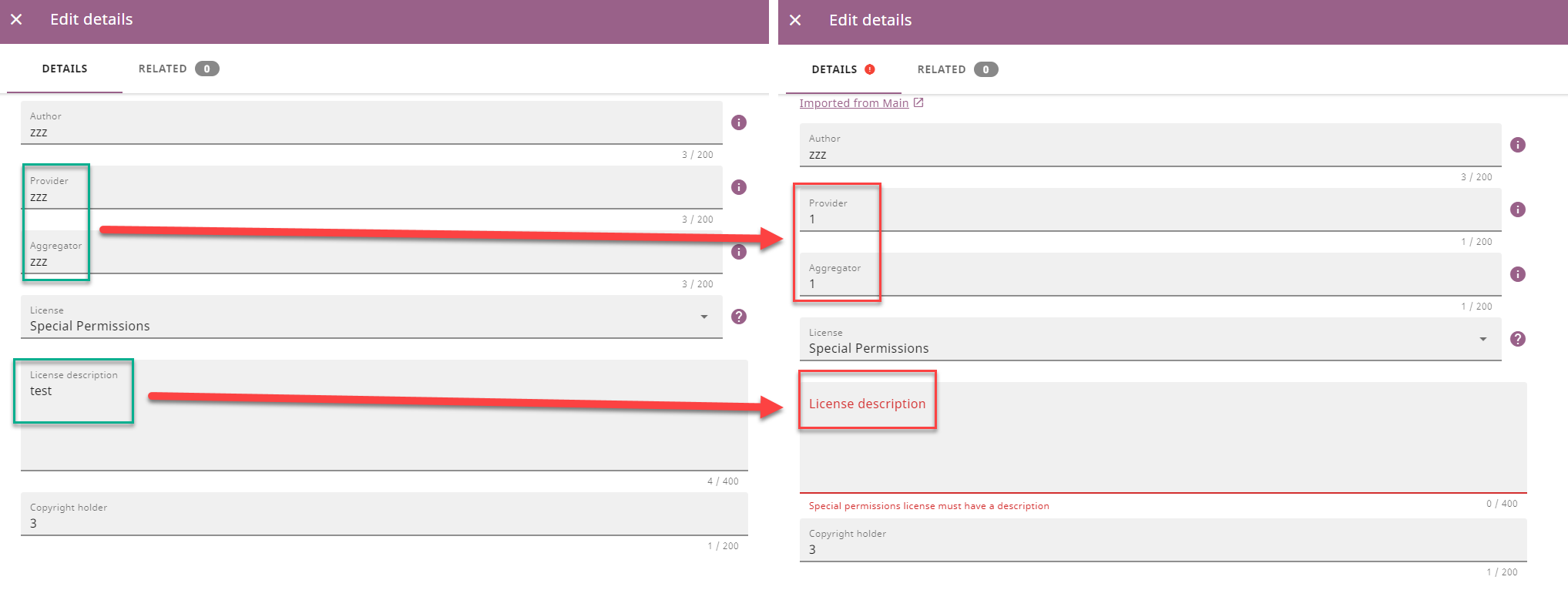
  1. The following fields don’t get updated after having selected all available ‘sync’ options”: Provider, Aggregator, License description
    2021-04-21_20-05-44

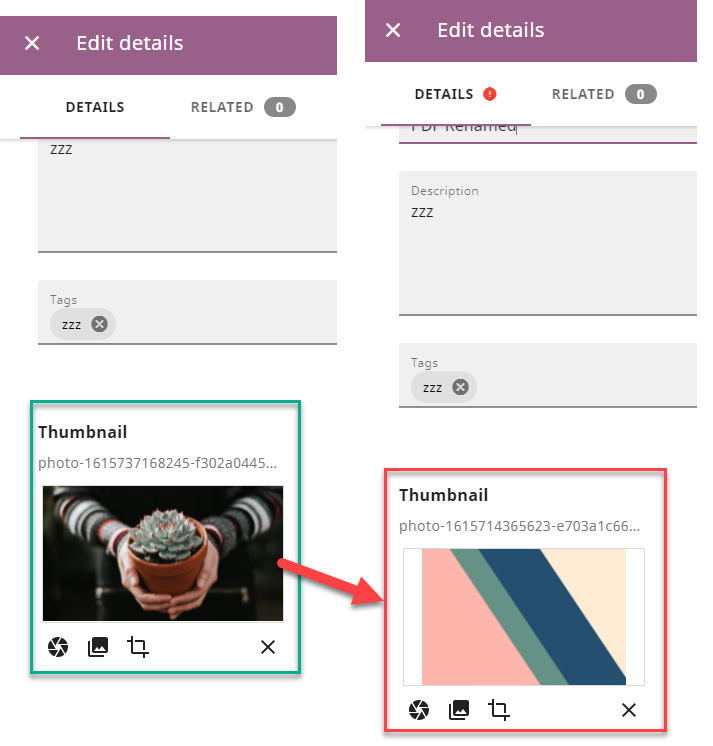
  2. Thumbnails don’t get updated.
    2021-04-21_20-09-28

Suggestions for improvements:

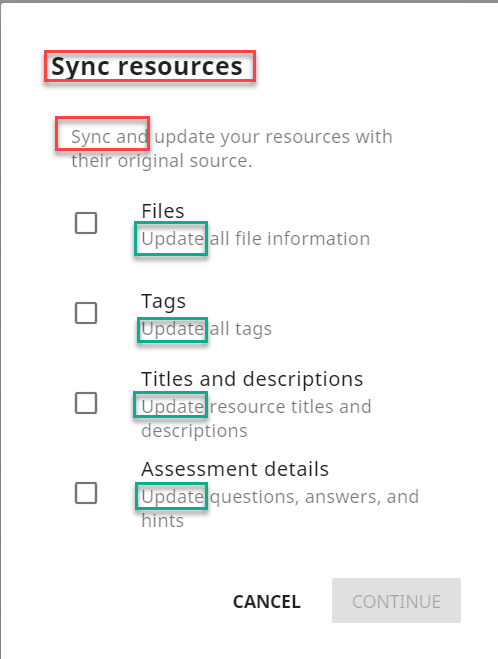
  1. Consider renaming the “Sync resources” option to “Update imported resources” to make it explicitly clear to the users what is the purpose of this option.
    2021-04-21_19-26-11

  2. Consider displaying a message/log where the user can see how many if any and which resources have been updated as currently it’s impossible to tell.

Question:
I noticed that I can sync resources from an unpublished channel - should that be the case as the owner of the unpublished channel might just be experimenting with some modifications and doesn't necessarily want those to be available to other users?

@pcenov
Copy link
Copy Markdown
Member

pcenov commented Apr 22, 2021

More notes from today's testing effort:

Issues:

  1. The option to sync “assessment details” (update questions, answers and hints) is not functioning when selected by itself alone - I have to select all 4 checkboxes in order to get my question, answers and hints updated.
  2. There’s a Stop button displayed on the “Syncing channel” modal window which is not functioning correctly because even if I select it and then I confirm that I want to stop the syncing I still see the resources in channel B synced and updated.

Observations and considerations:

  1. If I copy resources from a public channel to my channel A, then I modify the resources in my channel A and import them in channel B when I select the ‘Sync resources’ option from channel B, the content will be synced with the original content from the public channel and not from the modified content in my channel A.
  2. If I copy a resource from a personal channel A to channel B, modify the resource in channel A and then delete the entire channel I am still able to go to channel B and sync the resources from the deleted channel.
  3. When I create a topic with files in channel A and I import the entire topic with files in channel B if I add more files to the topic in channel A and then attempt to fully sync channel B, the additional files are not added in channel B.
    @radinamatic and @marcellamaki

@radinamatic
Copy link
Copy Markdown
Member

@pcenov Thank you for the in-depth investigation! 💯

Please report the following as syncing issue (do a search to confirm there is not one already):

  • Missing Provider, Agregator, License
  • “Assessment details” alone checked is not syncing
  • Stopping the sync

As for thumbnails, re-check if it takes more than one re-fresh to see them updated, it's what I seemed to have experienced.

Report your suggestions for improvement as a separate issues for string update (1), and feature request (2). The latter will need design decisions, and may not be viable or recommended in case the list of changes is too long...? 🤔

If I copy resources from a public channel to my channel A, then I modify the resources in my channel A and import them in channel B when I select the ‘Sync resources’ option from channel B, the content will be synced with the original content from the public channel and not from the modified content in my channel A.

cc @jtamiace @khangmach @rtibbles Is that the intended user experience?

If I copy a resource from a personal channel A to channel B, modify the resource in channel A and then delete the entire channel I am still able to go to channel B and sync the resources from the deleted channel.

Could that be some delay database update, or the resources are being synced

When I create a topic with files in channel A and I import the entire topic with files in channel B if I add more files to the topic in channel A and then attempt to fully sync channel B, the additional files are not added in channel B.

Channel structure (topics & subtopics) do not get synced, just single resources and their details, so as far as I understand syncing will not register changes like additional files in originally imported topic, just changes (if any) in individual files in that topic.

@pcenov
Copy link
Copy Markdown
Member

pcenov commented Apr 26, 2021

Hi @radinamatic I've reported the following syncing issues:

#3111 - Sync resources - Some fields in 'Edit details' don't get updated after attempted sync

#3112 - Sync resources - The option to sync 'assessment details' is not functioning

#3113 - Sync resources - Existing file thumbnails won't get synced and updated

And this as a feature request:
#3114 - Sync resources - It's not clear which resources have been updated

I noticed that there's an existing issue for stopping the sync here: #1740

And also there's an issue for modal improvements here: #2971

@rtibbles
Copy link
Copy Markdown
Member

If I copy resources from a public channel to my channel A, then I modify the resources in my channel A and import them in channel B when I select the ‘Sync resources’ option from channel B, the content will be synced with the original content from the public channel and not from the modified content in my channel A.

cc @jtamiace @khangmach @rtibbles Is that the intended user experience?

Yes, this is intended. Whether it's desirable, I am less sure - but I think that's the summary of the sync experience!

@radinamatic
Copy link
Copy Markdown
Member

Ok, let's leave it at that for now, as I'm not aware that any user had expressed the need to have a different workflow. If/when it happens, we'll revisit! 👍🏽

Copy link
Copy Markdown
Member

@radinamatic radinamatic left a comment

Choose a reason for hiding this comment

The reason will be displayed to describe this comment to others. Learn more.

Looking good! 👍🏽

@marcellamaki
Copy link
Copy Markdown
Member Author

Thank you @radinamatic and @pcenov for all of your work and investigation on this!! ✨

@codecov
Copy link
Copy Markdown

codecov bot commented Apr 28, 2021

Codecov Report

Merging #2983 (a4cf2c3) into hotfixes (28587f8) will increase coverage by 5.31%.
The diff coverage is 92.48%.

Impacted file tree graph

@@             Coverage Diff              @@
##           hotfixes    #2983      +/-   ##
============================================
+ Coverage     80.80%   86.12%   +5.31%     
============================================
  Files           281      305      +24     
  Lines         12659    16459    +3800     
============================================
+ Hits          10229    14175    +3946     
+ Misses         2430     2284     -146     
Impacted Files Coverage Δ
contentcuration/contentcuration/decorators.py 56.60% <50.00%> (-37.60%) ⬇️
...ntentcuration/contentcuration/db/models/manager.py 91.05% <90.17%> (-8.95%) ⬇️
contentcuration/contentcuration/forms.py 82.35% <94.04%> (+33.89%) ⬆️
contentcuration/contentcuration/api.py 92.06% <100.00%> (+1.43%) ⬆️
...tentcuration/contentcuration/context_processors.py 100.00% <100.00%> (ø)
...ontentcuration/contentcuration/db/advisory_lock.py 100.00% <100.00%> (ø)
...tcuration/contentcuration/db/models/expressions.py 95.23% <100.00%> (-4.77%) ⬇️
...entcuration/contentcuration/db/models/functions.py 100.00% <100.00%> (ø)
...ation/contentcuration/tests/test_rest_framework.py 36.93% <0.00%> (-63.07%) ⬇️
contentcuration/contentcuration/utils/format.py 21.05% <0.00%> (-49.54%) ⬇️
... and 192 more

Continue to review full report at Codecov.

Legend - Click here to learn more
Δ = absolute <relative> (impact), ø = not affected, ? = missing data
Powered by Codecov. Last update c7e1b5a...a4cf2c3. Read the comment docs.

@marcellamaki marcellamaki merged commit 228ca86 into learningequality:hotfixes May 13, 2021
Sign up for free to join this conversation on GitHub. Already have an account? Sign in to comment

Projects

None yet

Development

Successfully merging this pull request may close these issues.

7 participants