Skip to content

[Issue 145] Support base path#1642

Merged
tdonohue merged 6 commits intoDSpace:mainfrom
harvard-lts:145-base-path-support
Jun 2, 2022
Merged

[Issue 145] Support base path#1642
tdonohue merged 6 commits intoDSpace:mainfrom
harvard-lts:145-base-path-support

Conversation

@ghost
Copy link
Copy Markdown

@ghost ghost commented May 6, 2022

References

Description

Provides base path support.

Instructions for Reviewers

Run dspace-angular with defining configuration ui.nameSpace such as /dspace7. Which runs from URL http://localhost:4000/dspace7.

List of changes in this PR:

  • wrap server app with router configuring base path
  • update base href in head before providing APP_BASE_HREF
  • refactor absolute paths to relative including reload and redirects
  • add base-href script to support in development
  • My PR is small in size (e.g. less than 1,000 lines of code, not including comments & specs/tests), or I have provided reasons as to why that's not possible.
  • My PR passes TSLint validation using yarn run lint
  • My PR doesn't introduce circular dependencies
  • My PR includes TypeDoc comments for all new (or modified) public methods and classes. It also includes TypeDoc for large or complex private methods.
  • My PR passes all specs/tests and includes new/updated specs or tests based on the Code Testing Guide.
  • If my PR includes new, third-party dependencies (in package.json), I've made sure their licenses align with the DSpace BSD License based on the Licensing of Contributions documentation.

@ghost ghost requested review from artlowel, atarix83, paulo-graca, tdonohue and ybnd May 6, 2022 04:19
@ghost ghost marked this pull request as draft May 6, 2022 04:29
@ghost
Copy link
Copy Markdown
Author

ghost commented May 6, 2022

This will work for production using only the DSPACE_UI_NAMESPACE environment variable. However, using ng serve now requires updating angular.json as no longer supporting --base-href. Unfortunately, that means the current dev only Dockerfile may have to do some hacks to work.

@ghost ghost marked this pull request as ready for review May 6, 2022 04:54
@tdonohue tdonohue assigned ghost May 6, 2022
@tdonohue tdonohue added this to the 7.3 milestone May 6, 2022
@ghost ghost force-pushed the 145-base-path-support branch 9 times, most recently from 766cc33 to 8642d14 Compare May 6, 2022 18:12
@ghost
Copy link
Copy Markdown
Author

ghost commented May 6, 2022

I have added support for development and which the Dockerfile as is will support a base path. The only caveat is it changes angular.json in which could get caught up in a commit.

@ghost ghost force-pushed the 145-base-path-support branch from 8642d14 to 407f884 Compare May 6, 2022 18:31
@ghost ghost force-pushed the 145-base-path-support branch from 407f884 to 9a433b5 Compare May 6, 2022 19:32
@ybnd
Copy link
Copy Markdown
Member

ybnd commented May 12, 2022

I can't seem to get this to work properly: e.g. with ui.nameSpace: test in YAML config:

@ghost
Copy link
Copy Markdown
Author

ghost commented May 12, 2022

@ybnd It appears not only does ui.nameSpace need to start with a / but also does not seem like ui.nameSpace can be on one line as yaml supports. It must be

ui:
  nameSpace: /test

@tdonohue
Copy link
Copy Markdown
Member

@WWelling and @ybnd : As the nameSpace setting for both the ui and rest sections of config.yml are always shown as having a preceding slash, I'd recommend considering that as required. We can change that behavior in a future ticket if we feel it should be changed, but currently all examples show preceding slashes, e.g. https://github.com/DSpace/dspace-angular/blob/main/config/config.example.yml#L11 and https://github.com/DSpace/dspace-angular/blob/main/config/config.example.yml#L24

Copy link
Copy Markdown
Member

@tdonohue tdonohue left a comment

Choose a reason for hiding this comment

The reason will be displayed to describe this comment to others. Learn more.

@WWelling : Thanks! Tested this and it works in Production mode, but it doesn't appear to fully work in Docker (it's possible I misunderstood your comments above on how to get it working in Docker).

  1. (WORKS) First, tested in production mode (running locally, not in Docker):
    • Ran yarn build:prod
    • Updated my local config.prod.yml to have:
      ui:
        ssl: false
        host: localhost
        port: 4000
        nameSpace: /dspace
      
    • Started with: yarn serve:ssr
    • SUCCESS. Everything is at http://localhost:4000/dspace Tested basic actions (search/browse/login/logout) and everything seems to work fine.
  2. (DOESN'T WORK) Second, tested dev mode in Docker:
    • NOTE: Already had backend/REST API running in Docker.
    • Updated ./docker/docker-compose.yml to change value of DSPACE_UI_NAMESPACE.
      DSPACE_UI_NAMESPACE: /dspace
      
    • Spun up UI in Docker: docker-compose -p d7 -f docker/docker-compose.yml up -d
    • Waited for it to build & boot
    • INITIAL SUCCES: UI is available at http://localhost:4000/dspace
    • FAILURE: Login doesn't work (redirects to /dspace/dspace/home). Links in header don't work (Communities & Collections, All of DSpace, Statistics) -- same reason, uses /dspace/dspace as the path. After login, all links in sidebar also use /dspace/dspace

Overall, I'm +1 this effort, but I wanted to note that it's not working in a Docker dev environment. It does work well for Production though. So, if needed, we could document this only works in Production for now.

@ghost
Copy link
Copy Markdown
Author

ghost commented May 16, 2022

@tdonohue thanks for testing. I am not sure what went wrong with testing Dockerfile (dev mode) as I had success. Possibly, dspace__P__ui__P__url not updated or some stale image? It also may be something went wrong with the script that updates the angular.json before the dev server starts.

If you want to test a clean full Docker deploy you can try, https://github.com/TAMULib/dspace-docker/tree/145-base-path-support. It is all ready to go for this branch.

Caution: will clear docker images and containers

docker --version

docker kill $(docker ps -q)

docker container prune -f
docker image prune -f
docker volume prune -f

docker container ls -a
docker image ls -a
docker volume ls

rm -rf temp
mkdir temp
cd temp

git clone --branch 145-base-path-support git@github.com:TAMULib/dspace-docker.git

cd dspace-docker

cp .env.angular.example .env.angular
cp .env.dspace.example .env.dspace

docker-compose build --no-cache
docker-compose up

http://localhost:4000/dspace

admin@dspace.org:admin

@tdonohue tdonohue self-requested a review May 18, 2022 14:25
@tdonohue tdonohue added 1 APPROVAL pull request only requires a single approval to merge and removed merge conflict labels May 19, 2022
@ghost
Copy link
Copy Markdown
Author

ghost commented May 19, 2022

@tdonohue appears intermittent failing tests

Copy link
Copy Markdown
Member

@tdonohue tdonohue left a comment

Choose a reason for hiding this comment

The reason will be displayed to describe this comment to others. Learn more.

👍 Thanks @WWelling ! Your guess was correct. I retested this today & everything works. I think my mistake last time was that I neglected to rebuild the dspace-angular Docker image (a very important step!) after applying this PR, so I had tried to test this with an outdated image.

After correctly rebuilding everything, I'm finding this works both for Docker (using DSPACE_UI_NAMESPACE env variable) and for normal production mode (using config.prod.yml). So, this looks good to me. Thanks!

Copy link
Copy Markdown
Member

@artlowel artlowel left a comment

Choose a reason for hiding this comment

The reason will be displayed to describe this comment to others. Learn more.

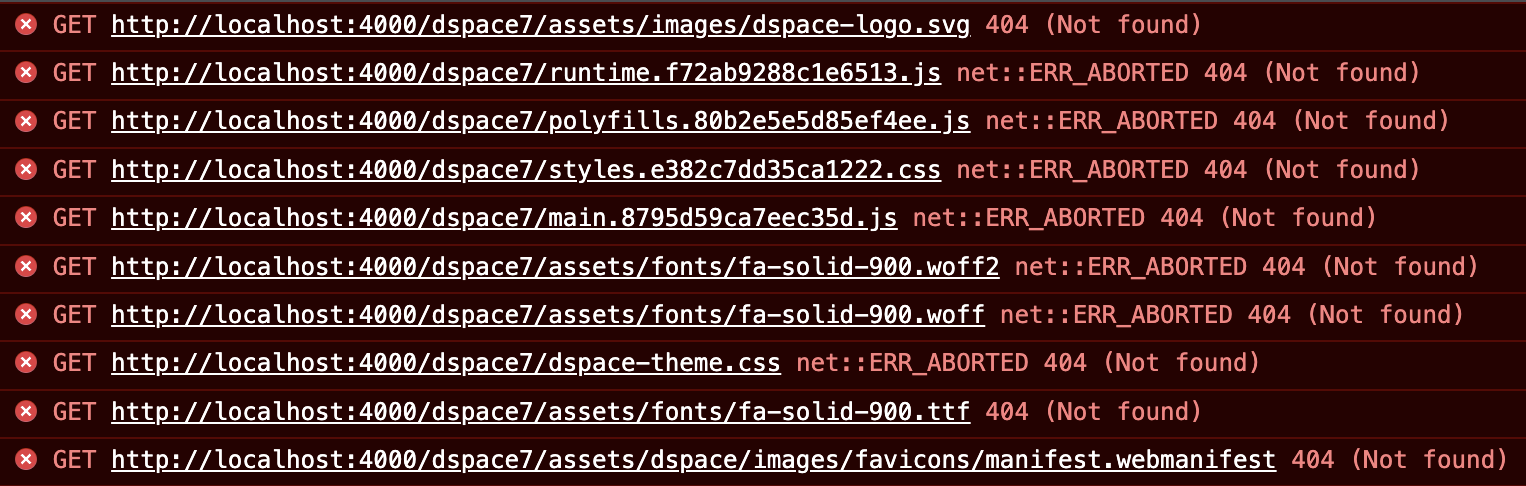
I just tried it today, and while it seems to work fine in dev mode, in prod mode it seems all the assets are still hosted under /
image

image

Perhaps I'm doing something wrong?

My prod config looks like this

ui:
  nameSpace: /dspace7

I also tried adding all the other UI properties but that doesn't make a difference

@ghost
Copy link
Copy Markdown
Author

ghost commented Jun 2, 2022

Thanks @artlowel. This is odd as we have it working in production on infrastructure, but it does not work with yarn start I will investigate.

@ghost
Copy link
Copy Markdown
Author

ghost commented Jun 2, 2022

@artlowel was a merge mistake here 2db8002.

Will commit fix soon.

@ghost
Copy link
Copy Markdown
Author

ghost commented Jun 2, 2022

@artlowel could you please try again?

@ghost ghost requested a review from artlowel June 2, 2022 15:18
Copy link
Copy Markdown
Member

@artlowel artlowel left a comment

Choose a reason for hiding this comment

The reason will be displayed to describe this comment to others. Learn more.

Now it works

Thanks, @WWelling!

@tdonohue
Copy link
Copy Markdown
Member

tdonohue commented Jun 2, 2022

Merging as this is now at +2. Thanks again @WWelling !

@tdonohue tdonohue merged commit c4f2e8c into DSpace:main Jun 2, 2022
@ghost ghost deleted the 145-base-path-support branch June 13, 2022 12:45
ybnd added a commit to atmire/dspace-angular that referenced this pull request Sep 20, 2022
This bug was originally fixed in DSpace#1642 but reintroduced in DSpace#1805
@ybnd ybnd mentioned this pull request Sep 22, 2022
6 tasks
@bkeese
Copy link
Copy Markdown

bkeese commented Sep 11, 2023

Adding a late comment here hoping for some feedback on a related (I think) issue.

I have just deployed a repo in a subdirectory here:
https://institutionalmemory.iu.edu/aim/communities/eabd44ee-7819-46d0-8355-f44769e0713d
Internal links seem to be fine. But, whenever handles come into play, redirects are to the base url instead of the subdirectory 'aim'. I don't know enough about the mechanics of handles to effectively find a solution. Can anyone help?

Sign up for free to join this conversation on GitHub. Already have an account? Sign in to comment

Labels

1 APPROVAL pull request only requires a single approval to merge bug configuration medium priority

Projects

None yet

Development

Successfully merging this pull request may close these issues.

Base Path support

4 participants