Latest compiler update does not override installation path, then CLIParser thinks "Custom WurstScript installation detected." #52
Description
Hello,
My wurstscript jar is on 1244, and latest build found is 1245.
When hitting Update WurstScript, the download bar runs and seems to work, but afterwards, Installed Compiler Build goes to (unofficial build):
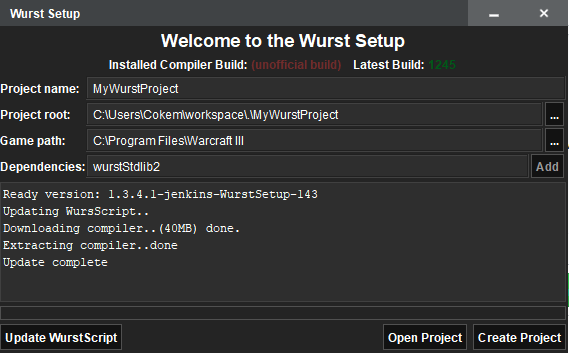
Checking through InstallationManager.kt and logs, I think an exception is swallowed during CLIParser.getVersionFromJar.
setup.log:
2020-06-20 14:17:27 [main] DEBUG file.SetupApp - path: file:/C:/Users/Cokem/workspace/WurstSetup.jar.2.jar
2020-06-20 14:17:27 [main] DEBUG file.SetupApp - file: C:\Users\Cokem\workspace\WurstSetup.jar.2.jar
2020-06-20 14:17:27 [main] DEBUG file.SetupApp - copy jar
2020-06-20 14:17:27 [main] INFO  file.SetupApp - ? No arguments found. Launching Wurst Setup GUI..
2020-06-20 14:17:28 [AWT-EventQueue-0] DEBUG ui.MainWindow - init UI
2020-06-20 14:17:28 [SwingWorker-pool-2-thread-2] DEBUG workers.OnlineCheckWorker - check connectivity
2020-06-20 14:17:28 [SwingWorker-pool-2-thread-1] DEBUG workers.OnlineCheckWorker - check connectivity
2020-06-20 14:17:28 [SwingWorker-pool-2-thread-3] DEBUG workers.OnlineCheckWorker - check connectivity
2020-06-20 14:17:29 [SwingWorker-pool-2-thread-1] DEBUG workers.OnlineCheckWorker - check build
2020-06-20 14:17:29 [SwingWorker-pool-2-thread-2] DEBUG workers.OnlineCheckWorker - check build
2020-06-20 14:17:29 [SwingWorker-pool-2-thread-4] DEBUG net.ConnectionManager - checking wurst build
2020-06-20 14:17:29 [SwingWorker-pool-2-thread-4] DEBUG global.InstallationManager - verify Install
2020-06-20 14:17:29 [SwingWorker-pool-2-thread-4] DEBUG global.InstallationManager - Found installation
2020-06-20 14:17:29 [SwingWorker-pool-2-thread-4] DEBUG global.CLIParser - running wurst to extract the version
2020-06-20 14:17:30 [SwingWorker-pool-2-thread-4] DEBUG global.CLIParser - parsing CMD output
2020-06-20 14:17:30 [SwingWorker-pool-2-thread-4] WARN  global.InstallationManager - Custom WurstScript installation detected.
2020-06-20 14:17:30 [SwingWorker-pool-2-thread-4] DEBUG global.InstallationManager - Client online, check for update
2020-06-20 14:17:30 [SwingWorker-pool-2-thread-4] DEBUG net.ConnectionManager - getting latest compiler build
2020-06-20 14:17:30 [SwingWorker-pool-2-thread-3] DEBUG workers.OnlineCheckWorker - check build
2020-06-20 14:17:30 [SwingWorker-pool-2-thread-4] DEBUG global.InstallationManager - latest compiler: 1245
2020-06-20 14:17:30 [SwingWorker-pool-2-thread-4] DEBUG net.ConnectionManager - getting latest setup build
2020-06-20 14:17:30 [SwingWorker-pool-2-thread-4] DEBUG workers.WurstBuildCheckWorker - current setup ver: 143 latest Setup: 143
2020-06-20 14:32:33 [AWT-EventQueue-0] DEBUG ui.MainWindow - handle wurst update
2020-06-20 14:32:33 [SwingWorker-pool-2-thread-5] DEBUG global.InstallationManager - isUpdate
2020-06-20 14:32:33 [SwingWorker-pool-2-thread-5] INFO  global.InstallationManager - ? Downloading WurstScript..
2020-06-20 14:32:37 [SwingWorker-pool-2-thread-7] DEBUG workers.ExtractWorker - extract compiler
2020-06-20 14:32:37 [AWT-EventQueue-0] DEBUG global.InstallationManager - Installed WurstScript
2020-06-20 14:32:37 [AWT-EventQueue-0] DEBUG global.InstallationManager - verify Install
2020-06-20 14:32:37 [AWT-EventQueue-0] DEBUG global.InstallationManager - Found installation
2020-06-20 14:32:37 [AWT-EventQueue-0] DEBUG global.CLIParser - running wurst to extract the version
2020-06-20 14:32:38 [AWT-EventQueue-0] DEBUG global.CLIParser - parsing CMD output
2020-06-20 14:32:38 [AWT-EventQueue-0] WARN  global.InstallationManager - Custom WurstScript installation detected.
2020-06-20 14:32:38 [AWT-EventQueue-0] DEBUG global.InstallationManager - Client online, check for update
2020-06-20 14:32:38 [AWT-EventQueue-0] DEBUG net.ConnectionManager - getting latest compiler build
2020-06-20 14:32:38 [AWT-EventQueue-0] DEBUG global.InstallationManager - latest compiler: 1245
compiler.log: https://gist.github.com/Cokemonkey11/39b55bdb0f4679a1cfe93edf6c5733ea
Interestingly, if I query wurstscript.jar, it seems that the jar on disk is still the old version:
$ ls -lt wurstscript.jar
-rw-rw-rw- 1 user user 4426046 May  9 14:00 wurstscript.jar
$ java -jar wurstscript.jar --version
1.8.1.0-jenkins-Wurst-1244
I think a few things could be going wrong, and not clear if it's maybe just a problem on my environment:
- logs indicate adopt openJ9, but in bash prompt above I'm using WSL, which is a local installation of OpenJDK 11 (see below)
- installer thinks it extracts wurstscript.jar successfully, but the file on disk is old + wrong version
- I don't see any exception in any logs
- parseCMDLine looks like a last-ditch-effort, but there is no indiciation that it failed or succeeded
$ which java
/usr/bin/java
$ readlink $(which java)
/etc/alternatives/java
$ readlink $(readlink $(which java))
/usr/lib/jvm/java-11-openjdk-amd64/bin/java
I would be interested in any suggestions for next steps. If I don't hear back, I'll try fiddling with $JAVA_HOME on windows environment and/or delete local wurstscript.jar in case it is causing a problem