Unhide string comparison operators in QueryBuilder#3501
Conversation
Lifts the restriction of the following operators for text fields
in the Query Builder:

>, Greater than
<, Less than
>=, Greater than or equal to
<=, Less than or equal to
|
Interestingly, the test panel keeps saying this is the Git SHA anytime I deploy this PR: 
|
 grantfitzsimmons
left a comment
grantfitzsimmons
left a comment
There was a problem hiding this comment.

Works as expected. Displays "Contains" in Specify 6, so this would further stray from what we consider "interoperability" with 6.
grantfitzsimmons
left a comment
There was a problem hiding this comment.

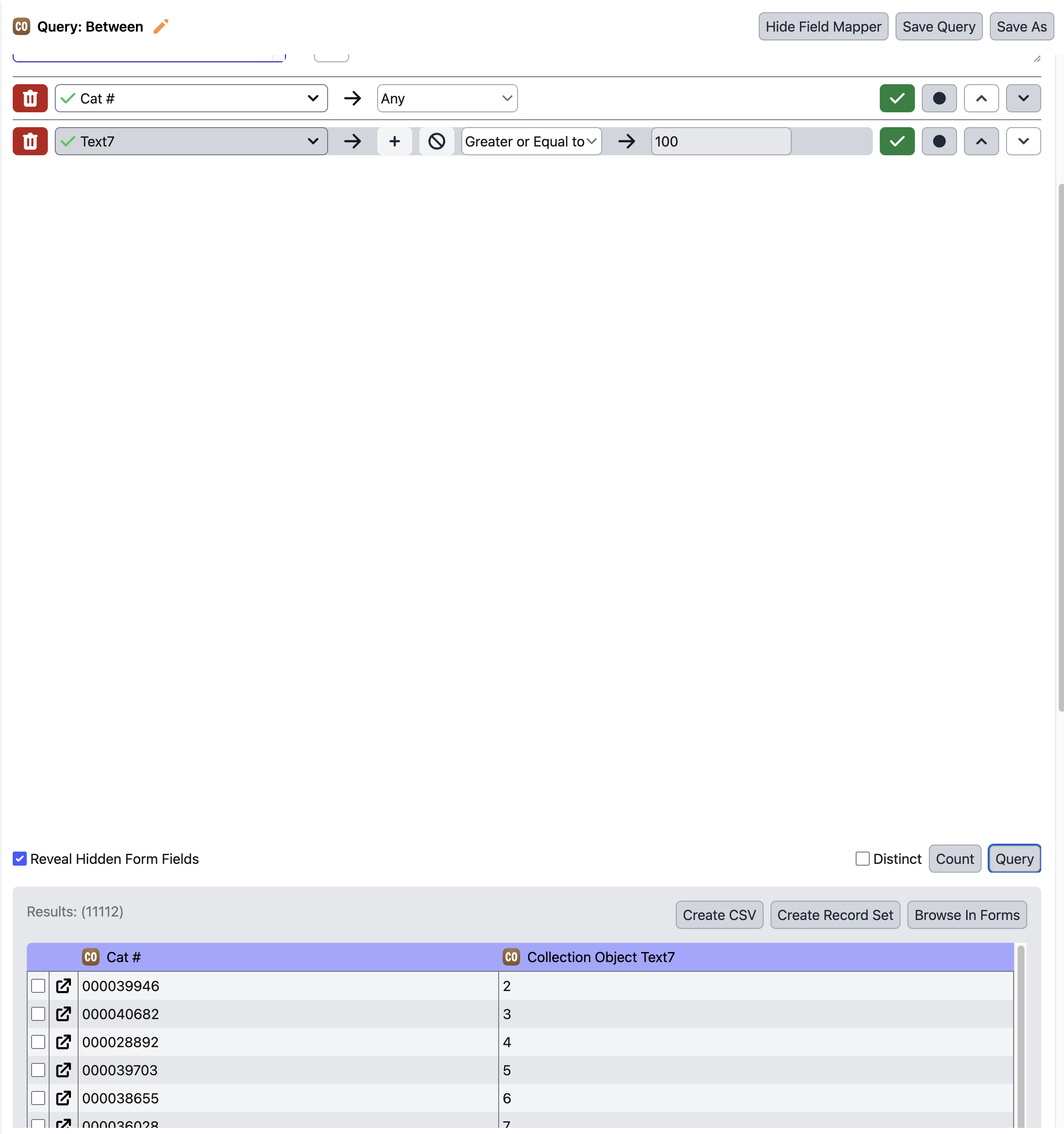
Another comment– string searching is still non-sensical to non-technical users. See this example.
Interesting. I thought Specify 6 had the
Yes, it is based on comparing the ASCII values of each character, which leads to results like this. |
Interesting. Could it be that the same filter id means different things for different data types in sp6 |
The comparator lists are stored in an Array in Specify 6. There are a lot of helper functions in QueryFieldPanel.java to get the correct comparison operators. (If you are interested, here are the relevant methods. Though I don't recommend going through them). The comparison operators are determined on the Data Class (type) for the field (when the field is not a Picklist or Catalog Number. There is special logic for both of those cases). Here is the Specify 6 logic for determining the comparison operators for the Catalog Number field... //CatalogNumber needs special treatment - works better as a number.
//And other fields? Not sure how to tell. Maybe the formatter?????
if (fieldInfo != null && fieldInfo.getName().equalsIgnoreCase("catalognumber")
&& fieldInfo.getTableInfo().getClassObj().equals(CollectionObject.class))
{
if (fieldInfo.getFormatter() != null && fieldInfo.getFormatter().isNumeric())
{
return getComparatorListForClass(Number.class);
}
OperatorType[] stringCmps = getComparatorListForClass(String.class);
OperatorType[] result = new OperatorType[stringCmps.length + 2];
int c = 0;
for (OperatorType ot : stringCmps)
{
result[c++] = ot;
}
result[c++] = SpQueryField.OperatorType.GREATERTHAN;
result[c++] = SpQueryField.OperatorType.LESSTHAN;
//result[c++] = SpQueryField.OperatorType.BETWEEN;
return result;
}It quite literally is an amalgamation of hardcoded operator types based on the formatter for the field. I am not sure on the logic, but more than likely, it is simply receiving a number which it interprets as the index for the Operator List. The 'index' in this case results in Because of this behavior, there will be a different operator in the query (for Catalog Number) depending on the formatter for the field. All other string fields look like they'll display |
|
🤦 🤦 🤦 🤦 🤦 |
|
We would not be able to make this compatible with Specify 6 without an update to 6. Contains We can close this pull request if the incompatibility is enough to warrant not implementing other operators in Specify 7. |
|
Sp7 Query builder is already not fully compatible (relative dates, OR filters, "current user" placeholder, ability to explicitly pick formatter aggregator) |
 bronwyncombs
left a comment
bronwyncombs
left a comment
There was a problem hiding this comment.
Operators are understandable and working as expected!

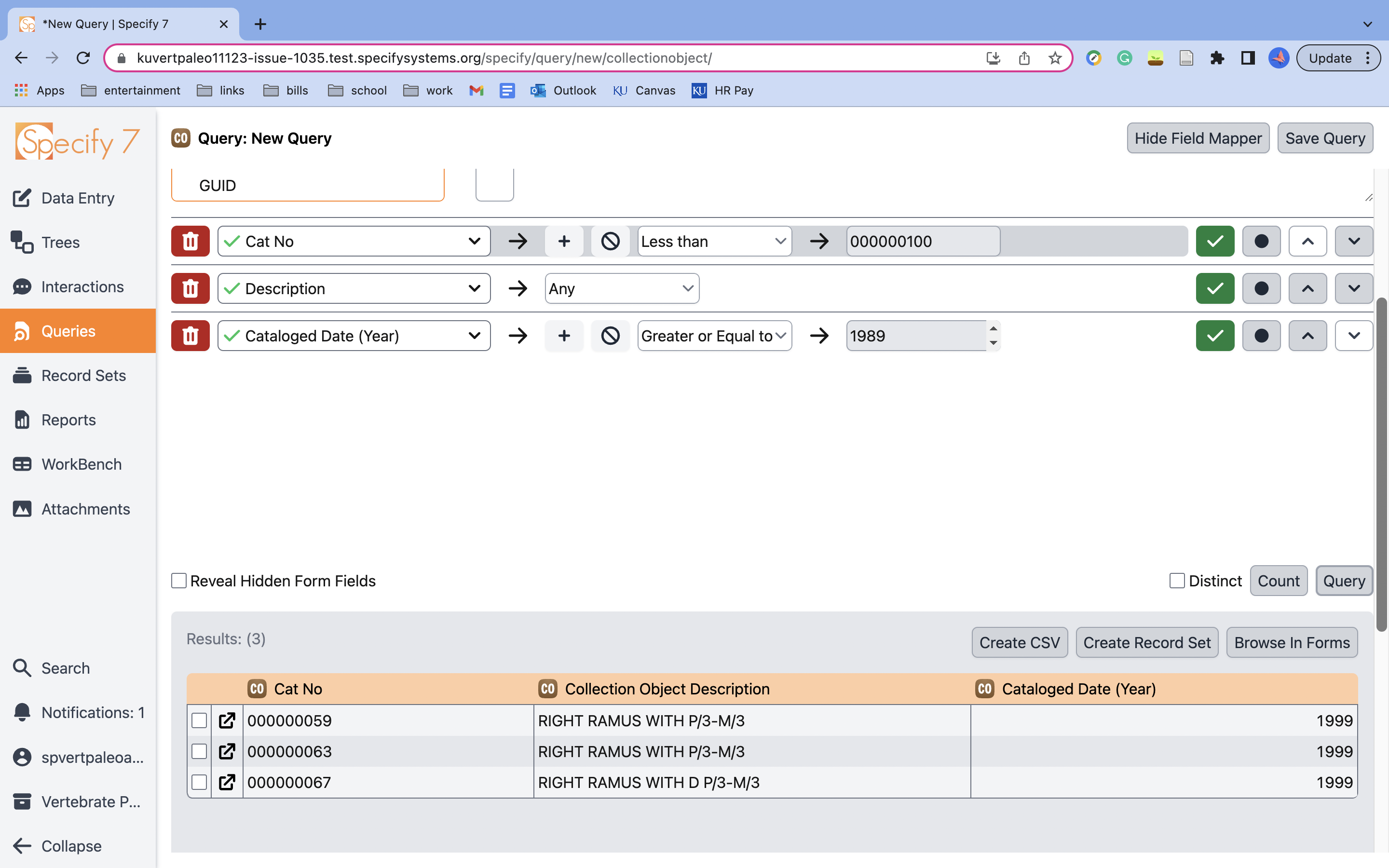
Hi @bronwyncombs thank you for the review! Can you test the following operators on a string field that is not Catalog Number and ensure they work? DO they make sense? |
|
@melton-jason thanks for catching that and letting me know! Good News: I did the test again on the string fields used for text in the forms and I believe it still checks out.  https://github.com/specify/specify7/assets/135047322/bde700c3-d66d-4c95-a714-a345b07a11d1
Does that look better? |
@bronwyncombs mentioned this as being questionable as-is. Can we discuss this as a group before merging? |
bronwyncombs
left a comment
There was a problem hiding this comment.
I don't think this should be implemented without including a preference to unhide or hide these operators for string fields. Unhiding them all by default may impact the non-technical users' ability to understand query building, causing unnecessary confusion and support requests.
|
Another request for this ability has come in from The College of Idaho– can this be added as a preference and included in |
 pashiav
left a comment
pashiav
left a comment
There was a problem hiding this comment.
- Click on/open the Filter Type dropdown (Any, Like, Equal, Between, etc.) and
- Ensure the Greater Than and Less Than filters are present in the dropdown
- Navigate back to the previously used Query and ensure that the comparison-based filter is present (and still respected by the query results) until changed
Nice job!
- Make sure the title and description of the preference makes sense!
I think it's good! The description in preferences explains it well.
✅ Did not run into #3501 (review):
I did get this result as well when mixing numbers and letters since we're comparing ASCII.
Triggered by 796fd6e on branch refs/heads/issue-1035
 emenslin
left a comment
emenslin
left a comment
There was a problem hiding this comment.
- Click on/open the Filter Type dropdown (Any, Like, Equal, Between, etc.) and ensure that the Greater Than and Less Than filters are not shown
- Ensure the Greater Than and Less Than filters are present in the dropdown
- Navigate back to the previously used Query and ensure that the comparison-based filter is present (and still respected by the query results) until changed
Looks good!
 Areyes42
left a comment
Areyes42
left a comment
There was a problem hiding this comment.
- Click on/open the Filter Type dropdown (Any, Like, Equal, Between, etc.) and ensure that the Greater Than and Less Than filters are not shown
- Ensure the Greater Than and Less Than filters are present in the dropdown
- Navigate back to the previously used Query and ensure that the comparison-based filter is present (and still respected by the query results) until changed
👍👍
|
Thanks for the reviews everyone! I will merge this PR with production now, given that there are three UX/UI testing approvals and one other Developer approval. |
stale review
Fixes #1035
Overview/Description
Adds a new Preference in the
QueryBuilder -> Behaviorsection of User Preferences calledShow comparison operators for text-based fields(default is unechecked/false)When checked, the preference unhides the following operators for text fields in the Query Builder:
All of these were able to be accomplished previously using the BETWEEN operator, but doing so required knowledge of how MySQL used the BETWEEN operator 'behind the scenes' (which itself would require knowledge of ASCII characters and their values).
This preference can lead to potentially nonsensical results, especially when numeric strings are sorted lexicographically (see #3501 (review)).
This potential confusion is the primary motivation behind putting this functionality behind a preference and making it non-default.
Edge Case Behaviors/Notes
Viewing existing queries which have comparison-based filters on a text field when the preference is disabled
If you do not have the preference checked but encounter an existing comparison filter on a text field, then Specify respects the filter on the field: leaving it untouched. However, if you then switch the filter to a non-comparison operator, then the previous comparison filter will be removed from the list of available filters; only reloading the page, enabling the preference, or generally leaving the page and coming back (i..e, reloading the Query) will allow the user. to"go back" to the previous filter.
edge_case.mov
Let me know if this edge case deserves more attention! A more user-friendly implementation for example might keep the previous comparison-based filter in the list of possible filters to choose from: until the query is saved or the web-page is left.
Viewing queries which have comparison-based filters on a text field in older versions
Support for this feature is not retroactive: if such a filter exists on a query, the filter will be replaced with
Anywhen viewing the query in older versions of Specify 7.When viewing the Query in Specify 6, Specify 6 will replace the filter with
Contains(see #3501 (review)). The Query, however, should be hidden in Specify 6 by default (see #3501 (comment))@specify/ux-testing @specify/dev-testing
Feel free to give any feedback on the wording of the preference, the default value, etc.! 😄
We can also consider defining this User Preference as a Remote Preference instead, if the scope of the preference should be broader than user (which might become important when/if Shared Queries (#256) are implemented)
Checklist
self-explanatory (or properly documented)
Testing instructions
Show comparison operators for text-based fieldspreference set to false (the default behavior)text1,text2,remarks)QueryBuilder -> Behaviorcheck/enable theShow comparison operators for text-based fieldspreferenceShow comparison operators for text-based fieldspreference