
ABOUT ME
Hey Chooms! This is a little bit about me and why I started curating mod collectionsBack in the 90s, I was a young kid, and I never slowed down for more than two seconds.
But this all changed one day when I visited my cousin he had a Super Nintendo!!! and I fell in love, from that moment on I knew gaming was something that called out to me.
So when my parents bought my sister and i our own console (Playstation) I was over the moon, long nights playing Crash Bandicoot, Spyro and Gran Turismo you can't beat these memories.
Skip forward 10 years and games like Red Dead Redemption, GTA Vice City and Need for Speed these games only solidified my love of gaming even more. Like many of us, it gave us a way to escape and let our imagination run wild.
Skip forward to the current day. The time when we can create new experiences in the games that we already love what could be better than this? Modding is really a cool way to add so much more. But it's not always easy to get all those cool mods to work together with no issues. This inspired me to combine my passion for helping people, with a desire to make games that use mods and work as seamlessly as they can.
So join us choombah and come along for the ride.

MY VISION FOR THIS COLLECTION
This isn't just a mod list we have slapped together this is a whole new world of **Starfield** with hundreds of hours spent building, configuring, modding, and testing to create the best **Starfield** experience possible.My Vision for all my Collections is for you to be able to play the game any way you want. I won't force you to play a certain way I want you to have the tools to create your own experience so you can get the most out of your game.
Constellation is the Ultimate experience you have access to everything you could ever need or want. Whether it's taking screenshots in photo mode, playing the most extreme difficulty, or cheating your way through Starfield this collection has it all and I mean all.
And that's it I hope to see you in the Cosmos but now it's time for me to go.
CLICK HERE FOR MORE COLLECTIONS IN THE SERIES
🎮 The largest & most comprehensive Collection for Starfield ⭐
🎮Full Star Wars Overhaul 💀 Add to our main Collection or Standalone ⭐
💻4k Pack by XilaMonstrr & v2 for our Constellation Collections🎮 But is also great alongside any mod collection⭐
🎮 2k Pack by XilaMonstrr & v2 ⭐
⛔ If you use our main Constellation collection these mods are already included⛔
💻1k Performance Pack Created for our Constellation Collections💪 But is also great alongside any mod Collection⭐
🎮Main Core Mods needed to Mod Starfield 🔮
⛔ All of our collections already contain these mods⛔
CLICK HERE
This collection is extensively tested with every new version, because we want to ensure you're in the Cosmos quickly. If ever there is an issue, please join our community [Discord](https://discord.gg/v2-s-collections-1076179431195955290) so we can provide the fastest help that our team can deliver. Often issues can be solved quicker than a downvote!



- These are the best mods from the most talented mod authors and are a must-have to immerse yourself in Starfield.
- The most extensive mod collection on Nexus for Starfield.
- Easy to follow step-by-step installation guide.
- Only-5Gb in download size for 180+ Mods. Optional Mods add another 10Gb
- Mods specifically created for the collection.
- Setup Video- HERE
- Continuous Support in Comments and on Discord.
- Live voice support.
- Giveaways. Game Keys/Discord Nitro (Every Week).
- and much much more Join our Discord for more information.

- (SFSE) Script Extender.
- (CCL) Constellation Collection Loader.
- Achievement Enabler.
- Bethini Pie (Performance INI Editor).
- SF1Edit.
- Discord Presence Intergration.
- Hotkey Support.
- Reshade.
- Gameplay Mods & Tweaks.
- Bug Fixes.
- Graphics and Texture Mods.
- Quality-of-life-Improvements.
- Input Mods.
- Improved UI.
- Console Command List with 100s of Easy to use Commands+Cheats.
- 20+ Splash Screens.
- 10+ Animated Menu Backgrounds.
- 65 Custom in-game cursors.
- Optional Star Wars Theme.
- Support for other Modular Expansion Packs.

⛔DO NOT
- Update any of the mods in this collection individually in Vortex when a mod gets updated we will update the collection.
⛔MAKE A BACKUP SAVE
***https://www.youtube.com/watch?v=y4oWIJmgLrg
- Mods for Bethesda games can be unreliable at times it's always good to make a backup of your save file. The save file location can be found below Just copy the contents of this file and place it somewhere on your PC.
- Alternatively, you can run the backup bat file that is in your main directory after you install the Collection to automate the backup of your saves.
C:\Users\[YOUR USERNAME]\Documents\My Games\Starfield\Saves
⛔HOW TO UPDATE
***https://www.youtube.com/watch?v=TC0GbFmp6Kw
- 1) Create a new Profile in Vortex and enable it.
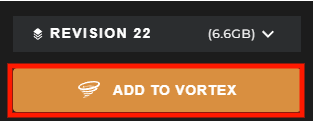
- 2) Go to the Collection page and ensure the most current revision number is displayed, then select "ADD TO VORTEX"
- 3) When prompted to select which profile to install to, select the new profile you created in Step 1)
- 4) Once the update is downloaded you can remove the old profile.
NOTE Don't worry you will NOT have to redownload the entire collection with this method.
⛔LAUNCHING STARFIELD
- Make sure Steam is open.
- Use Vortex to launch the game. (You cannot Launch from Steam)


⏰ INSTALL TIME
***https://www.youtube.com/watch?v=c\_VA7dgty3c

Premium Users: Takes 30 Min + Semi-automatic. You can be AFK with a few Install menus at the end of the installation.
Free Users: Takes 1 Hour + Semi-automatic. You will have to click on download for each mod one by one.
1️⃣ PC Updates
***https://www.youtube.com/watch?v=ANxf9o7gnWE
- ⛔Make sure that you have the latest version of Microsoft Visual Studio C++ >HERE
- ⛔Make sure that you have Desktop Runtime 7.0.3 >HERE
- ⛔Make sure that you have Desktop Runtime 6.0.23 >HERE
- ⛔Make sure that you have the latest Graphics driver update.
2️⃣ STARFIELD
***https://www.youtube.com/watch?v=T1KryenezUw
- ⛔This Collection only supports the Steam Version of Starfield.
- Start with a fresh install of Starfield.
- Make sure the game is installed on an SSD.
- If you have never launched the game or you have reinstalled the game launch the game at least once to generate the required files.
3️⃣ VORTEX
***https://www.youtube.com/watch?v=cX5tz-MO\_d8
4️⃣ VORTEX & STARFIELD
***https://www.youtube.com/watch?v=suCAprM6m94


4) Once Vortex has restarted it may say "Game not discovered" If it does click "Continue" at the bottom right of the popup.
5) A window will now pop up where you can choose the folder where "Starfield" is installed. (Locations below).
[DRIVE LETTER]\SteamLibrary\steamapps\common\Starfield
6) On your main Vortex window, it will now show an icon for "Starfield" showing that it is a managed game in Vortex.
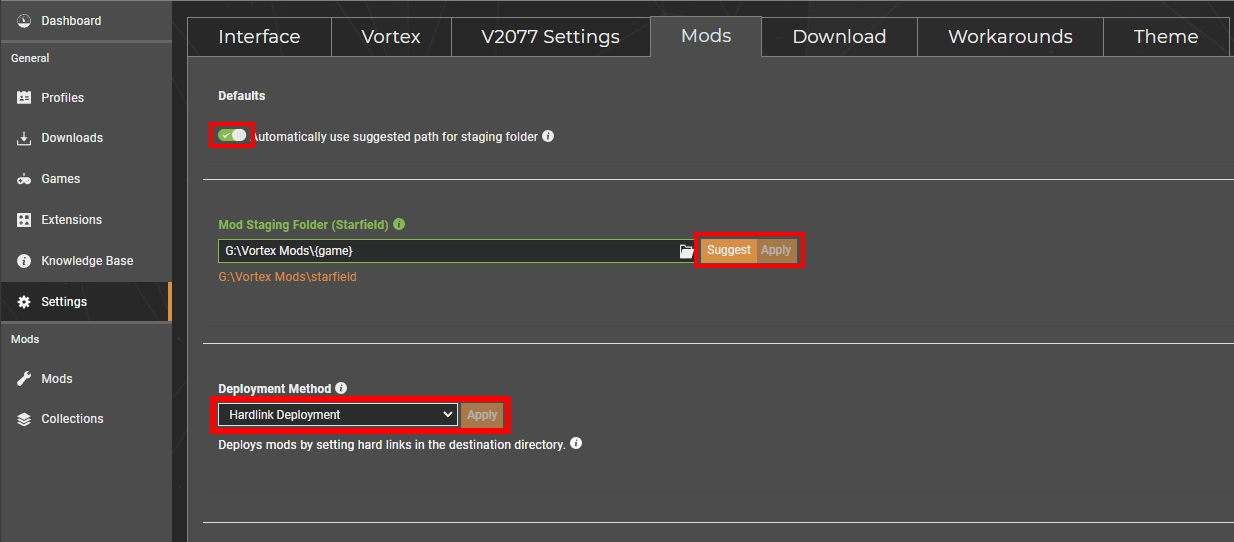
7) Go to the settings and on the Mods tab check "automatically use suggested path for staging folder" then check "suggest and "apply".
8) On the same window select "hard link deployment" and check "apply".
5️⃣ ENABLING MODDING
***1) If your Starfield.ini isn't set up for modding you will see this Pop-Up in the top right-hand corner of Vortex select "Fix".


C:\Users\YOURUSERNAME\Documents\My Games\Starfield
6️⃣ INSTALLING THE COLLECTION
***https://www.youtube.com/watch?v=9\_7bp8UkpBI

4) After the collection has finished installing you will get a pop-up for the Optional Mods. Select "Show" optional mods then select "No thanks"


7️⃣ ENABLING PLUGINS
***1) After the collection has finished installing select "Load Order" In the left-hand sidebar of Vortex.


8️⃣ OPTIONAL MODS
***https://www.youtube.com/watch?v=3bftJEk0eMI
ReShade is included with the collection once you have finished downloading it will be placed on the toolbar in the top left-hand corner of Vortex.
NOTE If you use a Reshade make sure that HDR is disabled in Windows.
1) Click on Reshade in the top corner.

Steam> Drive Letter\SteamLibrary\steamapps\common\Starfield\Starfield.exe
3) Select Directx 10/11/12
4) On the "select preset to install" select next
5) Select next and finish the installation.
6) Run the game
I have added the Reshade below.
- Constellation Reshade byv2
End key to toggle main effects
Home key to open GUI
🎮 IN-GAME SETTINGS
***To use the Console window use the ~ key on your keyboard to bring up the overlay here you can input commands to activate some of the Mods.
- To apply the tweaks, run "bat builderTweak"
- To uninstall the mod / revert the settings, simply run "bat builderReset"
- To increase the tolerance run "bat toleranceBig", or "bat toleranceHuge" (Huge basically disables any overlapping checks, letting you build some cursed things)
- To uninstall the mod / revert the settings, simply run "bat toleranceReset"
- Legendary Weapon Pack=bat v2_LegendPack
- Epic Weapon Pack=bat v2_EpicPack
- Rare Weapon Pack=bat v2_RarePack
showlooksmenu player 1
⌨️ KEYBINDS
These are set up for a full-size KB.- HOME = UI
- END = Toggle Reshade
- ~ = Console
- Numpad 2 = Ammo Pack
- Numpad 3 = Throwables Pack
- Numpad 4 = Med Pack
OVERVIEW
- Select your ship's available power systems with Quick-Keys 1 -> 6.
- Easily swap between Balanced, Combat, Escape, and Stealth power presets.
- Doesn't require any external scripts or hotkey software.
KEYBINDS
- This mod utilizes whatever in-game Quick-Key key binds you have set up.
Power Systems
- Quick-Key 1 = Select Weapon 1
- Quick-Key 2 = Select Weapon 2
- Quick-Key 3 = Select Weapon 3
- Quick-Key 4 = Select Engine
- Quick-Key 5 = Select Shields
- Quick-Key 6 = Select Grav-Drive\
Power Presets
- Quick-Key 7 = Combat Power Preset (Standard)
- Quick-Key 8 = Combat Power Preset (Alt)
- Quick-Key 9 = Combat Power Preset (Split)
- Quick-Key 10 = Balanced Power Preset
- Quick-Key 11 = Escape Power Preset
- Quick-Key 12 = Stealth Power Preset
- Numpad 9 = Covert Essence to Power


- You can find the full Troubleshooting list on our Discord and here Troubleshooting/FAQ
- You can find all our guides on our Discord and here Guides
COMMON FAQS
## [My controller doesn't work❓](https://)1) Open Steam.
2) Locate "Starfield" and select "Properties".
3) Select "Controller Settings" and disable Steam Input.
The Collection comes with some Installers that pop up and let you choose some Presets these installers are called FOMod Installers.
If you would like to change the preset you chose follow the guide below.
1) Open Vortex and find the mod you would like to change.
2) Right-click the Mod and select Reinstall.
3) This will allow you to choose your Presets again.
Sometimes you need to relink Vortex to a tool.
1) Go to the "dashboard" tab in Vortex.
2) Scroll down until you see "tools".
3) Click the 3 dots next to the tool you need to relink ie Reshade. and select "edit"
4) Now select "target" and browse to where you have the tool installed this will be in the main Starfield directory.
The mod we use to enable Achievements while playing the modded version of the game is called Baka Achievement Enabler (SFSE). This mod can sometimes stop working for some users. Below is a guide to fix this issue.
1) Uninstall SFSE (Removed archive as well with Vortex)
2) Uninstall Baka AE (Removed archive as well with Vortex)
3) Install Baka AE
4) Install SFSE
5) Make sure Steam is always open before you launch the game from Vortex


CLICK HERE TO BECOME A JEDI
### FeaturesThis theme is completely (OPTIONAL) Download the ADD-ON Pack HERE
A new constellation is taking shape in the cosmos, one that will awaken the inner Jedi or Sith within you. Prepare to leave the realm of Starfield behind as we introduce you to Constellation Star Wars by v2 a mod collection that will transport you from the unknown stars to the legendary galaxy of Star Wars!
Prepare for an adventure like no other, where the stars themselves rewrite their destinies to align with the Force. Welcome to Constellation Star Wars by v2 where the stars tell a tale of epic proportions in a galaxy far, far away...

Buffs and Nerfs to balance the gameplay.
CLICK FOR MORE DETAILS
- Enemies have more health. - Prevent the player from becoming a bullet sponge on the higher levels. - Rebalanced skill challenges.
Many fixes to vanilla game bugs.
CLICK FOR MORE DETAILS
- Fixes twitching/stuttering when sprinting in first person. - Fixed stuttering when changing weapons. - Fixes mine explosions being too quick. - Fixes an issue, where companions and other NPCs can steal your kill and you get no XP for it. - Fixes an issue with NPCs taking too long to blink. - Fixes the mantling animation. - Fixes a bug in third person where the player's head is permanently stuck facing the left or right after jumping while sprinting. - Fixes the flying leaves in-game.The Starfield Community Patch (SFCP) project is a collective effort by mod authors and the wider player community of Starfield to fix bugs, errors and other inconsistencies present in the game. This includes tweaks, typos and other changes that may have been missed (or not yet released) by the developers. The overall goal is to improve the vanilla experience for all players. All fixes should be considered unofficial unless the change is carried forward by Bethesda.
Fixes included in the patch are intended to correct bugs or errors in the base game, examples include:
- Misplaced objects
- Script errors
- Inconsistencies in item properties
- Faulty missions/quests
- Game-breaking exploits
- Missing attributes (such as tags, header flags, etc.)
- Spelling errors
You can see the current changelog HERE

The collection comes with many improvements to the graphics from upscaled textures to custom textures and our own reshade Starfield has never looked better. And if this isnt enough you can use our 4k add-on graphics pack HERE (This is for high-end systems only).
You can use our 1k add-on graphics Pack HERE (This is for low-end systems to help you gain some performance).
CLICK FOR MORE DETAILS
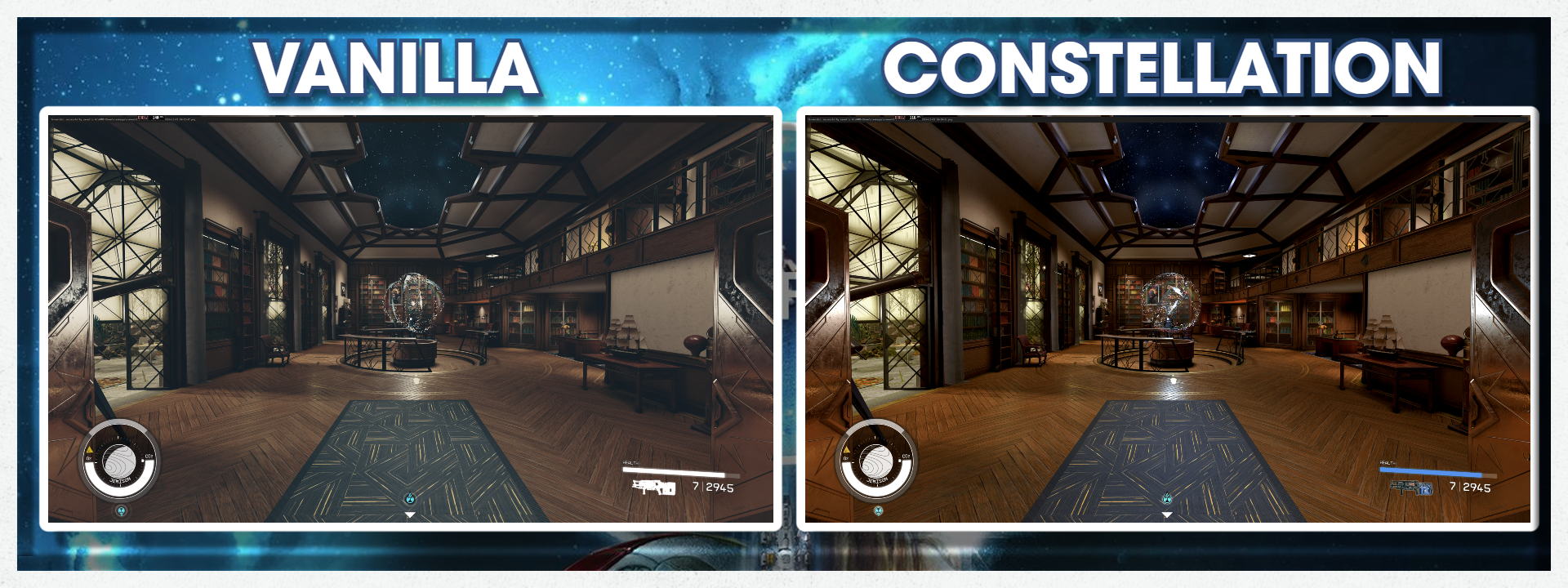
- Reshade included. - [Constellation Reshade](https://www.nexusmods.com/starfield/mods/103) Preset. - Constellation Tweaks Performance Boost. - 10+ Animated Main Menu Screens. - 20+ Splash Screens. - Cropped and upscaled loading screens for ultrawide monitors - Removes photo mode boundaries, and enhances sliders - for ultimate space screen-archery! - Removes the fog that trails your ship. - Over 1500 new Lights have been retextured in many locations of the game. - Retextured grass. - Retextured flashlight.- We have included a custom LUT and INI file that completely changes the visual quality of Starfield, paired with our Reshade the game looks incredible, check out the pictures below.
- Quick (favorites) menu
- Galaxy map
- Scanner
- Pause menu
- Data menu open/close animation
- Artifacts Redone - MonstrrMagic Texture Series
- Spacesuits Redone - MonstrrMagic Texture Series
- Eyes Brows and Lashes Redone - MonstrrMagic Texture Series
- Architecture Surfaces Redone - MonstrrMagic Texture Series
- Planets Redone - MonstrrMagic Texture Series
- Spaceships Redone - MonstrrMagic Texture Series
- Water Redone - MonstrrMagic Texture Series
- Landscape Ground Surfaces Redone - MonstrrMagic Texture Series
- Flora Redone - MonstrrMagic Texture Series
- Furniture Redone - MonstrrMagic Texture Series
- Barrett Redone - MonstrrMagic Texture Series
- Adoring Fan Redone - MonstrrMagic Texture Series
- Marika Boros Redone - MonstrrMagic Texture Series
- Lin Redone - MonstrrMagic Texture Series
- Heller Redone - MonstrrMagic Texture Series
- Sarah Morgan Redone - MonstrrMagic Texture Series
- Delgado Redone - MonstrrMagic Texture Series
- Amelia Earhart Redone - MonstrrMagic Texture Series
- Hadrian Sanon Redone - MonstrrMagic Texture Series
- Ezekiel Redone - MonstrrMagic Texture Series
- Eyes
- Bullet Holes
- Explosions
- Weapon fx
- Gore
- Storms of all kinds
- Fires
- Ambient fx like fog, dust, wisps, auras, smoke etc
- Prop fx like electric arcs, force fields, animated bits, etc
- Rabbit's Real Lights Cydonia
- Rabbit's Real Lights HopeTown
- Rabbit's Real Lights Neon
- Rabbit's Real Lights Landing Pads
- Rabbit's Real Lights Paradiso
- Rabbit's Real Lights Dazra
- Rabbit's Real Lights Eleos Retreat
- ⛔NOTE Our main Collection comes with some optional 2k Textures. If you add the 4k Collection on top of this Collection make sure to disable the optional 2k Textures included in this Collection.
- ⛔NOTE Our 1k and 4k Collections are NOT Compatible with each other for obvious Reasons.

The collection comes with many improvements and adjustments to the core gameplay of Starfield. This will suit all playstyles wether you want to cruise your way through the game or you want a hardcore experiance the collection has it all.
CLICK FOR MORE DETAILS
- Reduced the sound players produce when they are out of the line of sight. - Reduced the sound of footsteps. - Increased the travel distance of the horizontal boost. - You can now tweak how fast you can climb on ladders and other objects (mantle) to your preference. - You can now use Tactical Sprint similar to Call of Duty. - You can now disable aim assist on a controller. - You can now convert 10 Essence to Power or Power Ranks using a hotkey. (Hotkey) Numpad9 - You can now set Gameplay Options that grant you bonus XP and bonus Skill Points per level. - You can now set a cap on player-level progression using the gameplay options menu.- Have an unlimited number of followers. Command all of your followers at once using a communicator added automatically to your inventory
- Visible Companion Affinity allows you to monitor the metrics that describe your relationship with your four companions in Starfield.
- Followers now attempt to keep an average distance of about 2 - 5 meters from you. Generally closer while walking, and further while running.
- Followers will now only attack once an enemy has fully detected one of you.
- Followers will now attempt to stick very close to you (1.5 meters), and will no longer sandbox while sneaking. This makes them much less of a liability in stealth runs.
- Followers will now match your walking speed while they are close to you.
- Followers will now be able to move 50% faster when they are more than 50 meters away from you. Let's just say they keep a stockpile of ultra-strength AMP on them, specifically for these moments. The effect usually isn't too visually obvious, but they do a little better job of keeping up with you now.
- Followers will no longer stop to bully the local wildlife.
- Followers now stick close to you (1.5 meters) while you are in an airlock doorway.
- Followers will now attempt to find a seat near you and use it. If they can't find one, they will sandbox randomly instead. They should no longer just stand and stare at you.
- Enhances and fixes some of Sarah Morgan's dialogue in a light weight, thoughtful, lore-friendly way.
- Reduced the distance at which NPCs will talk to you.
- Reduced the distance at which NPCs will stare at you.
- You can capture incapacitated enemies and turn them over to local security for profit.
- Credit amounts from most sources are now boosted by about 25%-70% (e.g., generic early-game humanoid credit drops are increased on average by 50 credits).
- Credit rewards are no longer strongly tied to player level, although the player level still influences the amount.
- During the main quest "No Sudden Moves" you can take the artifact if in stealth without alerting the guards.
- Access mission boards anywhere via the internet with a newOnline Mission Boardsitem added to your inventory (it counts as a weapon).
- Increased the healing of all food items by x5
- Increased the duration of food, drink, and chem items by x2.
- Increases the rate of Legendary drops for all difficulties.
- Increased ammo/ship repair kit/Grenades/Mines by 100%
- Increased medical supplies by 50%, and 100% for some specific medical supply vendors
- Vendors have 10x the amount of credits. Restock in 1 day.
- Starborn enemies have different effects (or bounties) when the player defeats them, making them more interesting to dispatch. Killing any of these can now Empower you (add power or power ranks), allow you to loot them, or grant bonus quantum essence.
- Contraband is cheap in locations without scans, but expensive in these locations with scans.
- Ensures the Outpost Shipbuilder always has 800,000 credits on hand as soon as you open the menu.
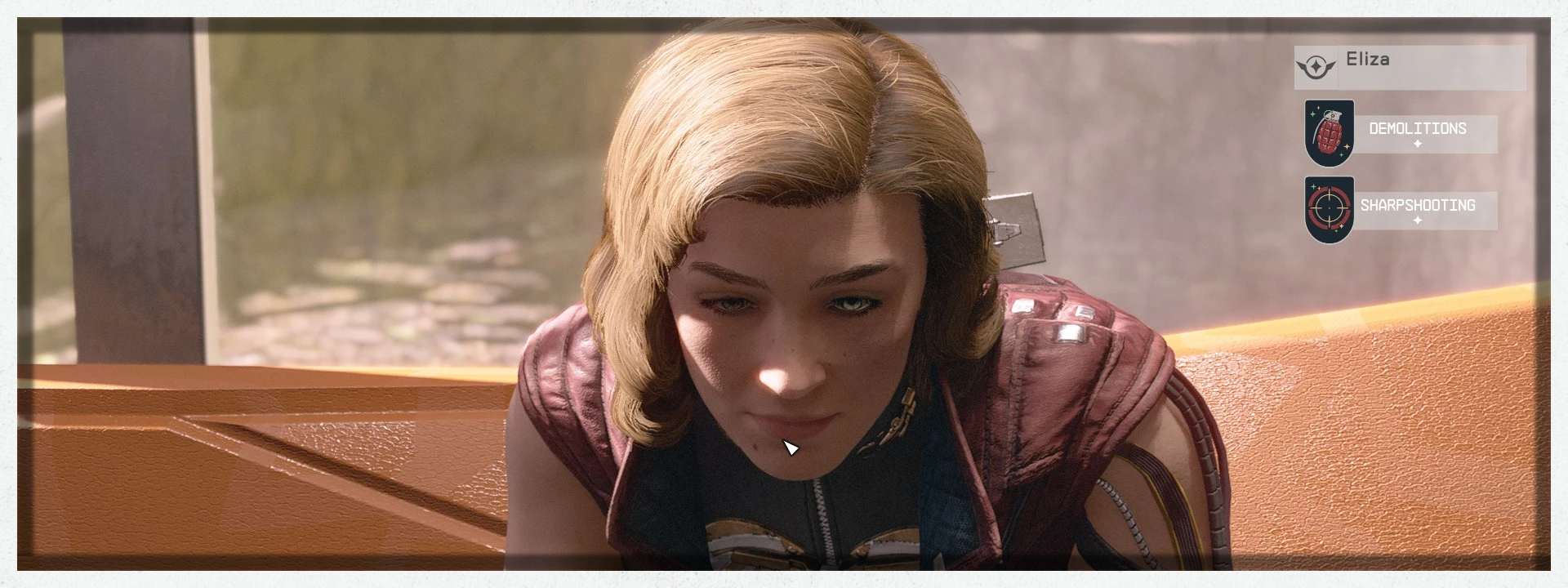
Extends functionality of companions and crew, adding quality of life improvements and improved stat/skill levels for high-level gameplay.
CLICK FOR MORE DETAILS
## [General Changes](https://)- More Crew - Increases the default number of crew assignable to ships by 5.
- Better Ship Command - Modifies the Ship Command perk to allow for 5 additional ship crew per level.
- Better Crew Stations - Increases the number of crew allowed by crew stations to 5 per station.
- Inventory Quick Access - Activating a follower with your weapon drawn will allow you to quickly access companion inventory without going through dialogue.
- Companion Previews - Viewing a companions inventory through dialogue or quick access will show their appearance in the menu rather than the players.
- Better Gifts - Expands the levelled lists of gifts to give more/better gifts at higher levels.
- Better Gift System - Rather than repeat "I have something for you." dozens of times until you break down and talk to them, the companion will say the dialogue once and add the item to their inventory, restarting the gift timer.
- Enhance! Support - Taking a follower to an Enhance! location will give them a new dialogue option, allowing you to alter their appearance to your liking.
- Additional Skills - Companions and Elite crew with less than 4 perks will have a chance for additional perks.
- Levelled Skills - When loading a new game, each companion's skills will be randomly levelled up to rank 4.
- Improving skills - Companions and hired crew members have a 5% chance to level a skill every week.
- Improved Outfits - Makes companion's default outfits usable by the player and allows them to be removed from the companion.
- Outfit Mirroring - When the player's suit and/or helmet are visible, the current followers will be as well.
- NG+ Improvements - Grants access to the followers that typically become unavailable when skipping the main story: Heller, Lin, Moara, and Rafael.
- More Crew - Crew will have a higher chance of spawning additional recruitable crew in each location, and the timer to respawn them has been reduced to 2 of the planets days.
- More Locations - Crew now spawn in additional locations, such as auto-generated civilian outposts.
- Inventory Control - Crew inventories can be accessed and armor/weapons equipped using quick access or the dialogue option.
- More Skill Variety - Potential list of crew members has been expanded, with higher level crews having stronger and/or more perks.
- More Appearance Variety - Potential faces has been expanded to allow for more unique appearances.
- Named Crew - Crew members are assigned random names. To help differentiate from elite crew in the menu, they only have a first name.
- More Skills - Crew members will now have up to 3 additional perks, randomly assigned for each crew member. The higher a players level and number of NG+'s increase the chance for additional perks.
- Less Generic Outfits - Crew members have been given better fashion sense, and should now wear a wider variety of clothes.
- Weapon Variety - Crew can spawn with alternate weapons, rather than an across the board pistol.
- Higher Levels - Crew now level up past level 5. Generic crew are roughly 75% of the players level and have improved health.
- Levelled - Modified crew AI so that they will help in combat now, notably at outposts. The AI is set so that they should attack when the player or other crew is attacked, and flee if their health is low.
These are perks that are new to crew and companions in general. There is a least one generic crew that can spawn with each, elite crew and companions have a chance to gain one or more of these skills based on their vanilla loadout.
- Armor Penetration - Attacks ignore 15% of enemy armour per rank.
- Automated Weapons - Automated ship weapons do 5% more damage and reduce all targeting mode costs by 5% per rank.
- Commerce - Improves buying and selling by 3% per rank.
- Crippling - Increases the chance of the enemy entering a bleed-out state by 10% and increases damage against enemies in bleed-out by 25% per rank.
- Duelling - Increases melee damage 25% and reduces damage taken 10% while weilding melee per rank.
- Engine Systems - Increases ship boost fuel by 5% and ship boost fuel recharge rate by 10% per rank.
- Gymnastics - Reduces fall damage by 10% per rank, also increases jump height and speed by 10% per rank.
- Heavy Weapons - Heavy weapons do +10% damage per rank.
- Incapacitation - EM weapons do 5% more damage per rank.
- Rapid Reloading - Companion reloads 25% faster per rank.
- Rejuvenation - Companion restores 0.5 health per second per rank in or out of combat.
- Research Methods - Increases all outpost production 2% per rank.
- Scanning - Increases planet scan range by 4 light years per rank.
- Ship Command - Functions the same as the leadership perk.
- Special Projects - Increases production of exotic and unique resources by 10% per rank.
- Starship Design - Improves ship efficiency +3% per rank (Repair Rate, Grav Jump Calculation Time, Weapon Recharge, Boost Recharge)
- Targeting - Improves weapon accuracy and range by 5% per rank.
- Targeting Control Systems - Increases the chance for a critical hit while locked onto a target by 3% per rank.
- Zoology - Increases organic outpost production by 10% per rank.\
Unlike most companion mods I've seen that modify companion perk levels, this mod adds additional effects for the levels, rather than just changing the number. The following crew perks have been edited to have 4 ranks each, following the levelling pattern set in place by the original levels.\
- Aneutronic Fusion
- Demolitions
- Energy Weapon Dissipation
- Incapacitation
- Marksmanship
- Outpost Engineering
- Outpost Management
- Pain Tolerance
- Pistol Certification
- Ballistic Weapon Systems
- EM Weapon Systems
- Missile Weapon Systems
- Shotgun Certification
- Sniper Certification
- Xenosociology
- Weight Lifting - Increases carry bonus to +25 per rank.
- Wellness - Increases health bonus to +20 per rank.\
These perks "control" the gifts a companion give you when following you, originally they had no actual effects, but they have been improved to expand their usefulness. Higher levels of the perk will also give additional/better gifts.
- Botany - Increases organic outpost production by by 10% per rank.
- Chemistry - Increases gas/liquid outpost production by by 10% per rank.
- Geology - Increases solid outpost production by by 10% per rank.
- Scavenging - Increases all outpost production by by 1% per rank.
- Medicine - Increases aid items magnitude for the player by 10% for rank.

The collection comes with many quality-of-life improvements.
CLICK FOR MORE DETAILS
- Skip the intro. - Swaps the helmet torch light out for a different clearer version. - Jetpacks now work with pressing and holding buttons, instead of being single press. - Auto unlock doors, containers, and terminals (including inaccessible ones) if you have the required perks. - Prevents neutral NPCs and spaceships from turning hostile when you accidentally hit them. - Displays your current/next-level XP on loading screens. - Disable Yannick's activity (incl. its quest marker) that continuously and automatically appears in your missions log every once in a while. - Hides your spacesuit while inside of a sealed starship, including your home ship. - Hides your spacesuit while on a safe, breathable planet. For example, anywhere on Jemison outside of New Atlantis. - If you step into a sealed area on a world where you need a spacesuit, only your helmet will be hidden. - Follower spacesuit behaviour will be synced to yours a bit in those areas. - Followers no longer needlessly wear their helmets in breathable environments. - Reduced the time it takes for Vendors to refresh their inventory from 2 days to 1. - Reduced the jogging movement speed. - Increased FOV when in dialogue. - Increased the distance at which the map marker is visible. - Increased the distance at which objects can be scanned. - Increased the speed of Air Lock Animations. It comes with various speed multipliers for you to choose from. - Increased the speed of Furniture animations. It comes with various speed multipliers for you to choose from.
Many different improvements to the UI click below to see all the changes.
CLICK FOR MORE DETAILS
- Smaller and moved Location Text and XP Indicator. - PS5 Controller Support. Playstations Icons Instead of Xbox. - Choose from 65 different cursors. - Fixes the spaceship targeting reticle looking choppy as it's locked to 30fps by default. - Add a small icon in front of lootable items in the world and inventory, so it's easier to see what is what It also helps with inventory management. - Enhance your dialogue experience with a wider, refined, and centred text area, and improved text clarity featuring a subtle shadow for better readability — all without annoying transition animations. - Gives terminals and kiosks a darker theme, and makes the terminal startup less bright. - Gives mission boards a darker theme. - Removes the warning when opening the console for the first time in a session. - Increased the speed of the sleep/wait Menus. - Increased the viewable ship component items by 33%. - Increased the viewable mission menu so more items can be seen at once by 50%. - Increased the viewable crew menu so more items can be seen at once by 50%. - Better icons for weapons. - Better icons for the World Map. - Changes enemy names to have standardized names instead of level-dependent variations. - Changes astronomical units (AU) into light years (LY). - Changes the player's boost bar colour to blue and flashes cyan when fully recharged. - Changes the colour of the player's health bar dynamically at 75%, 50%, and 25%.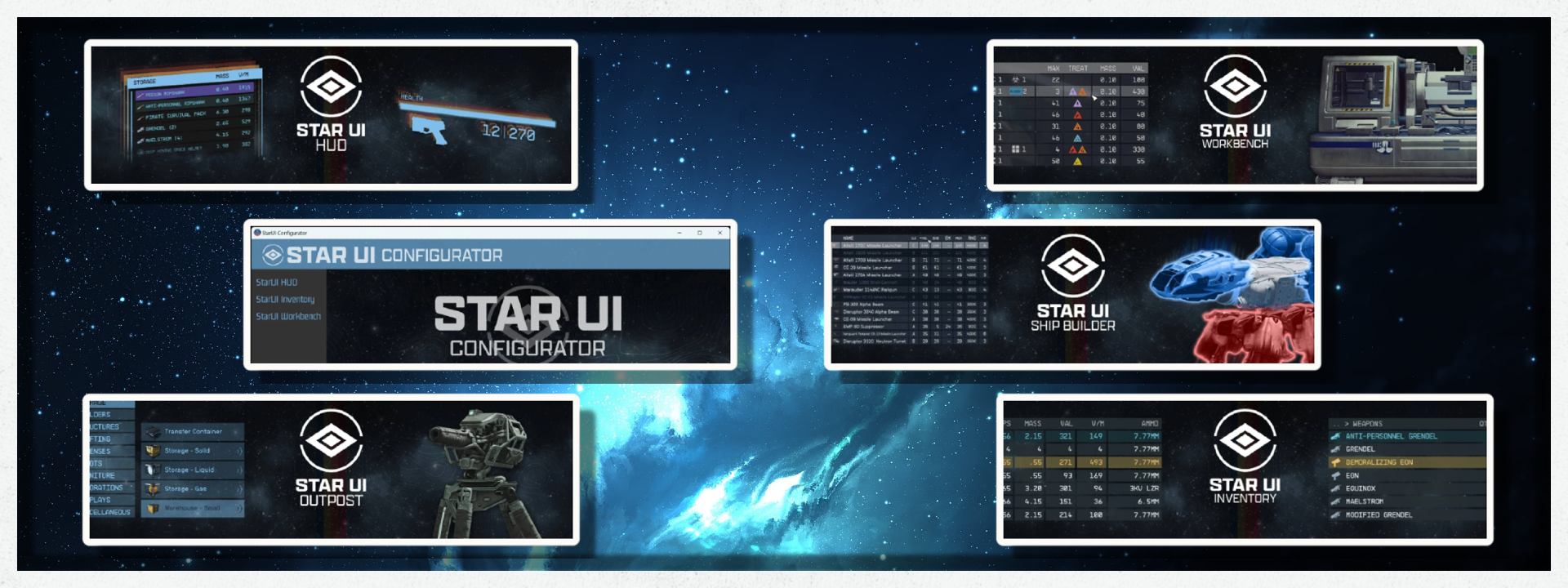
So many things to list. Customize every part of your HUD and Menu in the game. Check the drop downs below for more infomation.
STARUI INVENTORY
[**StarUI Inventory**](https://www.nexusmods.com/starfield/mods/773) improves all inventory screens for use on a PC. Compact display style. More details in sortable columns. Item tag icons. Category and subcategories as left sidebar. Many quality of life features!- Much compacter overview of the category list and item list
- Properties like mass, value, value/mass, mass of stack, value of stack, damage, DPS ("Burst DPS"), damage resistance, ammo type, ammo rounds, weapon type, item rarity, and many more are available as columns. Only a few are on by default - add as much as you like via INI!
- Sort the list to any of the columns by simply clicking on the column header (toggle asc/desc by another click)
- New special inventory-lookup column OWNED/SHIP/CARGO - See how many items you already have in your backpack/ship when buying or transferring.
- You can temporarily add inactive columns to the interface (lasts until you leave the inventory screen)
- You can fold in in the additional columns to take a look at your item in 3D
- Category icons before the item name, so you can directly see what a item is
- Automatic tagging and sub-categorizing of most important items to further filter your item list down
- Show all inventories in the bottom panel, including mass and an indicator in which direction you are currently transferring
- Show category summarized mass
- List navigation keys Page-Up, Page-Down, Home and End for fast navigation
- Mass transfer of a single category from/to container, from/to ship or buy/sell for trading! (Includes options to skip equipped, favorites, and specific items)
- Press the CTRL or SHIFT key and click to directly transfer/buy/sell one item or all items - without quantity popup!
- Bigger scrollbar, so it's easier to grab it.
- Change the font or font size (If you don't like the ALL UPPERCASE style. I recommend font number 3!)
- Configurable mouse wheel scroll amount of lists
- Option to make <TAB> go directly back to the game instead of the character screen.
- Option to disable the starting and ending animation of inventories
- Multi-language ready with easy translate-able files in the standard format
- Option to show the FormID of an item in the item card in inventory.
- Increases the interface framerate to 60 fps. Optional files for 30fps and 120fps are available in the installer or folder Optional for manual installation.
- Has no plugins and no quests - Absolutely safe to install and uninstall at any time!
- Doesn't affect the possibility to get Steam achievement
- Full support for controller. Hold L1 in the item list to access all new StarUI Inventory functions.
- Works with Steam and Game Pass (X-Box) version
- You can configure all options in the Data\Interface\StarUI Inventory.ini. (Will move to MCM as soon as one is available.
STARUI HUD
[**StarUI HUD**](https://www.nexusmods.com/starfield/mods/3444) gives you full control over most HUD widgets and provides an updated loot list and better item cards with DPS and V/W. Resize, move, recolor or disable most of the HUD widgets. The loot list can show additional columns like V/W (sort-able) and show you the item card for hovered items!- Change most widgets on the HUD to your liking:
-
- Change the position, the scale (size), the rotation and the color (color modifier or color overwrite available) individually per widget
- Hide it, if you don't want to see it!
- And for the special watch and player status widget: Adjust the 3D Position (only for 3D experts) or simply deactivate the 3D effect.
- New widget: Tag Label
-
- Reduces the HUD's clutter level and let you focus on the important things.
- Displays the item name and item tag icon below your cross-hair. So you see what an item is without the need to look at the big item card (which is moved to top right screen as you don't really need it)
- For tagged, stolen or contraband items the appropriate icon will be added after the name
- Trash items are displayed slightly faded out, so those item draw even less attention
- Customizable and can be disabled if you don't like it
- New widget: Loot-O-Meter
-
- Displays a bar below your cross-hair which fills up with the value per mass value of the item. So you can easily see what's worth to be taken!
- The bar can change the color from red to orange to green based on how much its filled
- Customizable and can be disabled if you don't like it
- Upgraded loot list (quick container view)
-
- Dynamic size, more items visible (or less if you like)
- Automatic height adaption based on content
- Item tag icons for every item - See easily what type the item is!
- Additional configurable columns (Default adds a V/M column). The list can also be sorted by the column (And you can toggle through the columns it in-game with the ALT key)
- Shows an item card for the highlighted item
- Upgraded item cards
-
- Added item tag icon
- Added value V/M for all items with value and mass
- Added value DPS for the weapon (Burst-DPS, reloading-time not accounted)
- Colorizable, relocatable, and resizable: All item cards can be adjusted for every situation where they are visible
- Quality of Life
-
- Accidental Steal Protection - Changes the button for taking, so you need to hold the E key (or controller A button) to actually steal the item.
- Loot list and Tag Label widgets will change to RED when taking would be stealing.
- Take All function for most containers - Press and hold R (or X on controller) to take all (when the R (or X) HOLD button is visible)
- Three presets you can choose from: Author's Choice, Vanilla Extended, and Vanilla. You can change that at any time and customize your chosen one as you like!
- Safe to install/remove at any time! Doesn't affect your save game and won't prevent your abiliity to get achievements!
- Integrated item sorting system for all Starfield items for the languages: EN, DE, ES, FR, IT, JA, PL, PTBR and ZHHANS.
- You can control when the reticle circle and line are visible individually for different situations (the leader line going from the looked item to the item card/name box)
- Reduce the button bars icon for key/controller button and slightly fade out the button bar
- Shows a big door icon on doors which leads to other areas (e.g. the ones that trigger a loading screen)
- Full translation support (See the translation section on this side if your translation is already available)
- Many other smaller or bigger improvements
- Completely customizable (see the well-documented INI file)
STARUI WORKBENCH
[**StarUI Workbench**](https://www.nexusmods.com/starfield/mods/4966) improves all workbenches with a more compact layout, more information, sortable columns, new data columns, custom layout, recolouring, dark mode, Quality-of-Life features, and more!- Much more compact design optimized for PC use
- Additional information columns for all workbenches, including DPS for weapons, secondary resists for armour, cost and max craft-able amount for food/drugs/industrial items, and a treatment column for aid items.
- All columns are sort-able - Just click on the column header
- Adds a tracking item for recipes/mods you are tracking
- Adds a favorite heart icon for your quick slot weapons
- Included item sorting tag support - Use either StarUI tag icons for consistency or the vanilla workbench icons
- Colorizes weapon and armor items by their rarity
- New Install Tag for weapon/armor mods - Easily see if a mod is installed, craftable, or if you miss something!
- Difference columns for mod installation - See how every mod changes your weapon/armor compared to your installed mod
- Re-colorize your workbenches like you want them. You can also re-colorize each interface part of each workbench individually
- Dark mode available (either use the preset or set iDarkMode in the INI)
- All interface parts can be moved and resized. You can choose one of the four pre-defined workbench layouts or create your own layout!
-
- The layout is configured in a separate file, so you can easily re-use a layout for another bench (or create more layouts if you like)
- You can choose for every workbench which layout is should use
- Available layout presets: Vanilla, Vanilla Extended, Hoarder, Hoarder Alternate
- Five pre-defined main configuration settings. Simply choose a preset that meets your taste in the installer. Or use it as a base for your own individual workbench configuration!
-
- Available main presets: Vanilla, Vanilla Extended, Hoarder, Hoarder Alternate, Hoarder Dark Mode
- Instant open/close - Animations removed
- Unlimited crafting - You can adjust the max amount in the INI
- Completely customizable - SeeStarUI Workbench (default).inioptimized
STARUI OUTPOST
[**StarUI Outpost**](https://) Improves the outpost interface for PC. Add a comfortable build menu with separate lists for category, building and variation (and you only need 4 keys instead of 8 to navigate) . Changes the key bindings to be like most other interfaces. Adds a inspect label and button hints at the cursor. And many other quality-of-life additions.- A much better-improved build menu with separate lists for categories, buildings and variants
-
- You no longer need 8 keys for the build menu navigation - 4 keys are enough
- Shows the produced item as a subtitle for fabricators
- View all variants in an easily navigable list
- Smarter variant naming - e.g. "Extractor - Iron - Commercial" is shown as "Commercial" in the variant lists
- Numbered naming for equal named items - e.g. "Poster 1", or "Poster 2" instead of "Poster" for all
- Changed the basic ui key handling, so it's like other interfaces - e.g. TAB is now back/exit and change mode is now "Q" or "Left Shoulder"
- Added comfort keys to several interfaces - You can use Mouse1 instead of only E for choosing an item from the action cards, like wiring. And in wire mode you can press Mouse1 where it was only E previously.
- New inspect label - Shows what you are viewing at directly under the crosshair
- New crosshair buttons - See what you can do directly under the crosshair
- Different colors for build and inspect mod - Now you see in which mode you are!
- Allows full adjustment of every widget. Control the color, size, and position individual for every widget. And you can hide it if you don't like it
- Option to disable the open/close animation
- Available in 30, 60 and 120fps
- Comes with three pre-defined presets: Author's Choice, Author's Choice (default color) and Vanilla Extended
- Completely customizable - Comes with an StarUI Configurator profile, so you can easily adjust your outpost interface
- Safe to install/remove at any time! Doesn't affect your save game and won't prevent your ability to get achievements!
- Multilanguage - Supports all languages out of the box
STARUI SHIP BUILDER
[**StarUI Ship Builder**](https://www.nexusmods.com/starfield/mods/6402) improves the ship builder for usage on PC. Compact style, sort-able columns, filter panel, category list, variant list, vertical upgrade list and many more Quality-of-Life additions.- Optimized for PC
- Compact style - See more information at once
- Adds data columns to the ship part list - Over 30 different data columns you can choose!
- The standard config contains the most important columns for every category out-of-the-box
- See the Damage Per Second and Damage Per Power point for all weapons
- Sort any column with a simple click - Toggle asc/desc by another click
- Adds a full functional vertical category list beside the main list - Navigate via click, Q/T, A/D keys or LShoulder/RShoulder buttons
- Adds a variant list popup, showing you all ship part's variants in a well-aligned list at once - No need to go through them one-by-one any more!
- Improved vertical upgrade list, now see what you can improve without the need to scroll vertically
- Improved ship part item card comparison - Downgrading your components are now shown as red numbers!
- Clipboard function for the color picker - Copy and paste the color set (all 3 colors) at once
- Optimized key binds and added keys to many interface parts - making the interface just feels much more intuitive
- Added button hints to show you available functions (like ship part multi-select and weapon assignment hidden in flight check)
- Allows custom ship part icons for mods (For mod authors: You can find the how-to here )
- Increases the frame-rate to 60 fps - Optional variants in 30fps and 120fps are available too
- Wide-screen support out-of-the-box
- Various bug fixes of the vanilla interface code
- Contain no plugins and no quests - Absolutely safe to install and uninstall at any time!
- Doesn't affect the possibility to get Steam achievement
- Works with Steam and Game Pass (X-Box) version
- Partial controller support - You can see all features, but can't control the filter panel or use the variant list popup
- Completely customizable - Customize with StarUI Configurator or via the full-commented INI file
STARUI CONFIGURATOR
[**StarUI Configurator**](https://www.nexusmods.com/starfield/mods/5467)\*\* \*\*Easily configure all settings with a well aligned and easy to use interface. Provides help texts, sliders, dropdowns, toggle switcher and specialized column-picker and color-picker widgets to make individualizing your StarUI mod an ease.- Allows you to easily configure all settings from StarUI Inventory, StarUI HUD, StarUI Workbench and StarUI Outpost.
- Supports individual inputs for number, boolean, or text values
- Sliders have a min/max setting, so you can't input wrong values (but if you want you can still do that by using the slider text input field)
- Contains help texts and images to help understand the configuration settings
- Column-picker with a list of all available columns. Allows easy sorting of your columns too.
- Color-picker with preview and transparency makes color-picking an ease
- Will store all settings in an update-proof user settings file
- All changes are instantly stored in your INI, so you can easily try them in the game, which can be running while you're configuring! Just close/re-open the interface (Inventory and Workbench) or save/load for HUD to see your new settings!
- You can revert any setting to its default value (specified by StarUI [Mod] (default).ini)
- Alternate versions for Linux, Mac, and other OS are available
- Accessibility mode with increased contrast, less problematic colors, added outlines, removed backgrounds and an easier-to-read font.
- Startup-log on the Welcome page, so you can easily check up on problems if your mod or settings file hasn't been found
- Open configuration API - Other mods can include a StarUI Configuration profile so you can configure other mods with StarUI Configurator too.

Many Cheats allow for full customization of the following gameplay elements.
CLICK FOR MORE DETAILS
- Prevents achievements from being disabled with mods or when using the console.Constellation Quick Packs was made especially for the Collection and allows you to add different items in one easy console command or Hotkey directly to your inventory.
- Ammo Pack 100 per Ammo Type (Hotkey)=Numpad2
- Throwables Pack 20 per Throwable Type (Hotkey)=Numpad3
- Med Pack adds 10 Med Kits (Hotkey)=Numpad4
- Legendary Weapon Pack (Console Command)=bat v2_LegendPack
- Epic Weapon Pack (Console Command)=bat v2_EpicPack
- Rare Weapon Pack (Console Command)=bat v2_RarePack
Console Command List with 100s of Easy to use Commands+Cheats. You can access this from the Tools bar in Vortex. You just have to copy and paste the commands you want from the Text document in Vortex into your console in the game. You can open the console (with the ~ key)
CLICK FOR DETAILS
## [This is a list of the types of cheats you can use.](https://)- God Mode
- Immortal Mode
- Damage multiplier
- Add money
- Sets your character to the specified level
- Add XP
- XP Multiplier
- Add skill points
- Movement speed multiplier
- Digipicks
- Carryweight
- Unlocks the targeted door or container
- Unlocks all 24 powers
- Total power
- Power recovery speed
- Power recovery rate
- No Clip
- Starts all main story and side missions
- Completes all main story and side missions
- Applies the specified weapon mods to your weapon
- Removes the specified weapon mods from your weapon
- Kills all hostile NPCs in the vicinity
- NPCs will no longer target and attack you
- All speech challenges automatically succeed
- Passes the specified number of hours
- Opens the wait/pass time menu
- Opens the character creator
- Suicide
- No fall damage
- Reload speed
- Aim stability increase
- Change max ownable ships
- Increase max scan range
- Instant scan
- Disables enemy health gain per level
- Camera FOV
- More custom landing sites
- Pickpocket 100% chance
- Get companions unstuck
- Pay Off Bounties for a specific Faction
- Resources
- Powers
- Perks
- Backpacks
- Backpack mods
- Spacesuits
- Armor mods
- Clothes
- Helmets
- Helmet mods
- Weapons
- Weapon modifiers
- Weapon upgrades
- Ammo
- Shipyard parts
- Teleport to ship services
- Easy Lockpicking
- Increased space loot distance
- Increased highlight range
- Show more points of interest
- Chance for NPC to drop equipped armor
- Max Docking Distance
- NPC visual abilities (Stealth level)
- NPC View Cone (How wide is their vision)
- Distance from enemies impact on Stealth
- Vendor selling price multiplier
- Days to restock Vendor inventory
- Increasing CO2 multiplier
- Give max auto hack attempts
- Earn auto attempts per hack
- Auto-Aim Settings
- Legendary enemy spawn chance multiplier
- Ship modifiers
- Increased melee damage
- Lower incoming ship damage due to the dramatic damage scaling
- Better borderless window support (keep game active when alt+tab)
- Relax faster after aggro
- Companion perks
- Boostpack settings
- Outpost settings
- Distance to receive greeting missions
- Toggles the UI on and off
- Plushies
- Artifacts

Many immersive features added to the game. From NPC engagement to many new world features.
CLICK FOR MORE DETAILS
- Guns will now leave behind more than the vanilla 10-shell casings. - Reduced the density of medium-populated planets by about 15%. - Reduced the density of low-populated planets by about 60%. - Reduced the possible distance between spawned objects/NPCs. - NPCs will always drop their equipped armor. - NPCs will stay angry at you for 7 days instead of 3 after committing a crime. - Followers will stay closer to you. - Bullet hole impacts are now much more realistic. - Gravity now affects inventory/carry weight. - Increased the density of highly populated planets by about 25%. - You can heal conditions, afflictions, and health by entering an infirmary bed if you have a crew member with the medical perk onboard. - Make city info kiosk terminals in New Atlantis and Akila City useful by giving you directions to stores and other buildings. - Discharging firearms in settlements while not in combat causes NPCs to panic and is considered a crime. - Allows you to see your companion rather than the player when equipping them with gear. - Adds a small variety of lore-friendly and easy to use in-game music players to the decoration menu.
The collection comes with many buffs and nerfs to combat and weapons to balance the game.
CLICK FOR MORE DETAILS
## [Weapons](https://)- Friendly fire is enabled among allied NPCs.
- Grenades become a more prominent part of NPC strategy- All changes affect all NPCs, including companions.
- Allows EM weapons and Neurostrike fists to give you XP for knocking an enemy unconscious.
- Adds a visual shaking effect (fake recoil) when firing a weapon, thus shooting a weapon feels more weightful and impactful. Comes with a configuration book from where you can tweak shake power and duration.
- Removes the tint, dirt, and glare from all reflex sights, making it easier to see your target.
- Reduced multiplier for how much light affects stealth.
- Reduced bullet spread while ADS or aiming in 3rd person by 50%, Keeps spread bonuses for using semi-auto/burst weapons.
- Increased weapon reload speed by 25%.
- Increased the speed of equipping weapons. It comes with various speed multipliers for you to choose from.
- Increased the firing speed of the micro gun.
- Removes the first-person stagger animation after being hit with a melee attack or an explosion. Prevents your character from being frozen in place.
- Blocking now reduces incoming melee damage by 90% (vanilla: 50%)
- Blocking now damages oxygen for 15% of the dealt damage + 5
- Blocking while your CO2 bar is full (= red oxygen bar) will damage your health
- NPCs are more inclined to shoot their weapons.
- NPCs fire from cover and change their positions more frequently.
- NPCs accuracy gets a slight but noticeable upgrade.
- Reduced stealth penalty for running.
- Reduced NPC reaction and idle times.
- Reduced detection of sleeping NPCs.
- Reduced enemy detection in exteriors slightly.
- Reduced the cost of Melee stamina by 25%.
- Increases the combat slide distance. Multiple versions to choose from.
- Prevents neutral NPCs and spaceships from turning hostile when you accidentally hit them.
https://www.youtube.com/watch?v=dE9x8gL9pCs
Starvegas - Cinematic Killcam by lKocMoHaBTl
Finish off an enemy in a more spectacular manner! With Starvegas every kill will be like a show. Introduces cinematic killcam. Has several features and options to play with.
CLICK FOR DETAILS
TRIGGERS CINEMATIC KILLCAM with IMMERSIVE ZOOM IN and DEEP SLOWMOTION EFFECTS, TO SHOW OFF YOUR FINAL BLOW- Works on foot and while piloting the spaceship.
- Last Hostile - the triggers on the last target in the player's vicinity.
- One-shot - triggers on unsuspected instantly killed targets.
- One-shot - two first options together.
- Combat - triggers on any kill, but only in combat/alerted status.
- One shot - kill-cam triggers on any kill and conditions.
- Cam triggers
CONFIGURATION BOOK WITH VARIOUS SETTINGS TO TWEAK
- Kill camera - kill camera trigger modes.
- Camera Settings - various camera settings such as zoom in, zoom out, field of view, and distance at which kill-cam triggers.
- Trigger Chance - the probability of kill-cam triggering.
- Cooldown - killcam restrictor.Restricts kill-cam trigger for a specified duration, regardless of the conditions met.
- Special FX - additional options while the kill-cam is active such as MUSIC MUTE, AUDIO & VISUAL FX, Recoil, and Player Invincibility.
- Properties - settings for power and duration of slow-motion effect.
- Races - active race types that can trigger the cinematic camera.
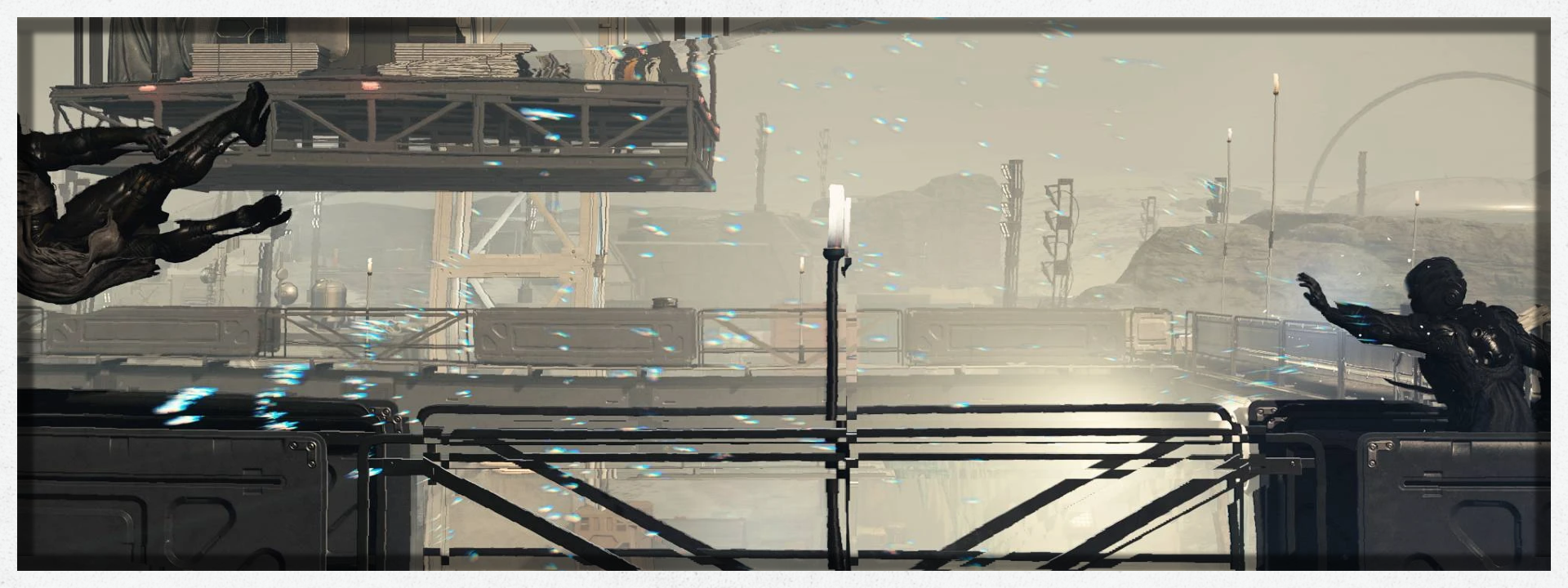
Turns Gravity Wave into a proper “force push” power, using ragdoll physics instead of the vanilla knockdown animations. Designed to be fair and balanced.
View content
## [ Features](https://)- No more knockdown animations. Just pure, proper ragdoll physics. This is a change across the entire game, but you will notice it the most with this power.
- Magnitude and cost now scale with the power’s level. It will be significantly more powerful, and cheaper to cast, at higher levels. This is balanced with other vanilla powers.
- Increases fall damage for NPCs while they are rag-dolled by this power specifically so that it is actually possible to kill them by blasting them off of a high enough surface.
- Small improvements and fixes to the existing aspects of the power.
The most important thing this mod does is disable the knockdown animations on humans, robots, and aliens. This allows for them to simply be ragdolled when they are knocked down. Not only does this look better, but it allows this power to actually “force push” an enemy away.
This is a sweeping change across the entire game, but don’t worry. I have checked other sources of knockdowns, such as fuel tank explosions, and they look fine without any adjustments.
The vanilla animations also only had "fall forwards" and "fall backward" versions, which means that hits from the side looked entirely wrong.

At level 1, this power will feel equivalent to vanilla. You will be able to knock enemies down, and might knock them off a nearby ledge, but you won’t be sending them flying.
Magnitude will very slowly increase with each level, with a noticeable increase at level 5. Then another slow crawl up to levels 9 and 10, where it once again becomes noticeably more powerful.
At level 10, it will be as powerful as a full Unrelenting Force shout from Skyrim. No really, I’m actually using the same magnitude value of 15 used by that shout. On a 1.0 G world, it looks pretty much the same as it did in that game. On lower G worlds, well… use it responsibly.

Here are some charts to illustrate exactly how the magnitude and cost scale with each level of the power. Just like the other vanilla powers, this one now becomes more powerful and cheaper to cast as it levels up too.


Vanilla fall damage is very weak. Almost to the point of being irrelevant. You could blast someone off of a 4-story watch tower... and down the cliff beside it... on a 1.34 G planet... and they’ll only lose 3/4 of their health. Ask me how I know.
I can’t just increase fall damage globally though. So with this mod, while an NPC is ragdolled by the Gravity Wave power specifically, fall damage is 1250% higher than default.
Yes, I know that sounds insane. In practice though, it really isn’t. It’s balanced out so that blasting enemies off of high ledges is just about as lethal as it was in Skyrim, in a 1.0 G environment. They still have to hit the ground pretty hard to die from the impact though, so don’t worry about it being overpowered.
Fall damage is NOT increased in any other case. Again, it is ONLY increased for NPCs while they are being ragdolled by this power specifically.

This mod fixes an oversight which caused NPCs who are supposed to be immune from this power (such as Sam and Sarah) to still receive the slowdown and yell out in pain when hit by it. They will now fully resist the power, as they are supposed to. The slowdown itself has not been touched, and still works the same as it originally did on NPCs who don’t resist the power.
This mod also adds a "casting effect" to this power, which looks like a white flash from your palm. Makes it look a bit more intense. Additionally, the sound becomes a bit more intense when the power is at level 5 or higher, to signify the increasing magnitude of the power.

Enhanced body features+Custom sculpted bodys.

Lite NSFW mods.
CLICK FOR MORE DETAILS (NSFW)
- Undress and unequip items from the player and any NPC.
A few new additions to ship building, pilioting and other ship parameters.
CLICK FOR MORE DETAILS
- Increased the speed of Ship Landing Animations. It comes with various speed multipliers for you to choose from. - Increased the Distance at which you can transfer items from Player to Ship. - You can increase the number of custom landing sites you can have saved simultaneously, increasing it from the vanilla 3 sites. - You can sit in the pilot seat to add the captured ship to your fleet. No need to make it your home ship. - Adds an interactive cargo panel to each landing bay module, allowing you to access your ship's cargo hold remotely - at your ship, but outside your ship.- A bunch of tweaks that make the shipbuilder more enjoyable and responsive to use. Includes faster and further zoom, faster panning, faster rotating, smaller snapping distance, and more floors.
- Increases the overlap tolerance in the ship-builder, allowing for more tight and varied builds with slightly overlapping modules.
- Increased the maximum number of ships you can own x5.
- Ensures the Outpost Shipbuilder always has 800,000 credits on hand as soon as you open the menu, and optionally unlocks all specialty parts at the outpost
- Adds categories to the Ship Builder.
- Displays the number of Ship Parts you have beside the repair icon on your HUD.
- Set the ship hull health % threshold when the repair icon appears.
- Show the true value of your shield health.
- Add mouse inertia to HUD elements (See video demo below.).
- Auto-repair your hull when its health falls below a certain threshold. (Works in scanner mode.)\
cLICK FOR CONSOLE COMMANDS
### Ship Builder Tweaks- To apply the tweaks, run "bat builderTweak"
- To uninstall the mod / revert the settings, simply run "bat builderReset"
- To increase the tolerance run "bat toleranceBig", or "bat toleranceHuge" (Huge basically disables any overlapping checks, letting you build some cursed things)
- To uninstall the mod / revert the settings, simply run "bat toleranceReset"
- Now run "bat lz5", to set the amount of maximum custom landing zones to 5
- The mod offers the following options: 3 (Vanilla), 5, 7, 9, 11, 13, 15, 20, 30, 50
- Simply run "bat lzX" to use any of those
https://www.youtube.com/watch?v=tS6XC02AZt4
Summoning of Ship - Ship Remote Control - Land - Take off - Set gravity by wSkeever
Use a remote control device to order your ship to take off, land, and set gravity.
CLICK FOR DETAILS
A **remote control** is added to your inventory with the following functions:Take off- order ship to take off when it is landed.
- You can be inside or outside the ship.
- You can watch the ship take off from inside the cockpit.
Land- order the ship to land near you when it is in space.
- If you're within 200m of a (medium or large) landing pad or landing area, the ship will land there.
- Otherwise, the ship will check your position to see if there is a 60m x 60m relatively flat and level area for it to land on. Tolerance for flatness is 2 meters.
- An activity quest will tell you exactly where the ship will land.
- Beeg ships will probably clip.
Set gravity- set the ship's interior gravity (for what purpose? Who knows):
- 0.0g
- 0.1g
- 0.5g
- 1.0g
The remote control counts as a weapon, so you can:
- favorite item favorite.
- Give it a hotkey hotkey.
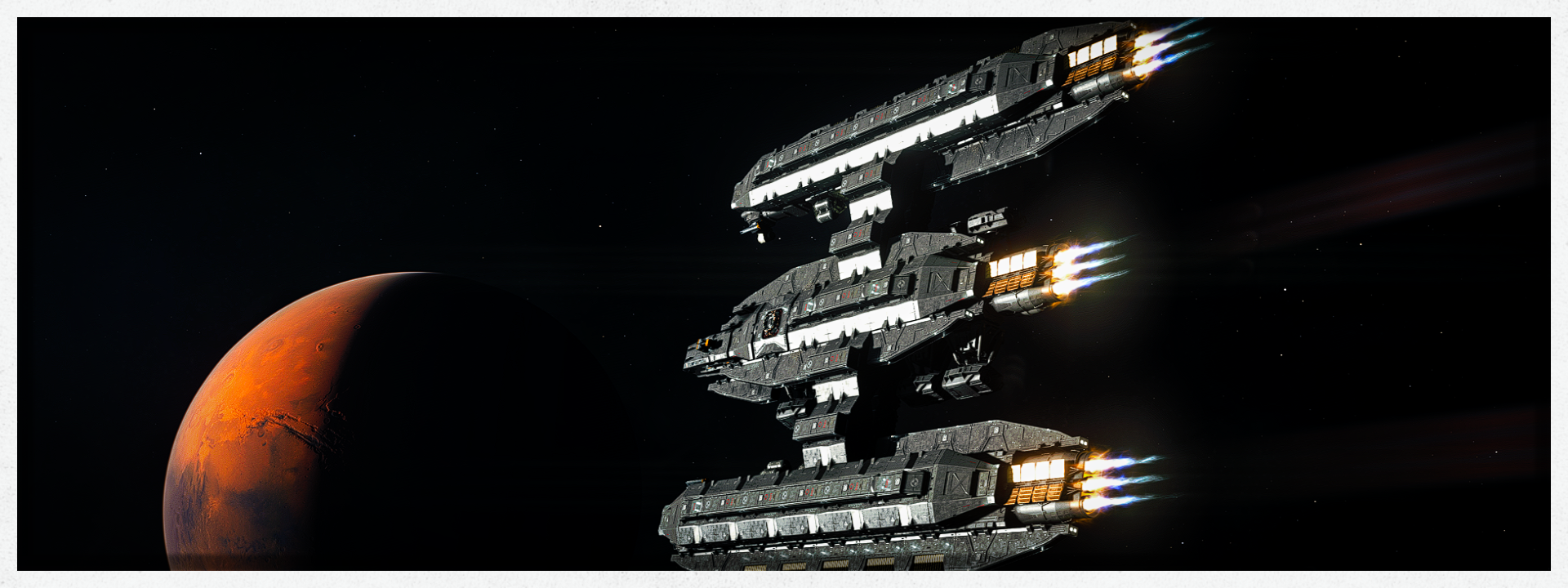
Various ship modules provide extensive customization over ships ans ship building.
CLICK FOR DETAILS
### Tweaks- TN's Hab Tweaks - Rebalances the Habs added into the game by giving them small amounts of cargo (or large amounts for dedicated cargo habs), and other stats befitting the hab's purpose. Each Hab also grants the ship some amount of Hull based on size, instead of being a flat rate for all Habs.
- TN's Useful Ship Structure - Gives all of the "decorative" structure items some Hull based on their size and a guestimate of how much 'armor' they would add to the ship. It also modifies some of the fuel tanks, landing gear, and dockers to give slightly more hull. Radiators give additional shield health, and the Sensors buff your lock on time slightly and to your crew station count (like weapons).
- TN's Expanded Cargo Holds - Triples the cargo capacity of the cargo containers, though shielded cargo gives 85% of what unshielded does, instead of 75%. It also adds a little hull to the 'armored' cargo hulls, and gives additional storage in the captain's locker (plus makes it not respawn).
- TN's Supplemental Thruster - Gives the braking thrusters, some of the landing gear, and maneuvering thrusters additional thrust and/or maneuvering at the cost of a small amount of power being diverted to them. The All in One also adds a little Hull where appropriate to bring it in line with the Useful Ship Structures.
- TN's Supplemental Reactors - Adds additional "reactors" that can be used alongside primary reactors without the need to remove reactor limits. The mod is balanced so that it doesn't make the additional reactors add more hull, and instead costs the ship additional mass and lowered hull to get additional power.
- TN's Supplemental Cockpits - Adds in copies of the primary cockpits with altered stats to act as decor and to grant additional crew stations, all without needing to remove the cockpit limit.
- TN's Weapon To Module Snapping - Adds the ability to snap weapons (and other small modules like the scan jammers) onto any slot, even those directly on habs and on structure parts. It makes no edits to the weapons, habs, or structure parts themselves in order to achieve this.
- TN's Separated Categories - Uses the Ship Builder Categories mod to separate Habs into categories by manufacturer, weapons into categories by damage type, and the braking thrusters into their own category separate from structure parts.
- All of the above individual mods have been combined into one with minor edits for better compatibility between them.
- Supplemental Cockpits and Supplemental Reactors are now found in their own categories.
- This mod now requires the Ship Builder Categories mod unless you use the "Less Dependencies Version". However it is highly recommended you get the Ship Builder Categories to avoid compatibility issues in the future.
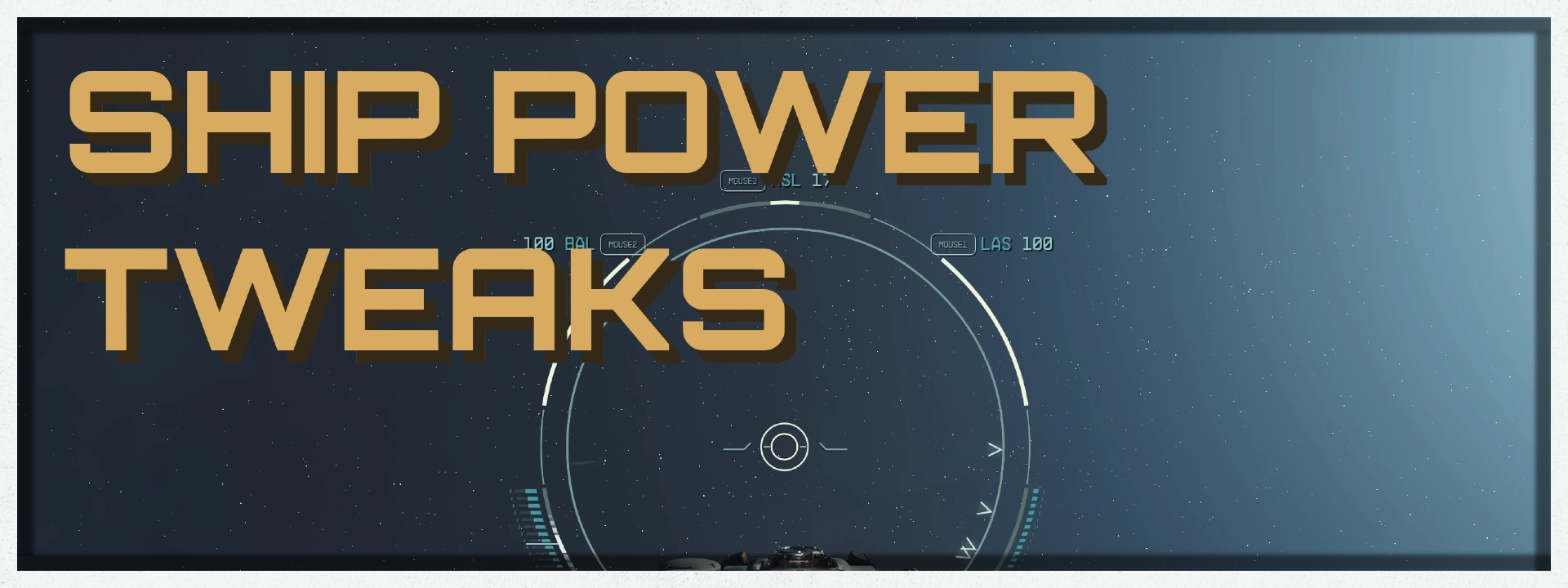
Easily swap between Balanced, Combat, Escape, and Stealth power presets. Select your ship's available power systems with Quick-Keys 1 -> 6. Fixes some vanilla bugs with crew power bonus calculations.
CLICK FOR POWER SYSTEM KEY BINDS
## [KEYBINDS](https://)
This mod utilizes whatever in-game Quick-Key keybinds you have set up.\
- Quick-Key 1 = Select Weapon 1
- Quick-Key 2 = Select Weapon 2
- Quick-Key 3 = Select Weapon 3
- Quick-Key 4 = Select Engine
- Quick-Key 5 = Select Shields
- Quick-Key 6 = Select Grav-Drive\
- Quick-Key 7 = Combat Power Preset (Standard)
- Quick-Key 8 = Combat Power Preset (Alt)
- Quick-Key 9 = Combat Power Preset (Split)
- Quick-Key 10 = Balanced Power Preset
- Quick-Key 11 = Escape Power Preset
- Quick-Key 12 = Stealth Power Preset
- Prioritizes power in an individual weapon system, tap Quick-Key 7 to switch which weapon is prioritized.
- The remaining power is balanced across all remaining systems.
- Keeps at least 1 power in Grav-Drive.
- Prioritizes power in an individual weapon system, tap Quick-Key 8 to switch which weapon is prioritized.
- Prioritizes remaining power in Shields, Engines, and remaining weapons in that order.
- Keeps at least 1 power in Grav-Drive.
- Prioritizes power in 2 weapon systems, tap Quick-Key 9 to switch which 2 weapons are prioritized.
- Prioritizes remaining power in Shields, Engines, and remaining weapon in that order.
- Keeps at least 1 power in Grav-Drive.
- Balances available power across all systems, keeping at least 1 power in Grav-Drive
- Prioritizes power in Grav-Drive, Shields, and Engines, in that order.
- The remaining power is balanced across Weapons.
- Powers down all systems keeping a single point in Engines.


We use a few tools in the collection to ensure that the collection is easy to use and user friendly.
CLICK FOR MORE DETAILS
- SFSE plugin that turns Quick Saves into normal Saves. - SFSE plugin adds a small delay when using the QuitGame function so that the "Bye." text is visible. - SFSE plugin that prevents achievements from being disabled with mods or when using the console. - KiLoader plugin that allows loose file loading from the game's root folder and more. - CCR Console Command Runner. - Custom Constellation Collection Loader. - Constellation Saves Backup. - Bethini Pie (Performance INI Editor). - SF1Edit. - Plugins Txt Manager. - Plugins.txt Enabler. - Address Library for SFSE Plugins
The Constellation Collection Loader can allow you to add most mods. So if there is a Mod out there you really want but its not part of our collection, you can use our loader to acitvate the Mod.
CLICK FOR MORE DETAILS
## [Constellation Collection Loader Guide](https://)Before we get started a great tool to have is Notepad++ you can download it from this link HERE. This allows easy editing of all text files.
You will find the Constellation Collection Loader in your main Starfield directory.
[DRIVE LETTER]SteamLibrary\steamapps\common\Starfield\Constellation Loader
1) Right-click the loader and select "copy" Place it somewhere on your PC this is your backup.
2) Open the loader with Notepad++
3) Go to Nexus and download your text/bat Mod of choice. Let's use THIS MOD as an example.
4) We chose the "v2_ConstellationAngryNpcs" file.
5) Find out the bat command to activate the Mod you chose in our case it is "bat v2_ConstellationAngryNpcs"
6) Copy the command and place it into the loader as seen below. Now save your edits in Notepad ++ for your customized loader file.
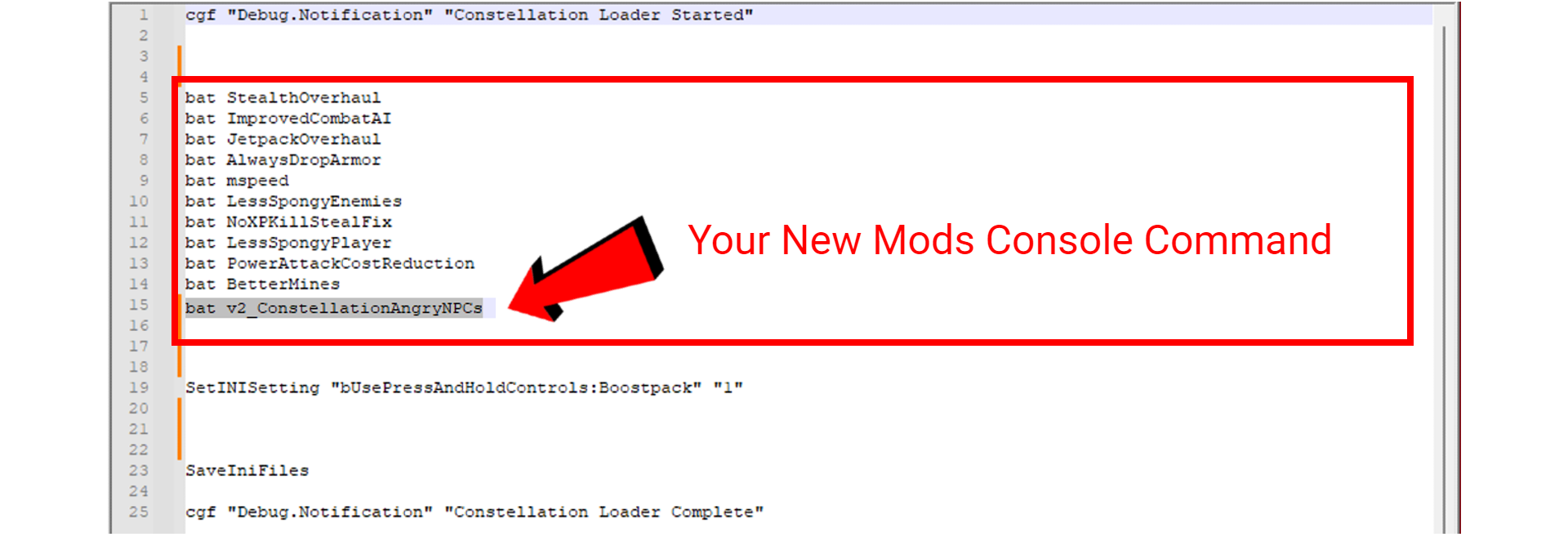
You are all done Remember that upon Collection updates this file will be overwritten by our new files. Use your ConstellationLoader backup file and replace it when need be.
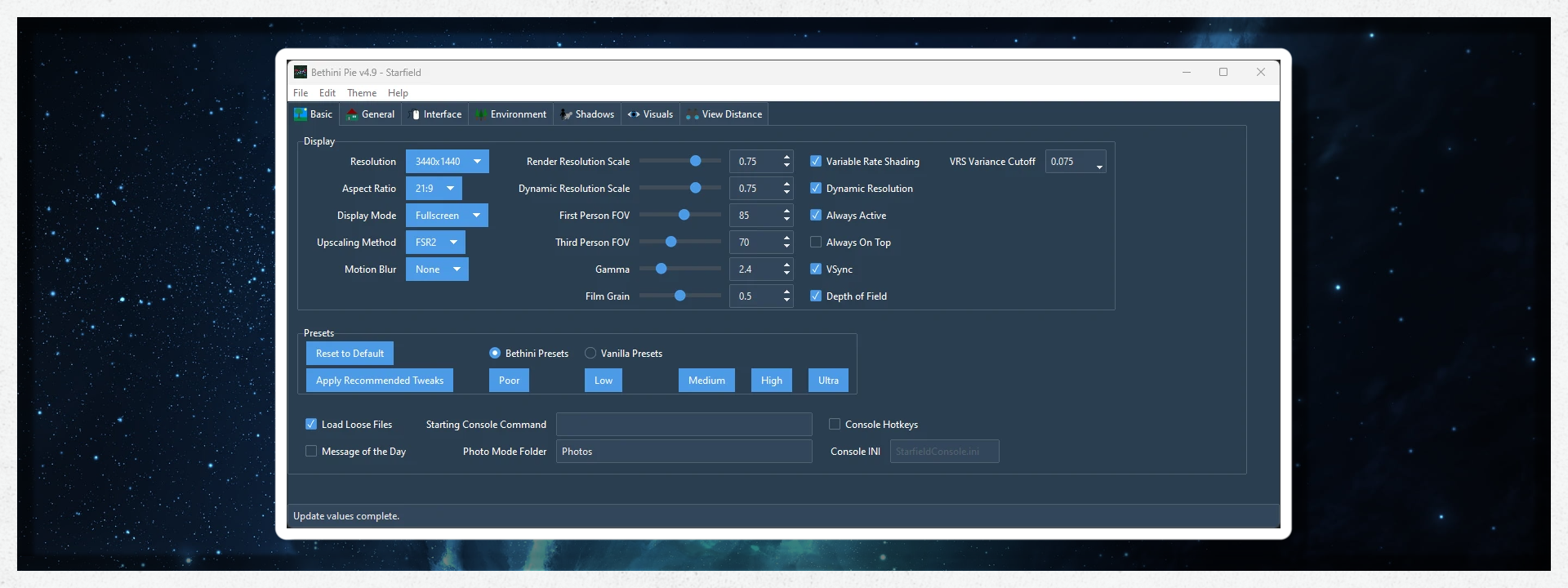
Bethini Pie (Performance INI Editor) is a universal tool to make editing INI configuration files simple via a graphical user interface.
CLICK FOR DETAILS
- Automatic backup of INI files. - Easy restoration of backups via a simple dropdown menu. - The preset system allows settings to be configured to apply multiple configuration changes at the touch of a button. - Themes - Tooltips - The preview system allows the user to right-click on settings to retrieve additional information or even images about any setting so configured. - Extensible to be able to add support for multiple games/applications through simple JSON files.⛔NOTE This is (OPTIONAL) and for advanced users only.


You can use our 4k add-on graphics pack HERE (This is for high-end systems only)
CLICK FOR 4K INSTALL GUIDE
Install guide for our 4kGraphics Collection.1) Select ADD TO VORTEX on Nexus
2) Add to your existing Constellation Collection Profile.
- ⛔NOTE Our main Collection comes with some optional 2k Textures. If you add the 4k Collection on top of this Collection make sure to disable the optional 2k Textures included in this Collection.
You can use our 1k add-on graphics Pack HERE (This is for low-end systems to help you gain some performance)
CLICK FOR 1K INSTALL GUIDE
Install guide for our 1kGraphics Collection.1) Select ADD TO VORTEX on Nexus
2) Add to your existing Constellation Collection Profile.
3) After installation, the AIO texture pack will be enabled. If you don't see enough of a Performance boost then you can enable 1 or more of the optional Packs. These will reduce the Texture Resolution even more for less VRAM usage and better Performance.
- ⛔NOTE Our 1k and 4k Collections are NOT Compatible with each other for obvious Reasons.
You can use our Constellation Star Wars add-on Pack HERE
CLICK FOR OUR STAR WARS INSTALL GUIDE
Install guide for our Constellation Star Wars Collection.1) Select ADD TO VORTEX on Nexus
2) Add to your existing Constellation Collection Profile.

Constellation Tweaks Performance Boost. Will improve performance on most systems. When in-game go to "Settings" and on the "Display" tab change the "Graphics Preset" to "High".

CLICK HERE TO SEE OUR PERFORMANCE GUIDE
## Performance Heavy ModsYou can disable some of the following Mods to increase performance. Just search for them in Vortex.
- Reshade
- Landscape Surfaces Redone
- Flora Redone
- Architecture Redone
Recommended In-game settings These settings will give a slight performance boost without sacrificing quality.

Recommended In-game settings These settings will give a big increase to performance while sacrificing quality.

If you have an NVIDIA GPU you can take advantage of DLSS
Below you will find the DLSS and Frame Generation (FG) options. These options are personal preference, just remember that once you start lowering the quality preset you will begin to see a loss in visual quality. Try to stick with the "Quality" or "Ultra Quality" for the best visual fidelity.

NOTE If you would like a more in-depth explanation of game settings please join our Discord for the full performance guide.

CLICK FOR SYSTEM REQUIREMENTS
- VRAM> 8GB - GPU>**(see below)** - 1080p> RTX 3060 or RX 6700 XT - 1440p> RTX 3080 or RX 6800 XT - RAM> 16GB - CPU> R5 3600x or i5 10600K - TOTAL STORAGE> 15Gb - MIN STORAGE 5Gb - STORAGE TYPE> SSD
Please let us know if you have any issues with this collection I'm sure we can figure it out.
If you enjoy this collection, PLEASE endorse the mod authors and Support us to help us build the best collection for Starfield.
Special thanks to these guys who helped make this collection what it is. And everyone on the Nexus and the Starfield modding Discords.
- v2s Collections Team
- canliberk
- Pickysaurus
- IxionXVII
And all the teams and modders behind all the tools that make Starfield modding possible.
- ElminsterAU and the xEdit Team
- ianpatt and the SFSE Team
- DoubleYouC
If you would like to support me so I can afford a new ship so I can store more sandwiches click the button below. Can't donate? I understand a simple thank you and endorsement is much appreciated.


- ⛔ I will not be responsible for any possibility of save corruption.
- ⛔ Please don't use a similar name to this collection.
- ⛔ I do not allow you to copy or clone this collection in any way.
- ⛔DO NOT use a pirated game. It is against Nexus rules and is illegal and I will not provide any support.
- © 2023 Bethesda Softworks LLC, a ZeniMax Media company. Trademarks belong to their respective owners.

Hey)
This)

These)
[My)
[**StarUI)
[**StarUI)
[**StarUI)
[**StarUI)
[**StarUI)
[**StarUI)