Add Alert Group demo #7843
There are no files selected for viewing
| Original file line number | Diff line number | Diff line change |
|---|---|---|
| @@ -0,0 +1,19 @@ | ||
| --- | ||
| id: Alert group | ||
| section: components | ||
| --- | ||
|
|
||
| import { useEffect } from 'react'; | ||
| import SearchIcon from '@patternfly/react-icons/dist/js/icons/search-icon'; | ||
| import DashboardWrapper from './examples/DashboardWrapper'; | ||
| import DashboardHeader from './examples/DashboardHeader'; | ||
|
|
||
|
|
||
| ## Demos | ||
|
|
||
| This demonstrates how you can assemble a full page view including the use of alert group toast notifications with timeout that are also displayed inside the notification drawer. | ||
|
|
||
| ### Alert group toast with notification drawer | ||
|
|
||
| ```js file='./examples/AlertGroup/AlertGroupToastWithNotificationDrawer.tsx' isFullscreen | ||
| ``` | ||
| Original file line number | Diff line number | Diff line change |
|---|---|---|
| @@ -0,0 +1,356 @@ | ||
| import React, { useEffect } from 'react'; | ||
| import { | ||
| Button, | ||
| Dropdown, | ||
| DropdownItem, | ||
| EmptyState, | ||
| EmptyStateBody, | ||
| EmptyStateIcon, | ||
| KebabToggle, | ||
| NotificationBadge, | ||
| NotificationBadgeVariant, | ||
| NotificationDrawer, | ||
| NotificationDrawerBody, | ||
| NotificationDrawerHeader, | ||
| NotificationDrawerList, | ||
| NotificationDrawerListItem, | ||
| NotificationDrawerListItemBody, | ||
| NotificationDrawerListItemHeader, | ||
| PageSection, | ||
| PageSectionVariants, | ||
| TextContent, | ||
| Text, | ||
| Title, | ||
| DropdownPosition, | ||
| EmptyStateVariant, | ||
| NumberInput, | ||
| Alert, | ||
| AlertProps, | ||
| AlertGroup, | ||
| AlertActionCloseButton | ||
| } from '@patternfly/react-core'; | ||
|
|
||
| import SearchIcon from '@patternfly/react-icons/dist/js/icons/search-icon'; | ||
| import DashboardWrapper from '../DashboardWrapper'; | ||
| import DashboardHeader from '../DashboardHeader'; | ||
|
|
||
| interface NotificationProps { | ||
| title: string; | ||
| srTitle: string; | ||
| variant: 'default' | 'success' | 'danger' | 'warning' | 'info'; | ||
| key: React.Key; | ||
| timestamp: string; | ||
| description: string; | ||
| isNotificationRead: boolean; | ||
| } | ||
|
|
||
| export const AlertGroupToastWithNotificationDrawer: React.FunctionComponent = () => { | ||
| const maxDisplayedAlerts = 3; | ||
| const minAlerts = 0; | ||
| const maxAlerts = 100; | ||
| const alertTimeout = 8000; | ||
|
|
||
| const [isDrawerExpanded, setDrawerExpanded] = React.useState(false); | ||
| const [openDropdownKey, setOpenDropdownKey] = React.useState<React.Key | null>(null); | ||
| const [overflowMessage, setOverflowMessage] = React.useState<string>(''); | ||
| const [maxDisplayed, setMaxDisplayed] = React.useState(maxDisplayedAlerts); | ||
| const [alerts, setAlerts] = React.useState<React.ReactElement<AlertProps>[]>([]); | ||
| const [notifications, setNotifications] = React.useState<NotificationProps[]>([]); | ||
|
|
||
| useEffect(() => { | ||
| setOverflowMessage(buildOverflowMessage()); | ||
| }, [maxDisplayed, notifications, alerts]); | ||
|
|
||
| const addNewNotification = (variant: NotificationProps['variant']) => { | ||
| const variantFormatted = variant.charAt(0).toUpperCase() + variant.slice(1); | ||
| const title = variantFormatted + ' alert notification'; | ||
| const srTitle = variantFormatted + ' alert'; | ||
| const description = variantFormatted + ' alert notification description'; | ||
| const key = getUniqueId(); | ||
| const timestamp = getTimeCreated(); | ||
|
|
||
| setNotifications(prevNotifications => [ | ||
| { title, srTitle, variant, key, timestamp, description, isNotificationRead: false }, | ||
| ...prevNotifications | ||
| ]); | ||
|
|
||
| if (!isDrawerExpanded) { | ||
| setAlerts(prevAlerts => [ | ||
| <Alert | ||
| variant={variant} | ||
| title={title} | ||
| timeout={alertTimeout} | ||
| onTimeout={() => removeAlert(key)} | ||
| isLiveRegion | ||
| actionClose={ | ||
| <AlertActionCloseButton title={title} variantLabel={`${variant} alert`} onClose={() => removeAlert(key)} /> | ||
| } | ||
| key={key} | ||
| id={key.toString()} | ||
| > | ||
| <p>{description}</p> | ||
| </Alert>, | ||
| ...prevAlerts | ||
| ]); | ||
| } | ||
| }; | ||
|
|
||
| const removeNotification = (key: React.Key) => { | ||
| setNotifications(prevNotifications => prevNotifications.filter(notification => notification.key !== key)); | ||
| }; | ||
|
|
||
| const removeAllNotifications = () => { | ||
| setNotifications([]); | ||
| }; | ||
|
|
||
| const isNotificationRead = (key: React.Key) => | ||
| notifications.find(notification => notification.key === key)?.isNotificationRead; | ||
|
|
||
| const markNotificationRead = (key: React.Key) => { | ||
| setNotifications(prevNotifications => | ||
| prevNotifications.map(notification => | ||
| notification.key === key ? { ...notification, isNotificationRead: true } : notification | ||
| ) | ||
| ); | ||
| }; | ||
|
|
||
| const markAllNotificationsRead = () => { | ||
| setNotifications(prevNotifications => | ||
| prevNotifications.map(notification => ({ ...notification, isNotificationRead: true })) | ||
| ); | ||
| }; | ||
|
|
||
| const getUnreadNotificationsNumber = () => | ||
| notifications.filter(notification => notification.isNotificationRead === false).length; | ||
|
|
||
| const containsUnreadAlertNotification = () => | ||
| notifications.filter(notification => notification.isNotificationRead === false && notification.variant === 'danger') | ||
| .length > 0; | ||
|
|
||
| const getNotificationBadgeVariant = () => { | ||
| if (getUnreadNotificationsNumber() === 0) { | ||
| return NotificationBadgeVariant.read; | ||
| } | ||
| if (containsUnreadAlertNotification()) { | ||
| return NotificationBadgeVariant.attention; | ||
| } | ||
| return NotificationBadgeVariant.unread; | ||
| }; | ||
|
|
||
| const onNotificationBadgeClick = () => { | ||
| removeAllAlerts(); | ||
| setDrawerExpanded(!isDrawerExpanded); | ||
| }; | ||
|
|
||
| const onDropdownToggle = (id: React.Key, isActive: boolean) => { | ||
| if (isActive) { | ||
| setOpenDropdownKey(id); | ||
| return; | ||
| } | ||
| setOpenDropdownKey(null); | ||
| }; | ||
|
|
||
| const onDropdownSelect = () => { | ||
| setOpenDropdownKey(null); | ||
| }; | ||
|
|
||
| const buildOverflowMessage = () => { | ||
| const overflow = alerts.length - maxDisplayed; | ||
| if (overflow > 0 && maxDisplayed > 0) { | ||
| return `View ${overflow} more notification(s) in notification drawer`; | ||
| } | ||
| return ''; | ||
| }; | ||
|
|
||
| const getUniqueId = () => new Date().getTime(); | ||
|
|
||
| const getTimeCreated = () => { | ||
| const dateCreated = new Date(); | ||
| return ( | ||
| dateCreated.toDateString() + | ||
| ' at ' + | ||
| ('00' + dateCreated.getHours().toString()).slice(-2) + | ||
| ':' + | ||
| ('00' + dateCreated.getMinutes().toString()).slice(-2) | ||
| ); | ||
| }; | ||
|
|
||
| const removeAlert = (key: React.Key) => { | ||
| setAlerts(prevAlerts => prevAlerts.filter(alert => alert.props.id !== key.toString())); | ||
| }; | ||
|
|
||
| const removeAllAlerts = () => { | ||
| setAlerts([]); | ||
| }; | ||
|
|
||
| const onAlertGroupOverflowClick = () => { | ||
| removeAllAlerts(); | ||
| setDrawerExpanded(true); | ||
| }; | ||
|
|
||
| const onMaxDisplayedAlertsMinus = () => { | ||
| setMaxDisplayed(normalizeAlertsNumber(maxDisplayed - 1)); | ||
| }; | ||
|
|
||
| const onMaxDisplayedAlertsChange = (event: any) => { | ||
| setMaxDisplayed(normalizeAlertsNumber(Number(event.target.value))); | ||
| }; | ||
|
|
||
| const onMaxDisplayedAlertsPlus = () => { | ||
| setMaxDisplayed(normalizeAlertsNumber(maxDisplayed + 1)); | ||
| }; | ||
|
|
||
| const normalizeAlertsNumber = (value: number) => Math.max(Math.min(value, maxAlerts), minAlerts); | ||
|
|
||
| const alertButtonStyle = { marginRight: '8px', marginTop: '8px' }; | ||
|
|
||
| const notificationBadge = ( | ||
| <NotificationBadge | ||
| variant={getNotificationBadgeVariant()} | ||
| onClick={onNotificationBadgeClick} | ||
| aria-label="Notifications" | ||
| ></NotificationBadge> | ||
| ); | ||
|
|
||
| const notificationDrawerActions = [ | ||
| <DropdownItem key="markAllRead" onClick={markAllNotificationsRead} component="button"> | ||
| Mark all read | ||
| </DropdownItem>, | ||
| <DropdownItem key="clearAll" onClick={removeAllNotifications} component="button"> | ||
| Clear all | ||
| </DropdownItem> | ||
| ]; | ||
|
|
||
| const notificationDrawerDropdownItems = (key: React.Key) => [ | ||
| <DropdownItem key="markRead" component="button" onClick={() => markNotificationRead(key)}> | ||
| Mark as read | ||
|
tompsota marked this conversation as resolved.
|
||
| </DropdownItem>, | ||
| <DropdownItem key="action" component="button" onClick={() => removeNotification(key)}> | ||
| Clear | ||
| </DropdownItem> | ||
| ]; | ||
|
|
||
| const notificationDrawer = ( | ||
| <NotificationDrawer> | ||
| <NotificationDrawerHeader count={getUnreadNotificationsNumber()} onClose={() => setDrawerExpanded(false)}> | ||
| <Dropdown | ||
| onSelect={onDropdownSelect} | ||
| toggle={ | ||
| <KebabToggle | ||
| onToggle={isActive => onDropdownToggle('dropdown-toggle-id-0', isActive)} | ||
| id="dropdown-toggle-id-0" | ||
| /> | ||
| } | ||
| isOpen={openDropdownKey === 'dropdown-toggle-id-0'} | ||
| isPlain | ||
| dropdownItems={notificationDrawerActions} | ||
| id="notification-drawer-0" | ||
| position={DropdownPosition.right} | ||
| /> | ||
| </NotificationDrawerHeader> | ||
| <NotificationDrawerBody> | ||
|
Contributor
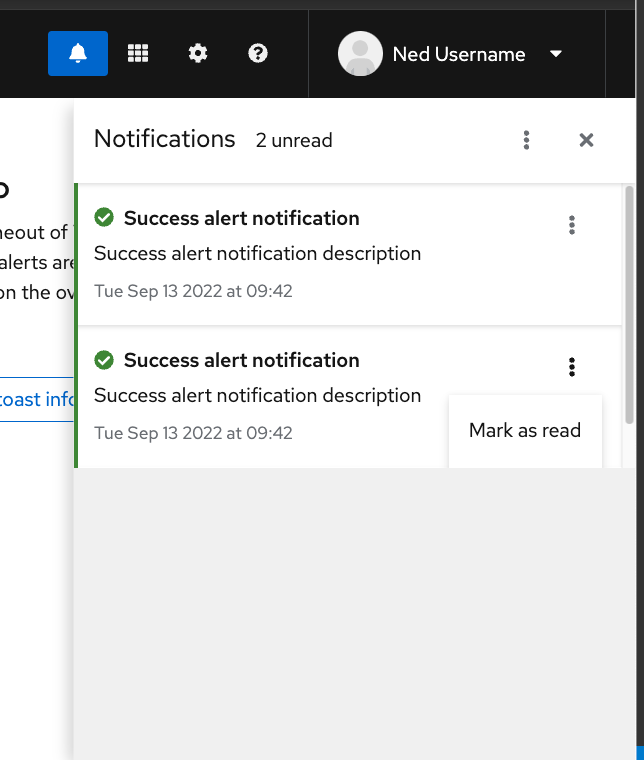
There was a problem hiding this comment. @mcoker currently the last alert in the NotificationDrawerBody causes and overflow when its kebab toggle is opened, even if there's enough vertical room for the kebab dropdown:
Either disabled the Do you think this would be an update that could be made in Core, or maybe just a style specific to this demo?
Contributor
There was a problem hiding this comment. @thatblindgeye nice catch! That looks like a bug in core to me - patternfly/patternfly#5091 |
||
| {notifications.length !== 0 && ( | ||
| <NotificationDrawerList> | ||
| {notifications.map(({ key, variant, title, srTitle, description, timestamp }) => ( | ||
| <NotificationDrawerListItem | ||
| key={key} | ||
| variant={variant} | ||
| isRead={isNotificationRead(key)} | ||
| onClick={() => markNotificationRead(key)} | ||
| > | ||
| <NotificationDrawerListItemHeader variant={variant} title={title} srTitle={srTitle}> | ||
| <Dropdown | ||
| position={DropdownPosition.right} | ||
| onSelect={onDropdownSelect} | ||
| toggle={<KebabToggle onToggle={isActive => onDropdownToggle(key, isActive)} id={key.toString()} />} | ||
| isOpen={openDropdownKey === key} | ||
| isPlain | ||
| dropdownItems={notificationDrawerDropdownItems(key)} | ||
| id={key.toString()} | ||
| /> | ||
| </NotificationDrawerListItemHeader> | ||
| <NotificationDrawerListItemBody timestamp={timestamp}> {description} </NotificationDrawerListItemBody> | ||
| </NotificationDrawerListItem> | ||
| ))} | ||
| </NotificationDrawerList> | ||
| )} | ||
| {notifications.length === 0 && ( | ||
| <EmptyState variant={EmptyStateVariant.full}> | ||
| <EmptyStateIcon icon={SearchIcon} /> | ||
| <Title headingLevel="h2" size="lg"> | ||
| No notifications found | ||
| </Title> | ||
| <EmptyStateBody>There are currently no notifications.</EmptyStateBody> | ||
| </EmptyState> | ||
| )} | ||
| </NotificationDrawerBody> | ||
| </NotificationDrawer> | ||
| ); | ||
|
|
||
| return ( | ||
| <DashboardWrapper | ||
| header={<DashboardHeader notificationBadge={notificationBadge} />} | ||
|
Contributor
There was a problem hiding this comment. This may be out of scope, but if you've passed
Contributor
Author
There was a problem hiding this comment. @mcoker That definitely is possible and I agree that it would be more consistent.. However, I cannot think about any neat solution. We could access the
Contributor
There was a problem hiding this comment. I haven't yet tried looking into it more closely, but I would agree that this would make sense as a follow-up issue. |
||
| mainContainerId="main-content-page-layout-default-nav" | ||
| notificationDrawer={notificationDrawer} | ||
| isNotificationDrawerExpanded={isDrawerExpanded} | ||
| > | ||
| <PageSection variant={PageSectionVariants.light}> | ||
| <TextContent> | ||
| <Text component="h1">Alert Group with Notification Drawer demo</Text> | ||
| <Text component="p"> | ||
| New alerts can be added with buttons below. Each alert has a timeout of 7 seconds, however, even after the | ||
| timeout expires, all alerts are still visible in the notification drawer. By default, only 3 alerts are | ||
| displayed. The rest can be accessed in the notification drawer after clicking on the bell icon in the header | ||
| or by clicking on the overflow message. | ||
| </Text> | ||
| </TextContent> | ||
| </PageSection> | ||
|
|
||
| <PageSection variant={PageSectionVariants.light}> | ||
| <Button variant="secondary" onClick={() => addNewNotification('success')} style={alertButtonStyle}> | ||
| Add toast success alert | ||
| </Button> | ||
| <Button variant="secondary" onClick={() => addNewNotification('danger')} style={alertButtonStyle}> | ||
| Add toast danger alert | ||
| </Button> | ||
| <Button variant="secondary" onClick={() => addNewNotification('info')} style={alertButtonStyle}> | ||
| Add toast info alert | ||
| </Button> | ||
| <br /> | ||
| <br /> | ||
| <Button variant="secondary" onClick={() => addNewNotification('warning')} style={alertButtonStyle}> | ||
| Add toast warning alert | ||
| </Button> | ||
| <Button variant="secondary" onClick={() => addNewNotification('default')} style={alertButtonStyle}> | ||
| Add toast default alert | ||
| </Button> | ||
| </PageSection> | ||
|
|
||
| <PageSection variant={PageSectionVariants.light}> | ||
| <TextContent> | ||
| <br /> | ||
| <Text component="h2">Max displayed alerts</Text> | ||
| <Text component="p">The maximum number of displayed alerts can be set below.</Text> | ||
| </TextContent> | ||
| <NumberInput | ||
| value={maxDisplayed} | ||
| min={minAlerts} | ||
| max={maxAlerts} | ||
| onMinus={onMaxDisplayedAlertsMinus} | ||
| onChange={onMaxDisplayedAlertsChange} | ||
| onPlus={onMaxDisplayedAlertsPlus} | ||
| inputName="input" | ||
| inputAriaLabel="max diplayed alerts number input" | ||
| minusBtnAriaLabel="minus" | ||
| plusBtnAriaLabel="plus" | ||
| style={{ margin: '12px 0' }} | ||
| /> | ||
| </PageSection> | ||
| <PageSection variant={PageSectionVariants.light}> | ||
| <AlertGroup isToast isLiveRegion onOverflowClick={onAlertGroupOverflowClick} overflowMessage={overflowMessage}> | ||
| {alerts.slice(0, maxDisplayed)} | ||
| </AlertGroup> | ||
| </PageSection> | ||
| </DashboardWrapper> | ||
| ); | ||
| }; | ||
Uh oh!
There was an error while loading. Please reload this page.
There was a problem hiding this comment.
Choose a reason for hiding this comment
The reason will be displayed to describe this comment to others. Learn more.
This could be moved below the example title heading, but since this is the only demo right now I'd also be fine with it being kept where it is.