A simple minimal zsh prompt theme.
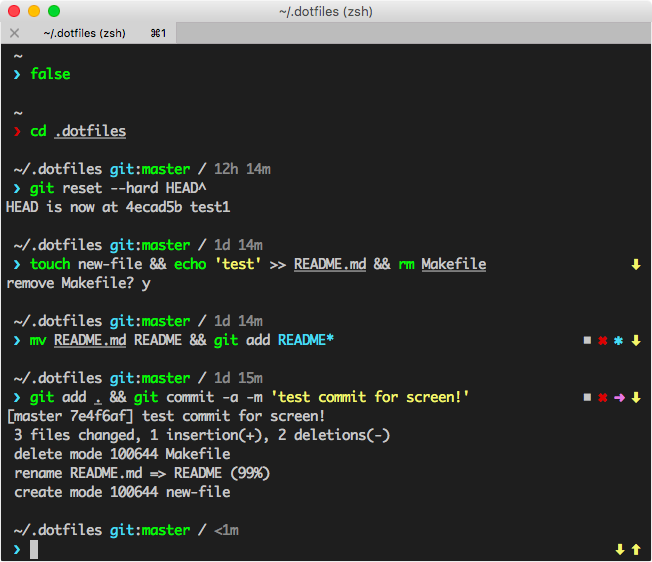

- displays current working directory (sic!)
- changes terminal title to currrent working directory
- shows if current user is root (prompt symbol,
❯❯❯for root,❯else) - shows if latest command executed successfully (by color of prompt symbols
❯) - displays username and host (optional, true for ssh shell by default)
- displays if current working directory is inside git repo
- displays in git repo:
- current branch (or commit hash in detached state)
- time since last commit (days, hours, minutes)
- if you need to pull (current state is behind remote repo state) with
⬇ - if you need to push (current state is ahead remote repo state) with
⬆ - if you have untracked files with
◼ - if you have added files with
✚ - if you have modified files with
✱ - if you have deleted files with
✖ - if you have renamed files with
➜ - if you have conflicts during merge with
!?
Add to your .zshrc:
antigen theme nksoff/muslim muslim
Add to your .zshrc:
zplug "nksoff/muslim"
Add to your .zshrc:
zgen load nksoff/muslim muslim
Add to your .zshrc:
antibody budle nksoff/muslim
Clone repo, copy theme:
git clone https://github.com/nksoff/muslim
mkdir -p ~/.oh-my-zsh/custom/themes
cp muslim/muslim.zsh-theme ~/.oh-my-zsh/custom/themes
Add to your .zshrc:
ZSH_THEME="muslim"
Clone repo, copy theme:
git clone https://github.com/nksoff/muslim ~/.zprezto/modules/prompt/external/muslim
ln -s ~/.zprezto/modules/prompt/external/muslim/muslim.zsh-theme ~/.zprezto/modules/prompt/functions/prompt_muslim_setup
Add to your .zpreztorc:
zstyle ':prezto:module:prompt' theme 'muslim'
Surely, if you do not use any plugin managers, you know how to include custom theme.
git clone https://github.com/nksoff/muslim ~/.muslim
echo 'source ~/.muslim/muslim.zsh-theme' >> ~/.zshrc
- geometry theme by frmendes
- pure theme by sindresorhus
- sunrise theme from oh-my-zsh