Summary
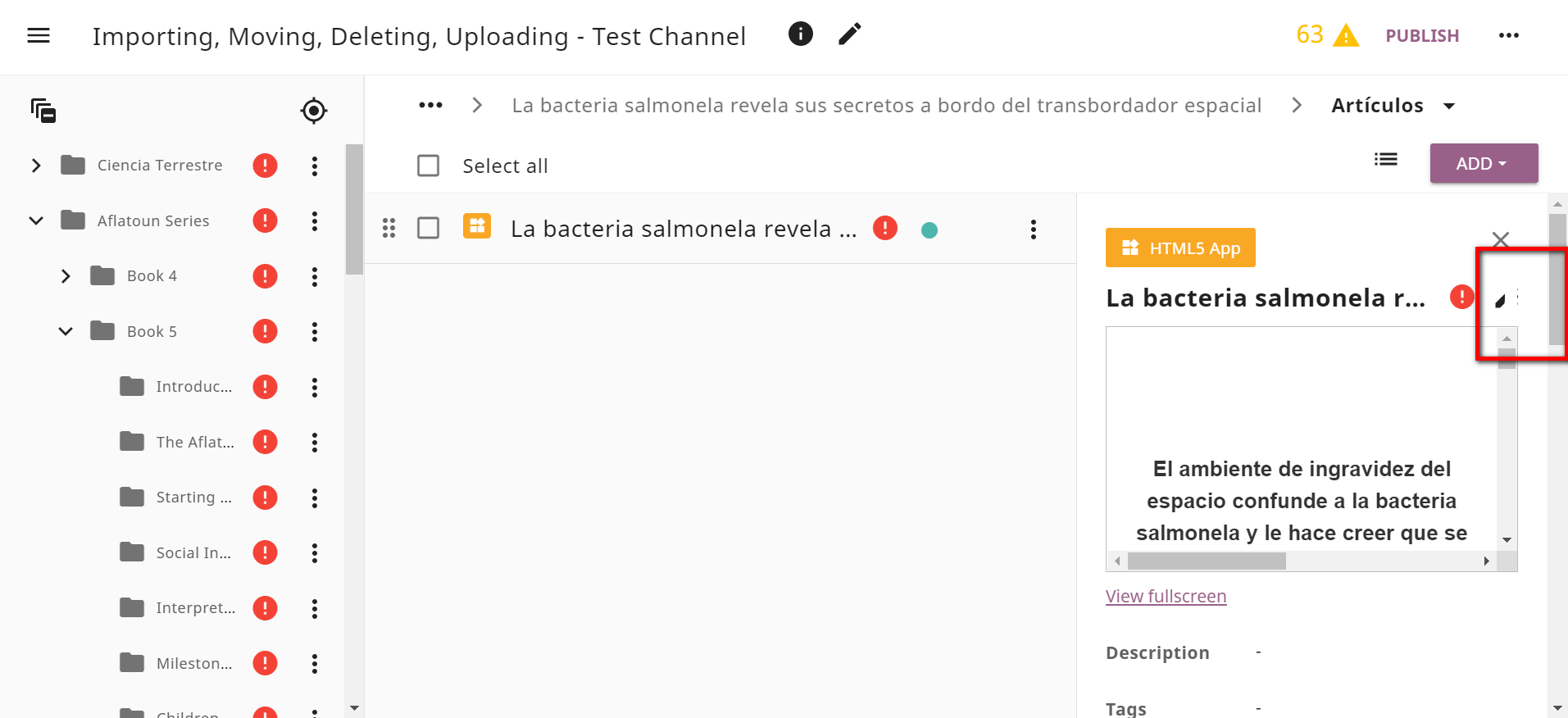
On the resource Preview pane the Edit and Options icons are partially hidden when the resource title is too long. When there is not enough space the buttons should still be visible so that the user doesn't need to mouse-toggle the preview pane. Possible solution: Shorten the resource title more in the preview pane in order to free some space for the Edit and Options icons.
Category
BUG | Low priority
Usage Details
Tested at: https://hotfixes.studio.learningequality.org/
- Windows 10
- Browser: Chrome, Firefox, Edge (latest versions)
How to reproduce
- Login to Studio
- Click a channel
- Find a single resource with longer title
- Click the resource to open the Preview pane
Screenshots
Summary
On the resource Preview pane the Edit and Options icons are partially hidden when the resource title is too long. When there is not enough space the buttons should still be visible so that the user doesn't need to mouse-toggle the preview pane. Possible solution: Shorten the resource title more in the preview pane in order to free some space for the Edit and Options icons.
Category
BUG | Low priority
Usage Details
Tested at: https://hotfixes.studio.learningequality.org/
How to reproduce
Screenshots