






HASS.Agent is a Windows-based client (companion) application for Home Assistant, developed in .NET 8.
Click here to download the latest installer.
HASS.Agent is completely free, and will always stay that way without restrictions.
- Why?
- Fork?
- Functionality
- Screenshots
- Installation
- Help and Documentation
- Articles
- What it's not
- Helping Out
- Credits and Licensing
- Legacy
Quick note from Sam on the initial idea:
The main reason I built this is that I wanted to receive notifications on my PC, including images, and to quickly perform actions (e.g. to toggle a lamp). There weren't any software-based solutions for this, so I set out to build one myself.
There's no need to explain that we (and the Community overall) like the idea. That's why we're here, to continue the development in the Home Assistant spirit of integrating everything into open source smarthome world.
The original HASS.Agent has been created by Sam.
Unfortunately due to some time constraints, they're not able to provide the constant support and feature updates. That's where we step in - trying to keep HASS.Agent bug free (dreams need to be big right?) and to introduce new features here and there!
"Why this project is named the same as original HASS.Agent, it's confusing"
Yes, I agree, you're right. The initial idea after Sam's disappearance was to continue the work and offer it to Sam once they're back. Well, now that's more than unlikely since it's been quite a long time we last spoke with Sam.
Knowing what we do now, we've probably made a different decision but doing it now it'll only create more confusion. We have a full rewrite project going and it has been already decided the name is going to be altered.
Summary of the core functions:
-
Notifications: receive notifications, show them using Windows builtin toast popups, attach images and receive input from them. Supports actionable notifications: add buttons so you can easily interact with Home Assistant, without having to open anything or ask user for an answer to a question.
- This requires the installation of the HASS.Agent integration.
-
Media Player: use HASS.Agent as a mediaplayer device: see and control what's playing and send text-to-speech.
- This requires the installation of the HASS.Agent integration.
-
Quick Actions: use a keyboard shortcut to quickly pull up a command interface, through which you can control Home Assistant entities - or, assign a keyboard shortcut to individual Quick Actions for even faster triggering.
-
Commands: control your PC (or other Windows based device) through Home Assistant using custom- or built-in commands.
-
Sensors: send your PC's sensors to Home Assistant to monitor every aspect of your device.
-
WebView: quickly show any website, anywhere - no browser required, for instance a HA dashboard.
-
Satellite Service: use the service to collect sensor data and execute commands, even when you're not logged in (not all commands/sensors are available for Satellite Service)
-
All entities are dynamically acquired from your Home Assistant instance.
-
Commands and sensors are automatically added to your Home Assistant instance via MQTT Integration
Notification examples:


WebView example, showing a dashboard when right-clicking the tray icon:
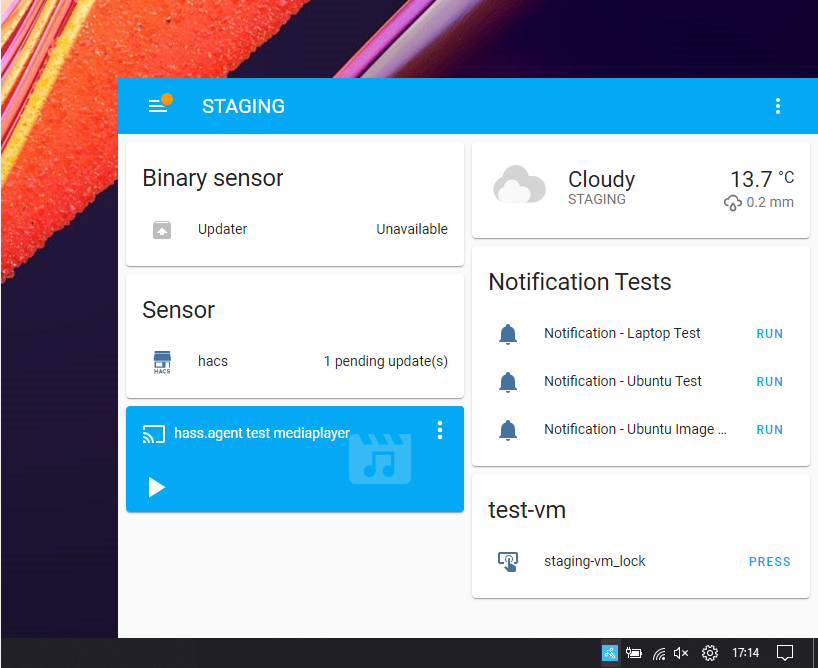
This is the Quick Action window you'll see when using the hotkey. This window automatically resizes to the amount of buttons you've added:

You can easily configure a new Quick Action, HASS.Agent will fetch your entities for you:

The sensors configuration screen:

Adding a new sensor is just as easy:

Easily manage the satellite service through HASS.Agent:

You'll be guided through the configuration options during onboarding:

Installing HASS.Agent is easy; just download the latest installer, run it and you're done! The installer is signed by us and won't download or do weird stuff - it just places everything where it should, and launches with the right parameter. (optionally installing .NET8)
After installing, the onboarding process will help you get everything configured, step by step. If you want an introduction into HASS.Agent, be sure to read the introduction docs.
Original HASS.Agent documentation is available here - please bear in mind however that it may not represent state of things present in this version.
Click here to download the latest installer
If you want to install manually, there are .zip packages available for every release. Read the manual for more info.
Stuck while installing or using HASS.Agent, need some help integrating the sensors/commands or have a great idea for the next version? There are a few channels through which you can reach out:
-
Github Tickets: Report bugs, feature requests, ideas, tips, ..
-
Documentation: Installation, configuration and usage documentation, as well as examples.
-
Discord: Get help with setting up and using HASS.Agent, report bugs or just talk about whatever.
-
Home Assistant forum: Bit of everything, with the addition that other HA users can help as well.
Starting from zero, and want to learn what HASS.Agent's about and how to start? Be sure to check the introduction article, and optionally the command basics.
EverythingSmartHome's youtube video is a great guide on the original HASS.Agent version: Control Your Windows PC With Home Assistant!. We recommend having a look at his other videos as well, great stuff!
If you want to help with the development of HASS.Agent, check out the Helping Out section for (translating) info.
Liam Alexander Colman from Home Assistant Guide was kind enough to write an article about HASS.Agent: Integrate Home Assistant with Windows using HASS.Agent. The website's full of useful articles, worth having a look :)
A Linux/macOS client (at least yet)!
Without getting into much of the details, it's not as easy as you think.
With HASS.Agent "2.X" version it's basically impossible. We are thinking about cross-platform support for the "v3 rewrite" but as of now it's only a hopeful wish.
You can try the official companion app for macOS, or IoPC which runs on Linux.
The best way to help out is to test as much as you can (or even join the beta program), and report any weird or failing behavior by opening a ticket.
Same goes for sharing ideas for new (or improved) functionality! If you want, you can join on Discord to discuss your ideas.
While all feature PR submissions are welcome, please note that their merging is at sole discretion of the main developers.
When designing the new feature please take into account:
- how they fit with the codebase/codestyle (yes, we are aware the codebase has it's flaws - hence the rewrite efforts)
- is the feature agnostic enough and will benefit all users
- the smaller the PR the better the chance of it being merged
Fully "vibe-coded" submissions will most likely be rejected.
While personal opinions on AI usage and it's impact can vary person-to-person, we'd rather put the effort writing code than reviewing fully AI generated and copy-pasted code.
First and foremost, huge thanks for Sam for creating and maintaining the original HASS.Agent in their spare time! We wouldn't be here withot the spark that pushed them to write the first line of code ❤️
As of now, we do not accept any kind of donation/coffee :)
If you'd like however, you can support creator of original HASS.Agent:
 |
 |
 |
|---|
Thanks to the entire team that's developing Home Assistant - such an amazing platform!
The initial development was boosed by sleevezipper's HASS Workstation Service. Thank you for sharing your hard work.
And a big thank you to all other packages:
CoreAudio, HotkeyListener, MQTTnet, Syncfusion, Octokit, Cassia, Grapevine, LibreHardwareMonitor, Newtonsoft.Json, Serilog, CliWrap, HADotNet, Microsoft.Toolkit.Uwp.Notifications, GrpcDotNetNamedPipes, gRPC, ByteSize.
Please consult their individual licensing if you plan to use any of their code.
Everything on the HASS.Agent platform is released under the MIT license.
HASS.Agent is a .NET 8 application. If for some reason you can't install .NET 8, you can use the last .NET Framework 4.8 version also developed by Sam:
Per it's release time it was pretty feature complete if you just want commands, sensors, quickactions and notifications.
You'll need to have .NET Framework 4.8 installed on your PC, which you can download here.
- .NET Framework version is considered legacy and unsupported
- All issues/requests regarding the .NET Framework version of HASS.Agent will be closed