Adds a real-time search bar to any Unity Inspector. Useful for components with many serialized fields — just start typing to filter the list.
Open Window → Package Manager → + → Add package from git URL and paste:
https://github.com/goto01/FieldsSearchEditor.git
Copy the repository folder into your project's Packages/ directory. Unity picks it up automatically — no manifest entry needed.
Create a custom editor that inherits SearchableEditor instead of Editor:
using FieldsSearchEditor;
using UnityEditor;

[CustomEditor(typeof(MyComponent))]
public class MyComponentEditor : SearchableEditor
{
}
That's it. The search bar appears at the top of the Inspector automatically.
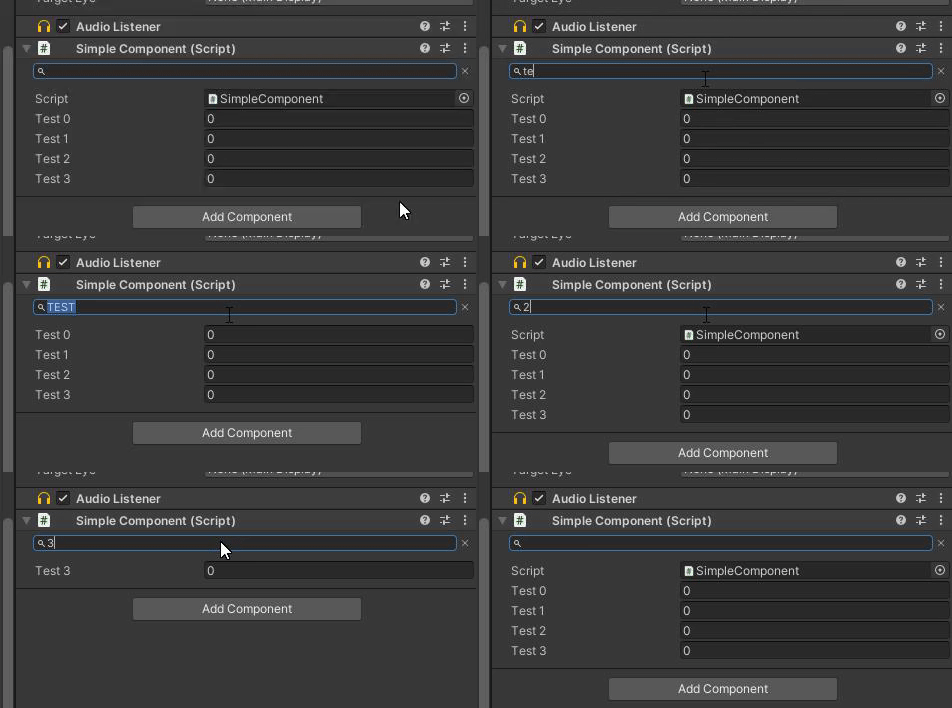
- The search filter is case-insensitive and matches field display names.
- The last search string is persisted per-machine via
EditorPrefs. - Override
OnInspectorGUI()if you need to draw additional UI above or below the field list; callbase.OnInspectorGUI()to keep the search bar. - Compatible with Unity 5+ and Unity 6 — toolbar style names are resolved at compile time via
#if UNITY_6000_0_OR_NEWER.