If you haven’t already, check out our contributing guidelines for onboarding and email contributors@expensify.com to request to join our Slack channel!
Action Performed:
Using mobile, desktop, or web apps
Expected Result:
My app should be set to english. And if it is set to Spanish, I should be able to change it back via preferences.
Actual Result:
All of my apps are locked in Spanish and I cannot change it back to English.
Platform:
- Web
- iOS
- Android
- Desktop App
- Mobile Web
Version Number: v1.1.11-1
Reproducible in staging?: Yes
Reproducible in production?: Yes
Notes/Photos/Videos:
Reproduction Steps (ported from comment below):
The language picker is hidden behind the internationalization beta, so the reproduction steps would be:
- Add an account to the internationalization beta
- Sign into that account
- Go to
Settings -> Preferences, and set the preferred language to español
- Sign out.
- Sign into another account not in the beta.
- App is in spanish 💥

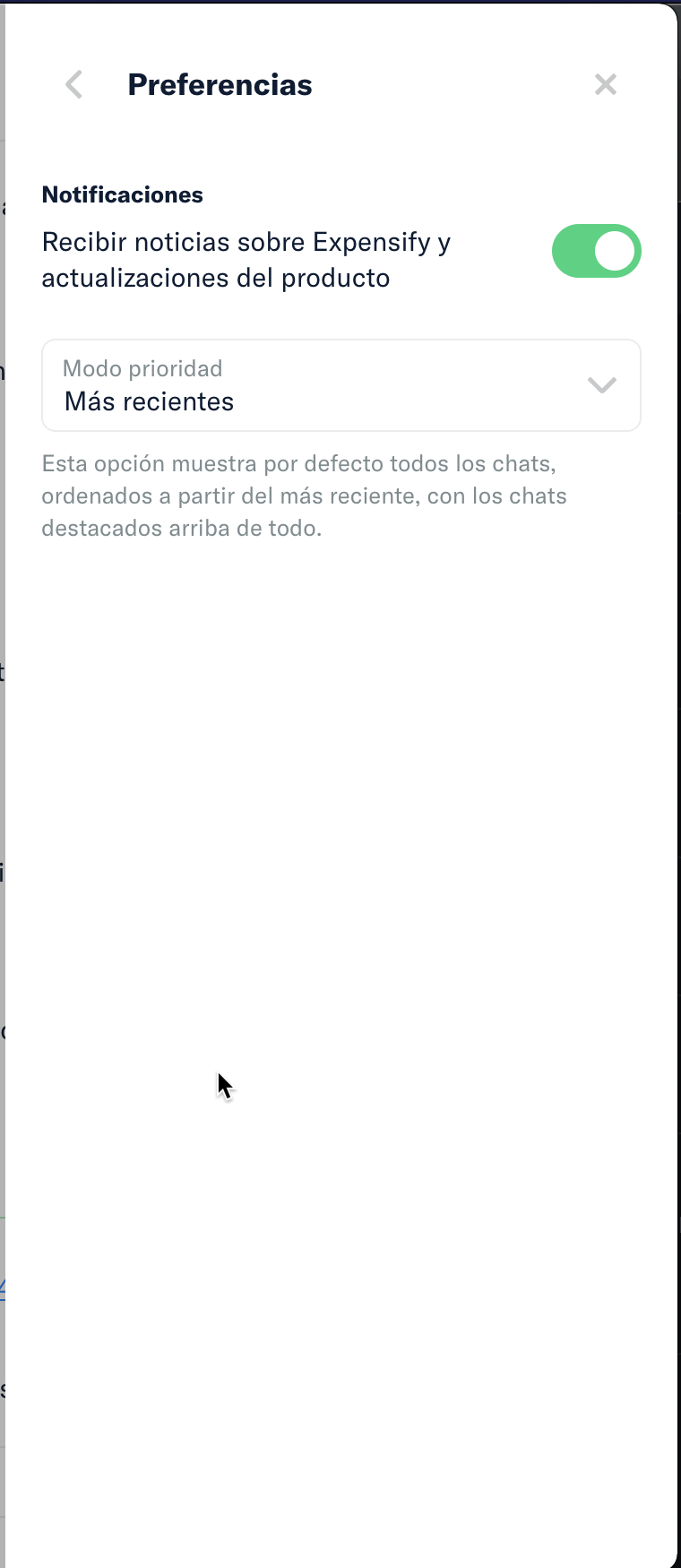
Slack conversation: https://expensify.slack.com/archives/C03TQ48KC/p1634694602133700
View all open jobs on GitHub
If you haven’t already, check out our contributing guidelines for onboarding and email contributors@expensify.com to request to join our Slack channel!
Action Performed:
Using mobile, desktop, or web apps
Expected Result:
My app should be set to english. And if it is set to Spanish, I should be able to change it back via preferences.
Actual Result:
All of my apps are locked in Spanish and I cannot change it back to English.
Platform:
Version Number: v1.1.11-1
Reproducible in staging?: Yes
Reproducible in production?: Yes
Notes/Photos/Videos:
Reproduction Steps (ported from comment below):
The language picker is hidden behind the internationalization beta, so the reproduction steps would be:
Settings->Preferences, and set the preferred language to españolSlack conversation: https://expensify.slack.com/archives/C03TQ48KC/p1634694602133700
View all open jobs on GitHub