This repository was archived by the owner on Feb 25, 2026. It is now read-only.
This repository was archived by the owner on Feb 25, 2026. It is now read-only.
Re-selecting an InfiniteCanvas text node can show incorrect Italics state in certain situations #3118
Description
Describe the bug
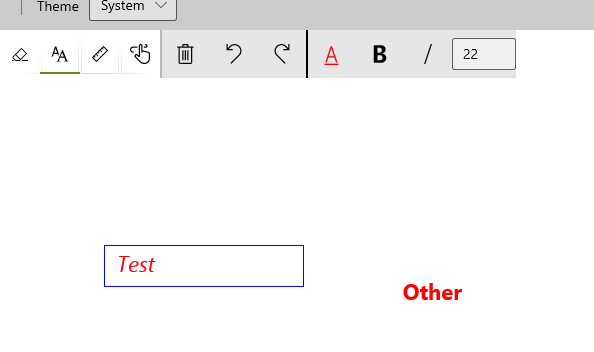
When re-selecting a previous text node in the InfiniteCanvas control, the Italic checked state in the toolbar is set to the same value as the Bold checked state.
- Is this bug a regression in the toolkit? If so, what toolkit version did you last see it work:
Steps to Reproduce
Steps to reproduce the behavior:
- Go to InfiniteCanvas page in sample app
- Create a text node with text "Test"
- Set text to Italics (observe Italics is checked and Bold is not checked)
- Create an additional text node elsewhere with text "Other" - no bold, no italics
- Re-select the first text node (observe Italics is wrongly not checked)
- Attempt to turn off Italics for this text node (observe the button must be pressed twice to get the text back in sync with the toolbar)
Expected behavior
Italic button updates to be checked to show the text is italic.
Screenshots
Environment
NuGet Package(s):

Package Version(s):

Windows 10 Build Number:
- [ ] Fall Creators Update (16299)
- [ ] April 2018 Update (17134)
- [ ] October 2018 Update (17763)
- [x] May 2019 Update (18362)
- [ ] Insider Build (build number: )

App min and target version:
- [ ] Fall Creators Update (16299)
- [ ] April 2018 Update (17134)
- [ ] October 2018 Update (17763)
- [ ] May 2019 Update (18362)
- [ ] Insider Build (xxxxx)

Device form factor:
- [ ] Desktop
- [ ] Xbox
- [ ] Surface Hub
- [ ] IoT

Visual Studio
- [ ] 2017 (version: )
- [x] 2019 (version: 16.4.4)
- [ ] 2019 Preview (version: )
Additional context
Add any other context about the problem here.