This course cover an introduction to Artificial Intelligence - from Python Crash Course to Generative Deep Learning.
List of all covered topics
| Intro to Python |
|---|
| Introduction to syntax |
| Lists, Sets and Tuples |
| Functions |
| Generators |
| Classes |
| Classes II |
| Classes III |
| Classes IV |
| Classes V |
| SQL with Python |
| Scraping |
| Intro to Numpy |
|---|
| Introduction to Numpy |
| Numpy II |
| Title | Description | Link |
|---|---|---|
| Simple Python Project | Project that showcases Python project structure and usability of modules | https://github.com/dqmis/simple_python_project |
| Dog Shelter | Repository to showcase FastAPI functionality | https://github.com/dqmis/dog_shelter |
| Recipes Scraper | Project showcasing web scraping with Python | https://github.com/dqmis/recipes_scraper |
| Recipes Classifier Service | Project showcasing FastAPI and Sklearn integration | https://github.com/dqmis/recipes-classifier |
| Text classification with Transformers | Project showcasing text classification with Transformers and comparing it to classical ML approaches | https://github.com/dqmis/nlp-classification |
| Text generation with Mini-GPT | Project showcasing text generation with Mini-GPT built from scratch | https://github.com/dqmis/gpt-demo |
| Deployment to GCP demo | Demo application for building and deploying simple python app to GCP Cloud Run | https://github.com/dqmis/fastapi-gcp-demo |
- Follow instructions presented in the website.
- Install
Python,Jupyter,autoDocstring,Mypy,Pylanceextensions
Follow instructions presented in the website.
- Install Python (if you use Windows)
- Go to the official webpage and download Python for windows.
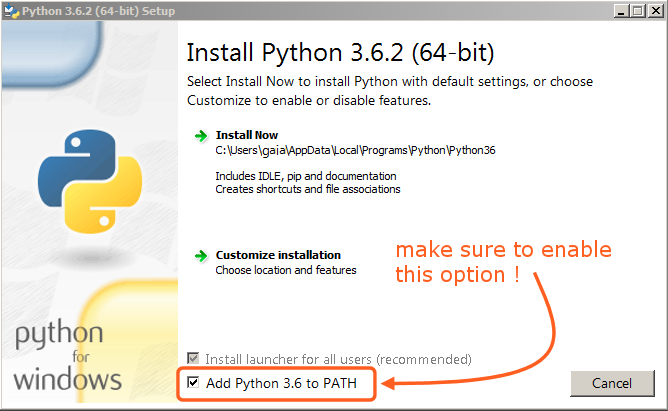
- Follow the instalation process. IMPORTANT - Check
Add Python to PATHcheckmark
- Set up Pyenv:
- OSX and Linux installation:
- Follow the installation guide from here: https://github.com/pyenv/pyenv#installation
- Windows installation:
- Follow the installation guide from here: https://github.com/pyenv-win/pyenv-win
$ pyenv install 3.9.13- If you want to set the global Python version -
$ pyenv global 3.9.13
- OSX and Linux installation:
- (Not recommended) Alternative - install a specific version of Python from https://www.python.org/downloads/


- Install (full guide: https://python-poetry.org/docs/#installation)
- Configure:
$ poetry config virtualenvs.in-project true- creates the virtual environment in the current folder as opposed to somewhere random$ poetry self add poetry-dotenv-plugin- enabled sourcing environment variables from .env when commands run through Poetry$ poetry config virtualenvs.prefer-active-python trueseems to make Poetry work better with Visual Studio Code
- Go to this project's dir with your terminal:
$ cd <PATH_TO_THE_PROJECT> $ poetry install(this will create apoetry.lockfile and a virtual environment in the .venv folder)- If you use OSX / Linux
$ source .venv/bin/activatethis will activate a newly created environment
- If you use windows
.venv\Scripts\activatethis will activate a newly created environment
- Alternatively run
$ poetry shellto initialize the environment.
$ pre-commit install
- Start Jupyter Lab:
$ jupyter lab - Execute Notebook inside notebooks dir