How does Discord, the Gaming Communications platform that took the world by storm, scale so quickly and efficiently? How do they handle all of the traffic and data they have today?
I would encourage you to go read their blog post: https://blog.discordapp.com/how-discord-handles-two-and-half-million-concurrent-voice-users-using-webrtc-ce01c3187429
They also make really awesome blog posts about how they do almost everything at Discord, which is awesome since many giant companies aren't public about how they handle massive user counts and data.
It may not seem like it, but companies/products like Discord could never exist if their infrastructure couldn't handle it. They scaled to millions of users in a few months. This is a perfect example of how it doesn't matter how great your service is if nobody can use it.
Let's think of a few examples on the bad side. Video game releases. Notorious for failure to predict infrastructure needs and often don't employ modern infrastructure scaling techniques to handle such a drastic load. I can think of a few examples: Overwatch, Destiny, Sea of Thieves, etc. The list goes on of good games who had their launches ruined by poor infrastructure. Come on Blizzard, if I have to wait in line just to LOG IN there is an infrastructure problem... For something like a low-latency game server, a VM (or should I say a persistent Linux OS install. Not only is it (mostly) static in cost, but they are very easy to duplicate across hardware. You can also have larger machines that host multiple sessions. Discord took the modern approach and said:
Let's use a cloud provider (GCP in their case), and have a system that dynamically assigns VMs to sessions, as well as spins them up/down as they are needed. But we always have more overhead than needed in case VMs crash or get DDoS attacked.
If video game studios used the same concepts as Discord had they would never have this problem.
TL;DR: Start with way more compute than you need and let auto scaling bring it back down.
It all starts with considering how data will be handled. Discord thought first of how they would handle millions of concurrent users if they grew to such a size (as they did), which allowed them to spend more time adding features instead of fixing bad architecture as their adoption rapidly grew.
The natural first choice is to think of Peer-to-Peer (P2P) networking for chat. That way you have little usage on your servers, and spend a lot less on cloud. While that's true, it's a terrible idea in practice. There are discord voice channels that have thousands of connected users at the same time. Let's think about how this might work as users start joining:
The first 2 people join. Each person has 1 uplink and 1 downlink, let's just say each uplink/download is a stream of 80kbps (80KB/s, the quality that Soundcloud and Spotify free streams at).
Stream totals per user: 80kbps up, 80kbps down.
Now there are 10 people in the voice server. When someone isn't talking the bandwidth is cut down drastically (Discord has a custom version of WebRTC that does this), but still now we have a lot more data going across. Let's say that at any given point in time a max of 3 people are talking:
Stream totals per user (everyone talking): 800kbps up, 800kbps down.
That's not bad, average internet speed in the US is about 25Mb/s, or 25,000kb/s
What if 100 people are in a server? Well if 100 people are listening (not sending data), and 1 person is talking, this is what we get:
Stream totals for listeners: 0kbps up, 80kbps down. Stream totals for the one talking: 8000kbps up, 0kbps down.
You can see how it gets bad, fast. Every person connected gets their own stream to every other person. In the worst case, if 1000 people were all connected and talking at the same time, we get this:
Stream totals per user: 80000kbps up, 80000kbps down. 80Mb/s up/down, or 10MB/s up/down. That's almost 4 times as fast as the average internet speed. You think your family would appreciate you using Discord if you sucked up more bandwidth than 5 4k video streams?
How do we fix this? We need the servers back. We can hammer a GCP VM with way more data than that, so no worries there. The VM ingests the data, creates a single 80kbps audio stream, and sends it back down.
Stream totals per user (for n users): 80kbps up, 80kbps down.
This also offers a lot of other features. IP privacy and server-wide voice/video muting to mention a few.
Now how do we handle assigning people to these VMs?
Sometimes we need literal VMs. Sometimes, even though there are hundreds of service offerings from a Cloud Service Provider, VMs are just the best fit. Sometimes you need to spin them up and down fast, while having the infinite life and use capabilities the VMs offer over containers and Serverless stuff. Sometimes you can't even deal with a load balancer, even with session affinity. Sometimes, you just need raw VMs.
But we can make all of these other service ourselves... in fact we can make custom versions that do exactly what we want.
One service they need is a VM assigning service. Their method is pretty clever. They use etcd DB (I would use Firestore because I love it, but I have not seen Firestore performance at such scale and I am unsure of the pricing at that scale). Let's look at a quote from that blog post to see how they do it (drawing it out is a good idea):
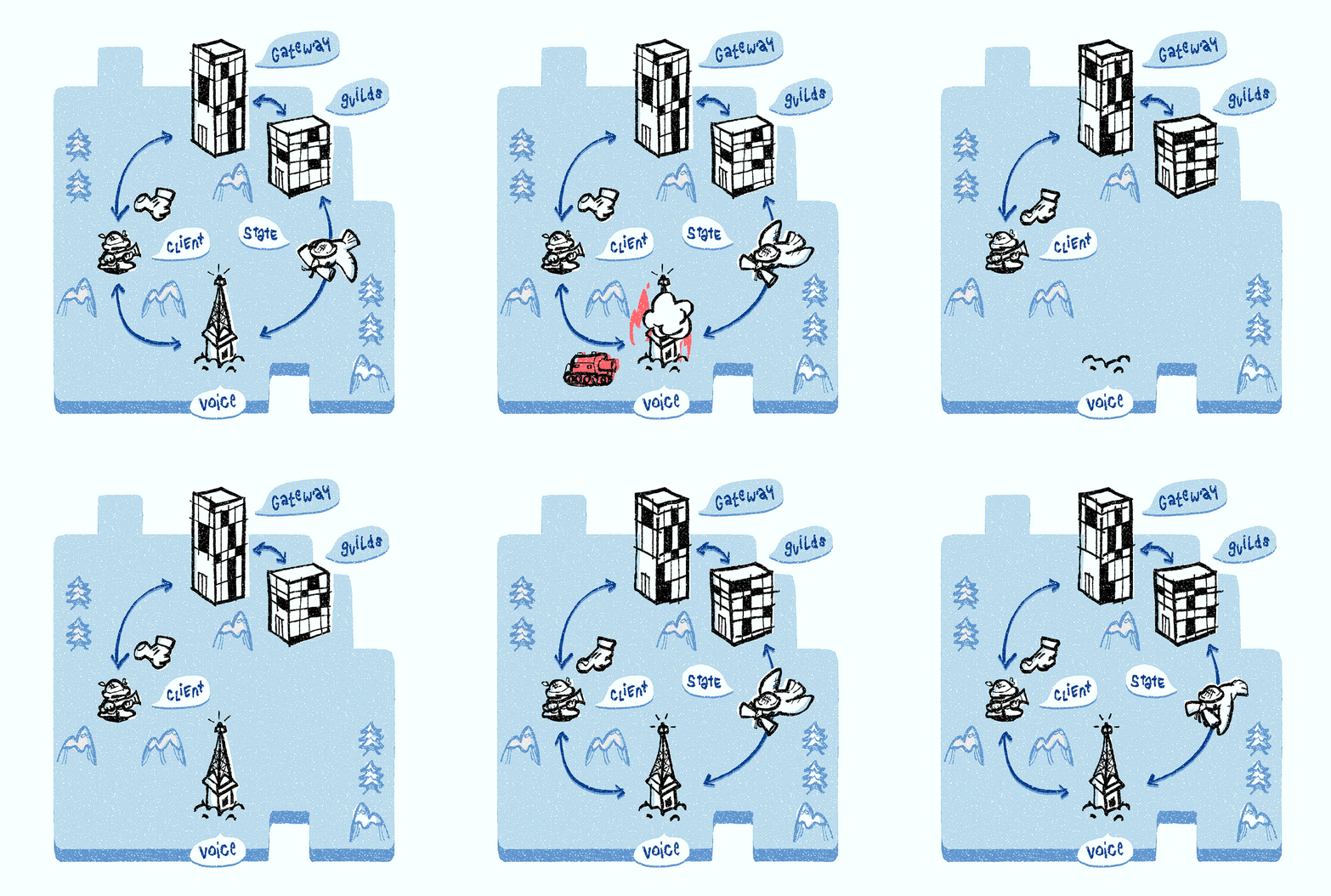
When you join a voice channel, you are assigned to a Discord Voice server. The Discord Voice server is responsible for transmitting every member’s audio to the channel. All the voice channels within a guild are assigned to the same Discord Voice server. If you are the first voice participant in the guild, Discord Guilds server is responsible for assigning a Discord Voice server to the guild using the process described below.
The Discord Guilds server watches the service discovery system and assigns the least utilized voice server in the given region to the guild. When a Discord Voice server is selected, all the voice state objects (also maintained by Discord Guilds) are pushed to voice server so it knows how to set up audio/video forwarding. Clients are also notified about the selected Discord Voice server. The client opens a second WebSocket connection to the voice server (we call this the voice WebSocket connection) which is used for setting up media forwarding and speaking indication.
A gif/diagram from this section of the blog:
To make sure their voice servers are performing, they have a certain usage set to trigger auto-scaling (probably CPU usage), as well as quick health checks to make sure the VM is alive and doing what it's supposed to (otherwise it's killed and a new one is spawned):
When a Discord Voice server dies, it fails the periodic ping and gets removed from the service discovery system. The client also notices server failure due to the severed voice WebSocket connection and requests a voice server ping through the gateway WebSocket connection. The Discord Guilds server confirms the failure, consults the service discovery system, and assigns a new Discord Voice server to the guild. Discord Guilds then pushes all the voice state objects to the new voice server. Every client is notified about the new voice server and creates a voice WebSocket connection to the new voice server to start media setup.
So they have a separate service for Voice, chat, and voice server assigning. This is a good example of why it is a good idea to chop up services so they can scale differently.